

The Five-System Club That Could Only Check In Members
Running your swim club across five different tools? Here's how scattered systems slow you down and why one platform changes everything.


It's 10 AM on a Saturday in June, and your front desk is three families deep. The first parent needs to update their credit card. The second wants to add a guest for today. The third is asking why they got charged twice. You open your billing software for the card update, switch to your spreadsheet for the guest pass, then log into your payment processor to check the duplicate charge. By the time you've helped all three, it's 10:20, and six more families are waiting. Sound familiar? You're not running one swim club. You're running five different systems that don't talk to each other, and it's costing you hours every single day.
Why Swim Clubs End Up With Multiple Systems
Most clubs don't start out planning to use five different tools. It happens gradually, one problem at a time.
You needed a way to track members, so you started with a spreadsheet. Then billing got complicated, so you added a payment processor. Waivers required another service. Check-ins needed their own app. Before long, you're switching between systems all day, entering the same information multiple times, and still can't answer basic questions without pulling data from three different places.
The Real Cost of Scattered Tools
Here's what actually happens when your club operations are split across multiple platforms:
- Double data entry: You update a member's email in your billing system, then have to remember to update it in your check-in app and your email tool
- Missing information: A family cancels their membership in your billing software, but they still show up as active in your gate system
- Time waste: Simple questions like "how many members checked in last month?" require exporting reports from multiple systems and combining them manually
- Staff confusion: Your seasonal workers need login credentials for five different systems and training on each one
- Member frustration: Parents get emails from three different platforms, each with a different login and password
One club manager told me she spent four hours every Monday morning just reconciling data between her membership list, billing system, and check-in records. Four hours. Every single week.

What Actually Happens on a Busy Day
Let me walk you through a real Saturday morning at a swim club running on scattered systems. See if this sounds like your operation.
9:45 AM: You arrive and log into your check-in system, your email, and your billing dashboard. Three browser tabs, three passwords you had to reset last month.
10:00 AM: Gates open. The first member scans in, but your system shows their account is suspended. You switch to your billing software. Their payment went through fine yesterday, but it takes 24 hours to sync with the check-in system. You manually override the gate.
10:15 AM: A parent wants to add their nephew as a guest. You open your guest tracking spreadsheet, add his name and relationship, then manually create a temporary pass in your gate system. You remind yourself to delete it tonight so it doesn't work tomorrow.
10:30 AM: Your board president calls asking how many new memberships you've sold this month. You open your billing system to count new accounts, then cross-reference with your member spreadsheet because some people signed up but haven't paid yet. You promise to call back with the number.
11:00 AM: A member's credit card was declined. You need to send them an email, but your billing system and your email platform aren't connected. You copy their email address, switch tabs, paste it into a new message, and type out the notification manually.
By noon, you've switched between systems 47 times. You haven't left your desk. The actual pool operations are running fine, but you're exhausted from managing software instead of managing your club.
The One Platform Difference
What changes when everything lives in one platform? Let's replay that same Saturday morning.
9:45 AM: You log in once. One browser tab. One dashboard that shows everything: today's expected attendance, outstanding balances, recent registrations, and any messages that need responses.
10:00 AM: The member scans in. Your system sees their payment cleared yesterday and automatically updated their status overnight. They walk through without issues.
10:15 AM: A parent wants to add their nephew as a guest. You click "Add Guest" next to the family's name, enter the nephew's details once, and the system automatically creates a time-limited pass and logs the guest visit. It'll expire tonight without you doing anything.
10:30 AM: Your board president calls about new memberships. You click the "New Members" filter, and your dashboard instantly shows 23 new memberships this month, with 21 paid in full and 2 pending payment. Total revenue: $4,830. The call takes 30 seconds.
11:00 AM: A member's credit card was declined. Your system already sent them an automated email with a link to update their payment method. It also flagged their account so you can follow up if they don't update within three days. You didn't touch anything.
This isn't magic. It's what happens when your club runs on one platform instead of five disconnected tools.
Real Tasks That Get Easier
| Task | Multiple Systems | One Platform |
|---|---|---|
| Update member info | Change in 3-5 places | Change once, updates everywhere |
| Check today's revenue | Export from billing, match with check-ins | One click on dashboard |
| Send renewal reminders | Manually track dates, send individual emails | Automatic reminders based on membership dates |
| Train new staff | 5 different logins and systems | One login, one interface |
| Answer board questions | Combine data from multiple reports | Real-time dashboard with filters |
Why "Integrated" Isn't the Same as Unified
You might be thinking, "But my systems integrate with each other." Let me explain why that's different from one platform, and why it matters for your daily work.
Integration means two separate systems exchange some information, usually through an API or data sync. That sounds good until you realize what it means in practice.
The Integration Reality Check
Here's what "integrated" systems still make you do:
- Wait for syncs: Information updates in one system but takes hours or days to appear in the other
- Manage two accounts: Different logins, different billing, different support contacts
- Fix sync failures: When the integration breaks (and it will), you're stuck between two support teams pointing fingers at each other
- Live with limitations: Integrations only share specific data fields, not everything you need
- Pay twice: You're paying for two separate subscriptions, often with integration fees on top
I talked to a club manager who used a "fully integrated" setup. Her membership platform synced with her email service. It worked great until her email service changed their API in February. The integration broke for three weeks. During that time, she manually copied email addresses into lists for every message she sent. Integration is better than nothing, but it's not the same as having everything in one platform from the start.
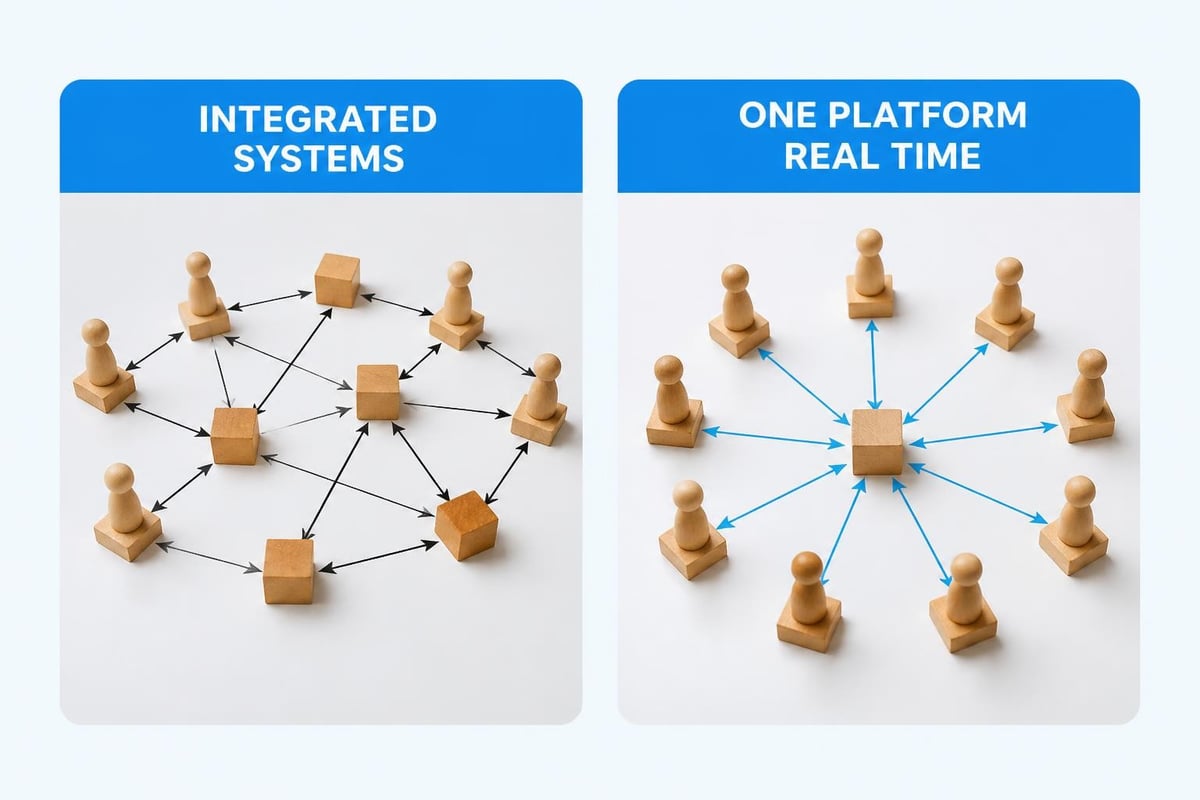
The Questions You Can't Answer With Scattered Systems
Here's a test. Try answering these questions about your club right now, without spending more than two minutes:
- How many members checked in at least once last week?
- Which families have outstanding balances over $100?
- What's your revenue from guest passes this month compared to last month?
- Which members are up for renewal in the next 30 days?
- How many waivers are expired or missing?
If you can answer all five questions in under two minutes using your current setup, you're in great shape. Most clubs can't, because the information lives in different places. Your check-in system knows who came through the gate. Your billing system knows who owes money. Your waiver tool knows who signed what. But none of them talk to each other in a meaningful way.
When everything lives on one platform, these aren't hard questions. They're just filters on your dashboard. You can answer all five in 30 seconds, and you can drill down into the details with another click.
Why This Matters for Revenue
Let's talk about money, because scattered systems cost you more than just time. They cost you actual revenue you should be collecting.
Example one: A family's membership expired two weeks ago, but they're still checking in because your gate system and your billing system don't sync automatically. You've provided two weeks of free access without knowing it. Multiply that by a few families, and you're losing hundreds of dollars every month.
Example two: You have 15 members with declined credit cards from last month. Your billing system knows, but you haven't had time to cross-reference that list with your active members and send follow-up emails. That's $900 in revenue sitting uncollected because the manual process is too tedious.
Example three: Five families asked about adding swim lessons. You meant to follow up, but those requests came through email, and you've been too busy switching between systems to track down interested families. That's potential additional revenue you left on the table.
One platform solves all three scenarios automatically. Expired memberships trigger gate access updates immediately. Declined payments generate automated follow-up emails with payment links. Inquiry forms create follow-up tasks that don't disappear into your inbox. You collect more revenue without working harder, simply because nothing falls through the cracks.
What to Look for in One Platform
Not every "all-in-one" platform is actually built as one platform. Some companies just bundle separate products together and call it unified. Here's how to tell the difference.
Features That Show True Unity
Shared database: When you update a member's phone number, it instantly changes everywhere because there's only one place it's stored. You shouldn't see "sync" buttons or wait times.
Single login: Your staff logs in once and sees everything they need. If someone tells you "just log into the billing module separately," that's not one platform.
Connected workflows: Actions in one area trigger updates in others automatically. A cancelled membership should immediately update gate access, stop renewal reminders, and adjust your revenue reports without you touching anything.
Unified reporting: You should be able to create a report that includes check-in data, billing information, and member demographics together. If you have to export from multiple places and combine in Excel, it's not truly unified.
Consistent interface: Every feature looks and works the same way. You don't feel like you're switching between different products.
The swim club management features you need should all work together naturally, not feel like separate tools forced to talk to each other.
Making the Switch From Multiple Systems
Switching to one platform sounds great in theory. In practice, most club managers worry about the transition. What happens to your current member data? How do you move everything over? What if something breaks during swim season?
Let me walk through what a realistic transition looks like, because it's simpler than you think.
The Practical Migration Path
Step one: Start with a data audit
Before you move anything, know what you have. Make a list of where your critical information lives right now:
- Member names, addresses, emails, phone numbers
- Current membership status and renewal dates
- Outstanding balances and payment history
- Active waivers and emergency contacts
- Check-in history (if you want to preserve it)
- Any special notes or tags
Most clubs discover they have duplicate records, outdated information, and data scattered even within the same system. This is your chance to clean house.
Step two: Plan your timing
The best time to switch platforms is when things are slower. For most swim clubs, that's fall or early winter. You'll have time to learn the new system, train your staff, and fix any issues before your busy season hits.
Don't switch on Memorial Day weekend. I've seen clubs try this. It doesn't go well.
Step three: Import in stages
You don't have to move everything on day one. Start with your active members and current season data. Historical information can come later, or stay in your old system as a reference during the transition period.
A migration to modern club software should include support for data import, testing, and verification before you go live.
Step four: Run parallel for a short time
Some clubs feel more comfortable running their new platform alongside their old systems for a few weeks. You're entering data twice temporarily, but you're building confidence that everything works correctly.
Just set a firm end date for the parallel period. Two weeks is plenty. Any longer and you'll never commit to the switch.
The AI Advantage in One Platform
Here's something most club managers don't realize: when all your data lives in one place, artificial intelligence can actually help you run your club better. Not in a creepy robot way, but in a "this system noticed something you might miss" way.
What AI Can Do With Complete Data
Pattern recognition: An AI-powered platform can spot trends you wouldn't notice manually. It might tell you that families who check in less than twice a month during June are 70% likely to not renew, giving you a chance to reach out before they quietly leave.
Revenue optimization: The system can identify which members haven't used their guest passes yet and suggest a mid-season promotion, or notice that your Wednesday afternoons are consistently slow and recommend different programming.
Automated follow-ups: AI can draft personalized renewal reminders based on each family's check-in patterns, membership history, and engagement level. No more generic "time to renew" emails.
Workload prediction: The platform learns your busy patterns and can predict staffing needs, suggesting when you'll need extra help at the front desk based on weather forecasts, school schedules, and historical data.
None of this works when your information is scattered across five systems. AI needs complete context, and one platform provides that naturally. You can learn more about AI-powered club insights and how they help with daily operations.

The Staff Training Factor
Let's talk about something that doesn't get enough attention: training your team. How much time do you spend teaching new staff how to use your systems?
With multiple platforms, you're teaching:
- How to log into each system (and where to find the passwords when they forget)
- Where to find member information in each platform
- Which system to use for which task
- How to handle situations when systems show conflicting information
- Who to contact for support when each system has problems
That's a lot of training for someone who's working summers while they're in college. Most seasonal staff never fully learn all your systems. They just learn enough to get by, which means your experienced staff ends up handling anything complicated.
One platform changes this completely. You're teaching one login, one interface, one way of doing things. A new front desk worker can become functional in an hour instead of a week. Your experienced staff spends less time helping confused coworkers and more time on actual club operations.
Real Cost Comparison
Let's put some actual numbers around what you're spending now versus what one platform costs. These are realistic prices based on what swim clubs typically pay.
The Multiple Systems Budget
| System | Monthly Cost | Annual Cost |
|---|---|---|
| Membership database | $89 | $1,068 |
| Billing/payment processing | $129 + fees | $1,548 + ~$600 fees |
| Check-in/gate access | $75 | $900 |
| Digital waivers | $49 | $588 |
| Email/communications | $45 | $540 |
| Total | $387+ | $5,244+ |
That's your subscription costs alone. Now add:
- Time spent managing multiple systems: ~5 hours/week at $25/hour = $6,500/year
- Missed revenue from data gaps: conservatively $1,500/year
- Training costs for seasonal staff: $500/year
Real annual cost: $13,744
The One Platform Alternative
Most comprehensive swim club platforms, including PoolPulse , cost between $150-250 per month depending on your club size and needs. Let's say $200/month or $2,400/year.
Add time saved because everything's in one place, revenue recovered from better tracking, and easier staff training. Your real annual cost drops to around $3,000-4,000 total.
You're saving roughly $10,000 per year while getting better functionality and making your life easier. That math works for any club.
What Your Members Notice
Your members don't care how many systems you use behind the scenes. They just notice how smoothly things work (or don't work).
When you're running multiple systems, members experience:
- Different login credentials for different things
- Emails from multiple addresses
- Delays when you need to "check something in another system"
- Conflicting information when data doesn't sync
- Having to repeat information they already gave you
One platform gives members:
- Single login for everything they need to do
- Consistent emails from one source
- Immediate answers to their questions
- Accurate, real-time information
- The sense that you have your act together
That last one matters more than you'd think. Parents notice when a club feels organized versus chaotic. One platform won't fix every problem, but it removes the technical chaos that makes simple things feel complicated.
The Board Question That Changes Everything
Here's a question every swim club board eventually asks their manager: "Can we get a report showing our top 50 most active families, their total spending this year, and which ones are up for renewal in the next quarter?"
With scattered systems, this takes hours. You export member lists, check-in reports, billing summaries, and renewal dates from four different places. Then you spend time in Excel matching everything up, removing duplicates, and calculating totals. By the time you're done, someone has asked a follow-up question that requires starting over.
With one platform, it's a five-minute task. Filter by check-in frequency, sort by revenue, highlight upcoming renewals, export. Done.
This isn't just about saving time. It's about being able to run your club based on data instead of guesswork. When board members can get answers quickly, they make better decisions about pricing, programs, capital improvements, and strategic direction.
Your role changes from "person who wrestles with software" to "person who provides insights." That's a much better place to be.
When One Platform Actually Matters Most
You can survive with multiple systems when things are slow. You notice the pain when:
Your busy season hits: Memorial Day through Labor Day is chaos with scattered systems. Every minute counts when you have lines at the front desk.
You're short-staffed: Missing a staff member is harder when the person who knew how to use three of your five systems just quit.
The board wants answers: Monthly reports become urgent projects instead of quick tasks.
You're trying to grow: Adding new members is harder when you're already drowning in administrative work.
Payment issues arise: Tracking down declined cards, expired memberships, and outstanding balances requires jumping between systems at exactly the worst time.
These situations expose the cracks in your current setup. One platform doesn't eliminate challenges, but it removes the software friction that makes challenges harder than they need to be.
The best time to switch is before you're in crisis mode. The second best time is now, while you have mental space to think clearly about what your club actually needs.
Your Next Step
Take 10 minutes this week and count how many different systems you currently use to run your club. Include everything: billing, check-ins, waivers, email, scheduling, reporting, member portals.
For each system, estimate how much time you spend on it weekly and what it costs monthly. Add it up. Look at that number. Then ask yourself: Is this the best use of our resources?
If the answer is no, you're ready to explore what one platform can do for your swim club. The technology exists. The question is whether you're ready to simplify your operations and get back to actually managing your club instead of managing your software.
Running a swim club shouldn't mean running five different systems that don't talk to each other. When you consolidate everything into one platform, you spend less time switching between tools and more time focusing on your members and operations. PoolPulse brings member management, billing, renewals, check-ins, and reporting together in one place, with AI-powered insights that help you make smarter decisions. If you're ready to simplify your club administration, see how PoolPulse can work for your facility.

The True Cost of Messy Billing: What Your Club Loses
Manual billing costs more than you think. Learn how swim clubs lose revenue, waste staff time, and frustrate members with outdated systems.

Guest Check-In Without the Saturday Morning Chaos
Learn how to check in guest visitors at your swim club without slowing down member access or creating bottlenecks during peak hours.

Does Your Check-In Process Really Protect Your Club?
Your front desk check-in might be costing you money and exposing liability. Learn how swim clubs use check out and check in systems that work.
Want to see if PoolPulse is a good fit for your club?
Book a walkthrough and we'll show you exactly how PoolPulse can help based on your club's needs, goals, and current processes.