

The Saturday Morning Admin Test for Workflow Tools
Does your swim club software actually save time on busy mornings? Use this practical test to evaluate workflow management tools.


Picture this: It's 9 AM on a Saturday in July. You've got 47 families trying to check in at the front desk, three new members who need wristbands, a parent asking why their auto-pay didn't go through, and your weekend staff member just texted that they're running late. Your board president walks up and asks for last month's revenue numbers. How fast can you pull that information while managing everything else?
This is the real test of whether your workflow management tools actually work. Not what they claim in a demo, but whether they help you handle the chaos of a busy Saturday morning without breaking a sweat.
Why Most Club Software Fails the Saturday Test
You've probably noticed that most swim club management systems look great in screenshots. Clean dashboards, impressive feature lists, promises of "streamlined operations." Then you try to use them during your busiest hours and everything falls apart.
The problem isn't usually the features themselves. It's how those features connect to each other. When your check-in process doesn't talk to your billing system, and your billing system doesn't update your membership status automatically, you end up doing the same work multiple times.
Here's what breaks down:
- Staff needs to check three different screens to verify a member is current
- Payment issues don't show up until someone's already at the pool
- Guest registration requires switching between windows and re-entering information
- Reports pull data from yesterday, not right now
This happens because many systems weren't designed with actual workflow in mind. They were built feature by feature, without thinking about how club administrators actually spend their day.
The Hidden Cost of Disconnected Systems
Let's talk about what this actually costs you. Not just in dollars, but in the time you spend fixing preventable problems.
When a parent's payment fails and nobody notices until Saturday morning, you've got an awkward conversation at the front desk. Your staff feels uncomfortable enforcing rules. The parent feels embarrassed. Other members waiting in line get frustrated. That's five minutes of chaos that ripples through your whole morning.
Multiply that by every disconnected process in your operation. Time spent manually updating spreadsheets. Emails back and forth clarifying member status. Board members asking questions you can't answer quickly. It adds up to hours every week.
According to The Workflow Management Coalition , organizations that implement proper workflow standards see significant improvements in process efficiency and error reduction. But you don't need industry statistics to know this. You feel it every time you have to do something twice because your systems don't work together.

What Actually Makes a Good Workflow Tool
Forget the marketing language for a minute. A good workflow management tool does three things really well: it saves you time, prevents mistakes, and gives you answers fast.
Time-Saving Features That Matter
The best tools eliminate repetitive work. When a member checks in, that action should automatically:
- Update attendance records
- Flag any outstanding balance issues
- Note if waivers need renewal
- Track guest usage against their allocation
- Record everything for reporting
You shouldn't have to think about these steps. They just happen.
Real workflow automation looks like this:
- Member scans their card at check-in
- System verifies membership status instantly
- Any issues (expired waiver, overdue payment) appear immediately
- Staff knows exactly what to do without checking multiple screens
- Everything gets logged for reporting and analytics
That's what modern workflow management should deliver. Not complexity, but simplicity that handles complexity in the background.
Mistake Prevention Built Into the Process
Good workflow tools don't just make things faster. They make mistakes harder to happen in the first place.
Think about membership renewals. In a disconnected system, someone might renew but the payment fails. They think they're set for the season. You think they're set. Nobody notices until they show up and your staff has to explain the awkward situation.
A proper workflow catches this automatically. Payment fails? Membership doesn't renew. Status stays "pending renewal." Staff sees it immediately. You can reach out proactively before it becomes a problem.
| Disconnected Process | Integrated Workflow |
|---|---|
| Manual data entry between systems | Automatic data sync across all functions |
| Staff checks multiple screens | Single view shows complete member status |
| Errors discovered by members | System catches issues before members notice |
| Reactive problem solving | Proactive notifications and prevention |
| Reports require manual compilation | Real-time dashboards and instant reports |
Evaluating Tools for Your Actual Workflow
Here's how to test whether a system will actually work for your club. Don't just watch a demo. Ask to see it handle your messiest scenarios.
The Real-World Scenario Test
Pick your three most common complicated situations. For most swim clubs, these might be:
Scenario One: The Family with EverythingA family of four checks in. Dad's membership is current, but mom's credit card expired last month. Their teenage daughter is bringing two guests (is she over her guest limit?). Their younger son needs a new wristband because he lost his.
How many clicks does it take to handle this? How many screens does staff need to check? Can they see everything in one place?
Scenario Two: The Urgent Board Question Your treasurer emails at 8 PM asking for current membership numbers, outstanding balances by category, and year-over-year revenue comparison. She needs it for tomorrow's board meeting.
Can you pull this information in five minutes from your phone? Or do you need to be at your computer, export multiple reports, and combine them in Excel?
Scenario Three: The Seasonal Staff Member Your weekend attendant is a college student working their third shift. A member asks why they were charged twice. Another asks about guest policy. A third wants to know if their waiver is current.
Can your staff member answer these questions confidently using your system? Or do they need to "ask someone" every time?
These scenarios reveal whether a tool supports your actual workflow or just looks good in screenshots.
Questions to Ask During Evaluation
Don't let vendors drive the conversation. Come prepared with specific questions about your daily work:
- How does check-in connect to billing and membership status?
- Can staff see a member's complete picture in one screen?
- What happens when a payment fails? Who gets notified and when?
- How fast can I pull reports for board meetings?
- Can I access critical information from my phone?
- What does training look like for seasonal staff?
The answers should be clear and specific. If someone starts talking about "robust functionality" and "enterprise-grade solutions," they're not answering your question.
Common Workflow Problems and Practical Fixes
Let's walk through the issues that frustrate most swim club administrators and what actually solves them.
Problem: Information Lives in Too Many Places
You've got member details in one system, billing in another, attendance tracked in a spreadsheet, and waivers filed in a cabinet. When you need to answer a simple question, you're checking four different sources.
What fixes this:A unified platform where everything connects. Not just data living in the same software, but actual integration where one action updates everything related. PoolPulse features this kind of comprehensive integration specifically designed for member-driven facilities.
The test: Can a front desk staff member answer any member question using just one screen? If they're switching between tabs, windows, or systems, your workflow needs help.
Problem: Reports Take Forever to Compile
Your board wants monthly financials. Your treasurer needs membership trends. Your facilities committee wants attendance data. Every report means exporting data, cleaning it up, and formatting it for presentation.
What fixes this: Automated reporting that pulls real-time data and formats it properly. The system should know what questions board members ask and have those answers ready.
Think about revenue tracking. In a good system, you can instantly see:
- Total revenue by category (memberships, guest fees, late charges)
- Comparison to last month and last year
- Outstanding balances by aging category
- Renewal rates and projected revenue
No spreadsheets. No manual calculation. Just accurate information when you need it.

Problem: Seasonal Staff Can't Figure Out Your System
Every summer you hire new attendants. Training takes two weeks. They still call you with basic questions. By the time they're comfortable with the system, summer's half over.
What fixes this: Software designed for actual humans, not IT specialists. The interface should be obvious enough that someone can figure out basic tasks in their first hour.
This doesn't mean dumbed-down features. It means thoughtful design that matches how people actually think and work. According to research on workflow architecture and authority , clear process structure significantly reduces training time and operational errors.
Problem: You're Always Playing Catch-Up
Issues don't surface until they're problems. Memberships lapse without renewal. Payments fail silently. Waivers expire. You find out when members show up expecting access.
What fixes this: Proactive notifications and automated processes. The system should work ahead of you, not behind you.
Smart workflow management tools send automatic reminders before things expire. They flag issues before they become emergencies. They keep everything moving forward without constant manual intervention.
Building Workflows That Actually Work
Here's the truth about implementing workflow management tools: the technology is only half of it. The other half is thinking through your actual processes.
Start With Your Daily Chaos Points
Write down the five things that cause the most frustration in a typical week. Not theoretical problems. Actual recurring pain points.
Maybe it's:
- Member questions about billing that require looking up payment history
- Guest registration taking too long during peak hours
- Finding specific information when board members ask
- Staff confusion about handling special situations
- Reconciling financial records at month-end
These chaos points are where workflow automation delivers the biggest wins. Focus there first.
Map the Connections
For each chaos point, trace the connections. What information do you need? Where does it come from? What actions need to happen?
Let's use guest registration as an example:
- Member wants to bring guests
- You need to verify: membership is current, payment is up to date, guest allocation isn't exhausted
- Guest details need recording: names, relationship to member, liability waivers
- Guest fees need calculating and charging
- Access needs granting for today
- Everything needs logging for reports and compliance
In a disconnected system, that's six separate steps touching multiple systems. In a good workflow tool, it's one process that handles everything automatically.
Test With Real Scenarios
Before you commit to any system, test it with actual situations from your club. Not the vendor's canned demo, but your real workflow.
Run through a busy Saturday morning simulation:
- Check in 20 members in rapid succession
- Handle a failed payment
- Register guests for three different families
- Answer a board question about current membership
- Update a member's contact information
- Process a new membership application
Time how long each task takes. Count how many clicks. Note where staff get confused or hesitate.
The best swim club management software handles these scenarios smoothly, without forcing you to adapt your workflow to fit its limitations.
The Real ROI of Better Workflows
Let's talk about what better workflow management tools actually give you back. Not in theoretical efficiency percentages, but in real time and money.
Time Recovered
Calculate what you currently spend on administrative tasks:
- Hours per week on manual data entry and updates
- Time answering questions that should be self-service
- Minutes per day pulling information for various people
- Hours at month-end compiling reports
- Time fixing preventable errors
For a typical swim club, this easily adds up to 10-15 hours per week. That's time you could spend on member experience, facility improvements, or strategic planning instead of administrative firefighting.
Mistakes Prevented
Every billing error costs you something. Staff time to fix it, member frustration, sometimes lost revenue if you decide to write it off. Multiply that by the number of billing cycles in a season.
Every membership that lapses without proper renewal creates confusion and awkward conversations. Every expired waiver that goes unnoticed is a liability risk.
Good workflow automation prevents these problems before they happen. What's that worth to your club?
Better Decision Making
When you can access accurate, current information instantly, you make better decisions faster. You spot revenue trends early. You identify operational issues before they become crises. You answer board questions with confidence instead of rough estimates.
This isn't about fancy dashboards. It's about having the information you need, when you need it, in a format that makes sense.
| Traditional Approach | Automated Workflow |
|---|---|
| 10-15 hours/week on admin tasks | 3-5 hours/week on exception handling |
| Errors discovered by members | System catches issues proactively |
| Information requires manual compilation | Real-time access to accurate data |
| Board questions need research and preparation | Instant answers with supporting details |
| New staff needs weeks of training | New staff productive within days |
Integration: The Make-or-Break Factor
Here's something most clubs learn the hard way: individual features matter less than how everything works together.
You might find a system with great billing, but if it doesn't integrate with check-in, you're stuck managing two separate processes. Another system might have excellent reporting, but if the data isn't real-time, those reports tell you about yesterday's problems instead of today's opportunities.
What Real Integration Looks Like
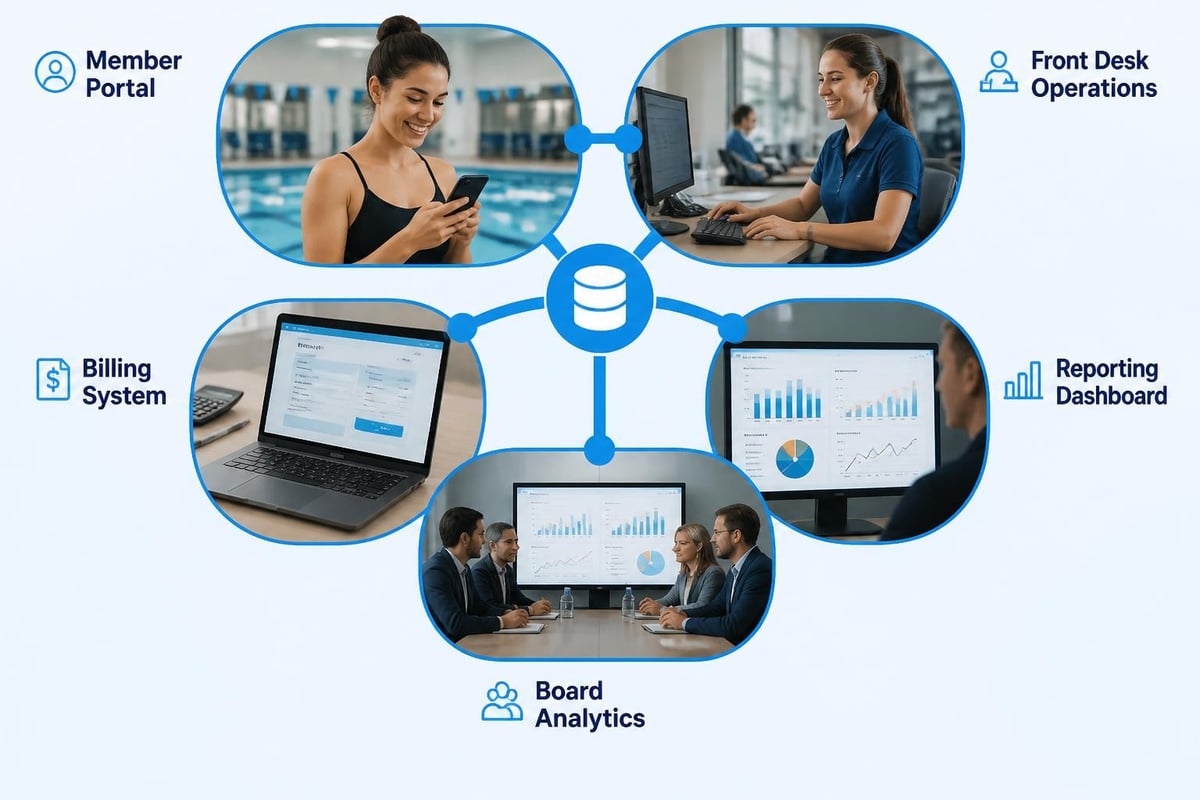
True integration means one action cascades through your entire system automatically. A member checking in doesn't just record attendance. It verifies status, updates activity logs, checks for expiring waivers, notes guest usage, and flags anything requiring attention.
Payment processing doesn't just record transactions. It updates membership status, sends receipts, flags failed payments, schedules retries, and keeps everything in sync.
This level of integration requires software built as a unified platform from the ground up. You can't achieve it by duct-taping separate systems together, no matter how sophisticated the API connections.
The Website Connection
Most swim clubs have a website where members can view information, maybe register for programs, sometimes check their account status. In many cases, this website doesn't actually talk to your management system.
That creates duplicate work and synchronization headaches. Member updates their email on the website? You need to manually update it in your system. They think they registered for swim lessons? You don't see it until you check the website separately.
Website integration should be seamless and automatic. Member-facing information and back-end operations should be the same system, not separate platforms trying to stay coordinated.
Making the Switch Without Disrupting Operations
Let's address the concern that stops most clubs from improving their workflow tools: the fear of transition chaos.
You're right to be cautious. Switching systems during peak season would be a disaster. But staying with inadequate tools because you're afraid of change costs you every single day.
Timing Your Transition
The best time to implement new workflow management tools is during your slowest period. For most swim clubs, that's late fall or winter. You've got time to learn the system, import data carefully, train staff without pressure, and work out any kinks before the rush starts.
Planning a migration to modern software requires thinking through several key elements:
- Data export from your current system
- Cleanup and verification before import
- Staff training schedules
- Member communication about changes
- Testing period with parallel operations
- Full cutover timing
The Parallel Period
Here's a strategy that reduces risk: run both systems briefly in parallel. Your new workflow tool handles day-to-day operations. Your old system stays available for reference and backup.
This lets staff build confidence without fear of losing critical information. Once everyone's comfortable and you've verified everything works correctly, you retire the old system.
Most clubs need about 30 days of parallel operation. That's enough time to encounter most common scenarios and confirm the new system handles them properly.
Training That Actually Sticks
Technology training fails when it's too abstract. Sitting staff down with a manual doesn't prepare them for real situations.
Effective training uses your actual scenarios:
- Walk through checking in your most complicated family
- Practice handling common problems (failed payments, expired waivers, guest limits)
- Show how to pull the reports board members request
- Demonstrate troubleshooting when something seems wrong
Keep documentation simple and visual. Screenshots showing exactly where to click for common tasks. Quick reference cards for front desk staff. Short videos demonstrating key workflows.
The goal isn't teaching them everything the system can do. It's making them confident handling the situations they'll encounter every day.
Measuring What Matters
Once your new workflow management tools are running, how do you know if they're actually working? Look at practical measures, not vanity metrics.
Time-Based Measures
Track how long common tasks take:
- Average check-in time during peak hours
- Time to answer typical board questions
- Duration of end-of-month closing process
- Speed of processing new membership applications
Compare these before and after implementation. The differences should be obvious and significant.
Error Reduction
Count mistakes that require correction:
- Billing errors per month
- Membership status confusion incidents
- Missed renewal notifications
- Waiver expiration oversights
Good workflow automation should drive these numbers way down, ideally close to zero for preventable errors.
Staff Confidence
This one's harder to quantify but easy to observe. Do seasonal staff members handle situations independently? Do they ask fewer clarification questions? Can they confidently answer member inquiries without "checking with someone"?
When workflow tools are working right, staff spend their time helping members instead of fighting the system.
Member Experience
The ultimate test: are members happier with their experience? Fewer complaints about billing confusion? Smoother check-in during busy times? Faster responses to their questions?
Your workflow improvements should be invisible to members as technology, but obvious as better service.
Future-Proofing Your Workflow
Technology changes fast. The workflow management tools you choose today need to evolve with your club's needs, not become obsolete when requirements change.
Adaptability and Configuration
Look for systems that let you adjust workflows without needing a developer. Your guest policy might change. Your billing structure might evolve. Your board might want different reports.
Can you adapt the system yourself? Or are you locked into the vendor's timeline and priorities for every modification?
Modern platforms like those detailed in IEEE's overview of workflow management software emphasize flexibility and user configuration as critical features.
AI and Automation Advances
Artificial intelligence isn't just hype anymore. Practical AI applications can genuinely improve workflow management by:
- Predicting staffing needs based on historical attendance patterns
- Identifying revenue recovery opportunities from billing data
- Detecting anomalies that might indicate problems
- Generating insights from operational data automatically
The key is AI that helps you work smarter, not complexity for its own sake. AI-powered insights should answer questions you actually have and surface opportunities you might miss.
Data Ownership and Portability
Make sure you truly own your data and can export it in standard formats. Technology relationships change. You might need to switch systems eventually. You shouldn't be held hostage by proprietary data formats.
Ask specifically about data export capabilities. Can you get everything out? In what formats? How complete is the export?
Better workflow management tools give you back something more valuable than efficiency percentages or feature checklists. They give you time, confidence, and control over your club's operations. When your systems work together smoothly, you spend less time fixing problems and more time focusing on what actually matters: creating a great experience for your members. PoolPulse delivers this kind of integrated workflow through highly configurable, AI-powered software purpose-built for swim clubs, tennis facilities, and member-driven organizations. If you're ready to stop fighting your technology and start using it to actually simplify your work, it's worth exploring how modern club management software can transform your daily operations.

The True Cost of Messy Billing: What Your Club Loses
Manual billing costs more than you think. Learn how swim clubs lose revenue, waste staff time, and frustrate members with outdated systems.

Guest Check-In Without the Saturday Morning Chaos
Learn how to check in guest visitors at your swim club without slowing down member access or creating bottlenecks during peak hours.

Does Your Check-In Process Really Protect Your Club?
Your front desk check-in might be costing you money and exposing liability. Learn how swim clubs use check out and check in systems that work.
Want to see if PoolPulse is a good fit for your club?
Book a walkthrough and we'll show you exactly how PoolPulse can help based on your club's needs, goals, and current processes.