

How the Billing Pool Changed Our Saturday Morning Chaos
A billing pool transforms how swim clubs handle memberships, family accounts, and seasonal charges. Learn practical setup and revenue tracking tips.


It's 9:15 on a Saturday morning in June, and your front desk is already three families deep. Someone's asking why their May invoice shows their neighbor's snack bar charges. Another parent swears they paid the guest fee last week, but it's showing as overdue. Your seasonal staffer is frantically toggling between three different screens trying to figure out which Smith family account to credit. Sound familiar?
This mess usually happens when your club grows beyond the "everyone knows everyone" phase but your billing system still treats every transaction like a separate island. You're not actually dealing with a payment problem. You're dealing with a billing pool problem, and most clubs don't realize it until they're drowning in reconciliation emails every Monday morning.
What Actually Is a Billing Pool?
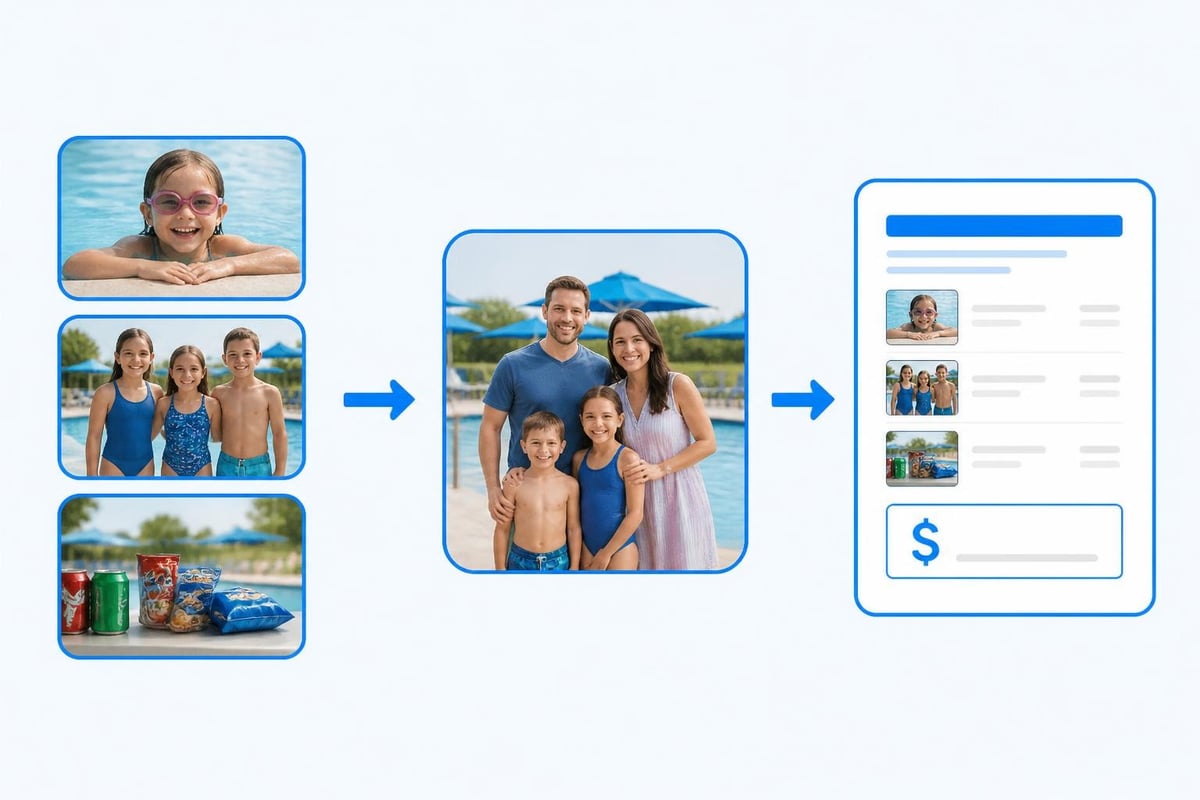
Think of a billing pool as the financial container that holds related charges together before they hit your members' statements. Instead of creating 47 separate invoices for 47 individual transactions, you group charges by account, by family, or by membership type, then bill once.
Here's the real-world version: The Martinez family has two kids on the swim team, Grandma who comes as a guest twice a month, and Dad who always forgets his member card and pays the daily rate. Without a billing pool, that's potentially a dozen small transactions every month. With a proper billing pool setup, everything rolls into one family account and one monthly statement.
The Container vs. The Contents
A billing pool isn't just a fancy name for "putting stuff together." It's a systematic approach to:
- Grouping related charges before invoicing
- Allocating shared costs across multiple accounts
- Consolidating payment from various revenue streams
- Tracking usage at both individual and group levels
Most swim clubs already do some version of this without calling it a billing pool. You probably charge annual dues once instead of splitting them into 365 daily fees. That's pooling. The question isn't whether you need it, it's whether your current approach actually saves you time or creates more weekend headaches.
The Three Billing Pool Models That Work for Swim Clubs
Not every club needs the same billing structure. Your pool (the water kind) might serve 100 families or 1,000. You might run a competitive team program or just offer open swim. Here are the three patterns we see working consistently:
Account-Level Pooling
Everything a member or family does gets assigned to one master account. Guest fees, swim lessons, tournament entries, locker rentals, and that $3.50 snow cone all appear on one statement.
Best for: Small to mid-sized clubs (under 500 member accounts) where families are the primary membership unit.
Watch out for: Corporate members or landlords who need separate billing for different properties or units. You'll need sub-accounts or a different structure.
| Advantage | Challenge |
|---|---|
| Simple for families to understand | Requires clear account ownership rules |
| Easy reconciliation | Can get messy with divorced parents or shared custody |
| One payment, one receipt | Doesn't naturally handle business/HOA scenarios |
Category-Based Pooling
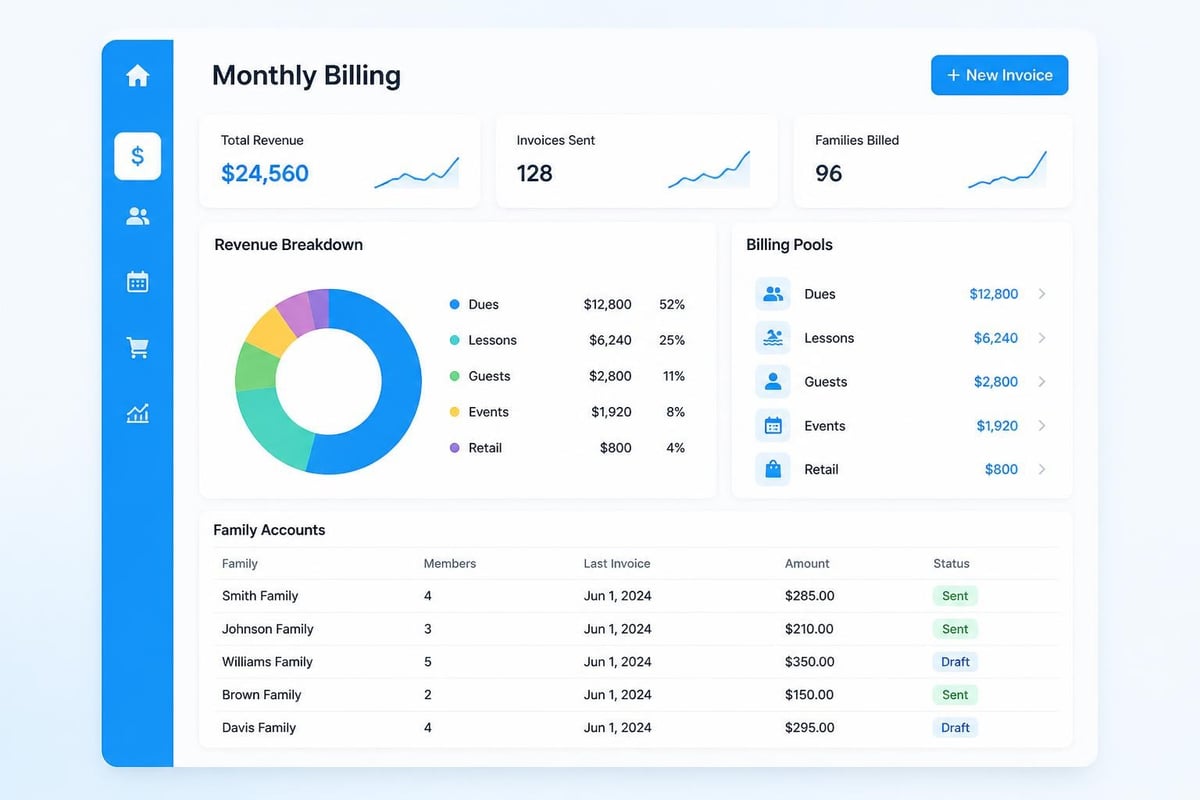
Charges get grouped by type first, then allocated to accounts. All swim lesson revenue pools separately from membership dues, which pools separately from facility rentals. This is how clubs track revenue by category while still sending consolidated invoices.
Best for: Clubs that need detailed financial reporting for board meetings, tax purposes, or grant applications.
| Revenue Category | Pooled Separately | Billed Together |
|---|---|---|
| Annual dues | ✓ | ✓ |
| Swim lessons | ✓ | ✓ |
| Guest fees | ✓ | ✓ |
| Concessions | ✓ | ✓ |
Hybrid Pooling
This is where your swim club management software earns its keep. Charges pool by category for your financial reports, but by account for member invoices. You get clean revenue tracking and simple family billing.
Think of it like this: Your treasurer sees that swim lessons generated $14,200 in April. The Martinez family sees that their April invoice includes $180 for lessons, $45 for guests, and $22 for snacks. Same data, two different views, both pulled from the same billing pool structure.
Setting Up Your First Billing Pool (The 30-Minute Version)
You don't need a finance degree to get this working. You need a clear picture of how money moves through your club and about half an hour of focused setup time.
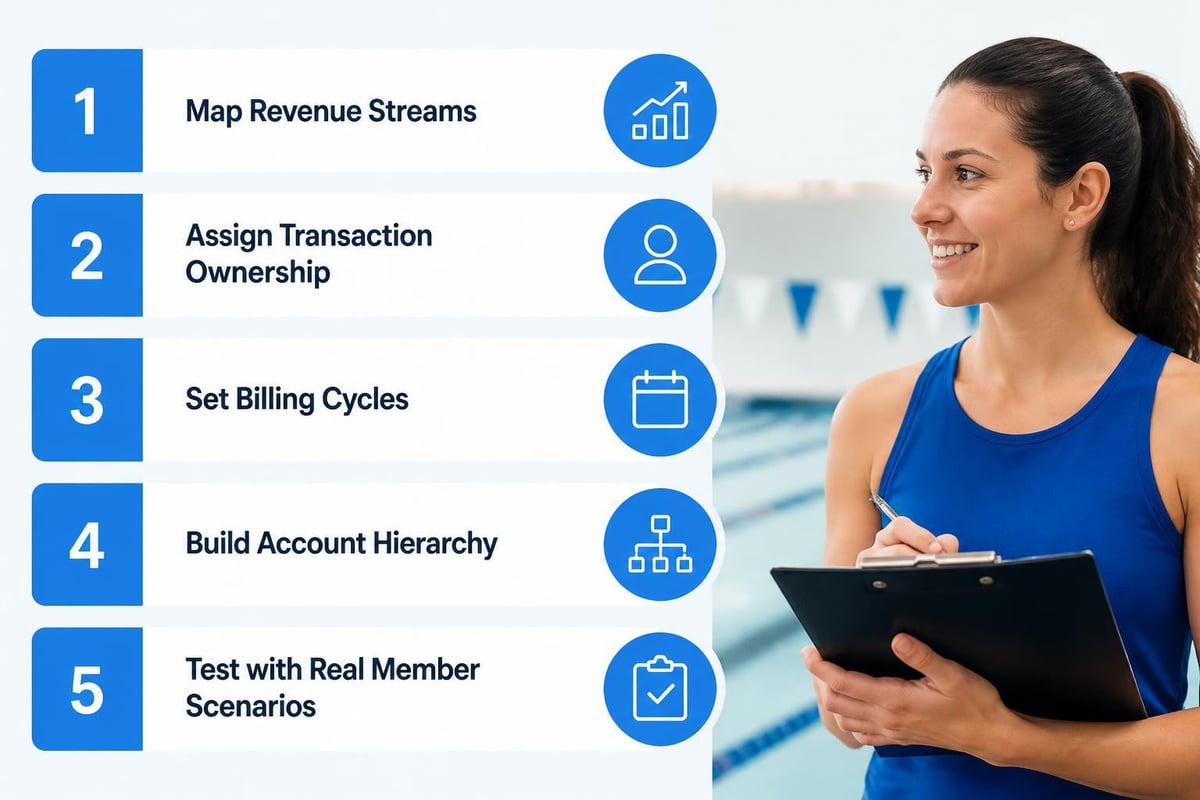
Step 1: Map your revenue streams
List every way money comes into your club. Not categories from your old software. Actual, specific things people pay for:
- Membership dues (annual, seasonal, monthly)
- Swim lessons (group, private, adult)
- Guest fees (daily, punch cards, extended family)
- Facility rentals (birthday parties, team events)
- Concessions and retail
- Special events and tournaments
Step 2: Decide who owns each transaction
For every revenue stream, answer: Does this charge belong to a person, a family account, a business/organization, or a visitor with no account?
This decision drives your entire billing pool structure. Most clubs default to family accounts, but that breaks down fast if you host corporate team-building events or rent lanes to the local high school.
Step 3: Set your billing cycle
Pooling only makes sense if you're consolidating multiple charges. If you're billing annually and everyone pays once, you don't need pooling, you need a spreadsheet.
The sweet spot for most swim clubs: monthly billing cycles with a statement date around the 25th. Charges from the 1st through the end of the month pool together, statements go out on the 25th, payment is due by the 10th of the following month.
Step 4: Build your account hierarchy
Here's where clubs get stuck. You need a logical structure that matches how families actually use your facility.
    Primary Account: Martinez Family ├── Member: Carlos Martinez (Adult) ├──
    Member: Ana Martinez (Adult) ├── Member: Sofia Martinez (Youth) ├── Member:
    Diego Martinez (Youth) └── Authorized Users: Grandma Rodriguez (Guest
    privileges)
Every transaction any of these people make flows to the Martinez Family billing pool. One invoice, one payment, everyone's happy.
Step 5: Test with real scenarios
Before you flip the switch for 500 families, run through these situations:
- Kid takes a swim lesson, mom pays at the desk that day
- Dad brings a guest, puts it "on the account"
- Both kids sign up for a tournament with a registration deadline
- Family's annual dues are past due, but they want to register for lessons
If your billing pool setup handles all four without creating duplicate charges, missed revenue, or confused statements, you're ready.
The Hidden Costs Nobody Warns You About
Every club operator who's implemented a billing pool system has learned at least one of these lessons the expensive way. Save yourself the tuition:
The Partial Payment Problem
Member pays $200 on a $350 invoice. Which charges in the billing pool does that payment cover? Your system needs rules, or you'll spend hours every month manually allocating payments.
Common approaches:
- Oldest charges first (best for overdue situations)
- Priority order (dues first, then lessons, then extras)
- Pro-rata allocation (split the payment proportionally across all charges)
Pick one method and stick with it. Changing mid-season creates reconciliation nightmares.
The Shared Custody Scenario
Two divorced parents, joint custody, both want separate billing for the same kid's swim lessons. Your billing pool needs to handle split accounts or you'll be fielding angry calls every month.
The "I Paid in Cash" Gap
Someone pays cash at the concession stand. That revenue exists in the real world, but does it exist in your billing pool? If your cash handling process doesn't connect to your billing system, you'll have mysterious gaps in your monthly reconciliation.
Modern systems like those used for HOA pool management solve this with mobile check-in and integrated point-of-sale, but plenty of clubs still run hybrid cash/digital operations. Your billing pool structure needs to account for both.
The Advance Payment Puzzle
Family prepays for the entire summer in March. Do those funds sit in the billing pool as a credit? Do you recognize the revenue immediately or defer it? This isn't just a billing pool question, it's an accounting question, and you need a clear answer before your first prepayment arrives.
How Billing Pools Actually Save Time (With Numbers)
Let's get specific. Here's what changes when you move from scattered transaction billing to proper billing pool management:
Before billing pools:
- 23 minutes per month per account reconciling various charges
- 4-6 hours monthly answering "what's this charge?" emails
- 2-3 hours monthly fixing duplicate or missed charges
- 1-2 hours monthly chasing down partial payments
After billing pools:
- 3 minutes per month per account reviewing consolidated statements
- 30-45 minutes monthly answering billing questions
- 15 minutes monthly fixing exceptions
- 10 minutes monthly allocating partial payments (system does most of it)
For a 300-member club, that's roughly 115 hours saved per season. At $25/hour for admin time, you just saved $2,875 that can pay for that new starting block you've been eyeing.
Connecting Your Billing Pool to Revenue Recovery
Here's where billing pools go from "nice organizational tool" to "actual money in the bank." When charges pool properly, your revenue recovery system can spot patterns that individual transaction tracking misses completely.
Pattern Detection
- Family X always pays 15 days late (automate a reminder)
- Guest fees spike on Saturdays but go unbilled 23% of the time (staffing or system issue?)
- Concession charges under $5 have a 40% write-off rate (time to fix the honor system)
You can't see these patterns when you're looking at 4,000 individual transactions. You can see them when those transactions pool into logical groups.
Automated Follow-Up
A properly configured billing pool knows the difference between:
- An account that's $20 short because someone forgot to pay for last week's guest
- An account that's $500 behind because annual dues went unpaid
- An account that shows a balance but actually prepaid for next month
That distinction drives your follow-up strategy. The first one gets a friendly reminder. The second gets a formal notice. The third gets nothing because they're actually paid up.
The Technical Side (In Plain English)
You've probably seen documentation about consolidated billing in cloud services or read about billing groups in enterprise software. The concepts transfer directly to swim club operations, just with different terminology.
At its core, a billing pool is a data structure that groups related financial records before generating invoices. Whether you're running AWS accounts or swim team registrations, the mechanics are similar:
- Transactions occur (someone swims, takes a lesson, brings a guest)
- Charges assign to pools (based on your rules: account, category, both)
- Pools accumulate over your billing cycle
- Invoices generate from pooled totals
- Payments apply to pools, then allocate to individual charges
Why This Matters for Your Software Choice
When you're evaluating swim club management software , ask specifically about billing pool capabilities:
- Can charges automatically pool by account and category simultaneously?
- How does the system handle split payments across pool types?
- Can I run financial reports at the pool level without drilling into transactions?
- What happens when I need to move a charge from one pool to another?
These aren't theoretical questions. They're the difference between software that handles your billing and software that creates your billing headaches.
Some subscription billing platforms like Zuora offer invoice grouping specifically designed for this kind of pooled billing scenario. Others, like Twilio's billing groups , show how service providers consolidate usage across multiple accounts. The swim club version needs the same flexibility with domain-specific features like seasonal memberships and family account structures.
Regulatory and Compliance Considerations
Most swim clubs don't think about regulatory requirements until they're already in trouble. If you're collecting and pooling member funds, especially if you're holding prepayments or running a trust account, you have obligations.
Payment Processor Rules
When you work with payment processors, your billing pool structure intersects with their compliance requirements. Stripe's documentation on pooled accounts explains how settlement funds can be combined, but you need clear internal accounting to reconcile what belongs to which member.
State and Local Requirements
Some jurisdictions treat membership deposits or prepaid seasons differently than regular service fees. Your billing pool needs to separate these funds not just for member convenience, but for legal compliance.
Audit Trails
Whether it's your board, your accountant, or a random audit, someone will eventually ask: "Show me how this $14,000 in lesson revenue breaks down." Your billing pool structure should make that question answerable in under five minutes.
Real Club Examples (Names Changed, Problems Real)
Situation 1: The Summer Surge
Hillside Swim Club has 200 family memberships. From June through August, they average 850 individual transactions per month: lessons, guests, concessions, locker rentals, and special events. Before implementing billing pool management, their treasurer spent 12-15 hours monthly reconciling accounts.
After setup: All transactions pool by family account automatically. Monthly reconciliation dropped to under 2 hours. The system flags accounts with unusual patterns (like families with guest charges but no active membership) for quick review.
Situation 2: The Multi-Tier Membership
Oak Valley runs a tennis and swim facility with combined membership options . Some families only swim. Some only play tennis. Some do both. Their old system created three different invoices for families with both memberships.
Solution: Category-based billing pools that still roll up to family accounts. The Jones family sees one invoice with clear line items for swim annual dues, tennis court fees, and swim lesson charges. The treasurer sees separate revenue totals for swim vs. tennis operations.
Situation 3: The HOA Complexity
Riverbend is an HOA with pool access included in dues, but non-resident members can join separately. Plus they rent the facility for private events. Three completely different billing scenarios needing three different pool structures.
Their HOA pool management software handles this with pool hierarchies: resident billing pools (tied to HOA dues), non-resident pools (standard membership), and event pools (per-booking invoicing). All feeding into unified financial reporting.
Common Mistakes and How to Avoid Them
Mistake 1: Too Many Pools
Club tries to create a separate billing pool for every conceivable charge type. Twenty different pools, none of them providing useful information, all of them requiring manual oversight.
Fix: Start with 3-5 major categories. You can always split later if needed.
Mistake 2: No Clear Ownership
Charge sits in the billing pool but nobody knows which account it belongs to. Common with guest fees when staff forgets to ask "whose account should this go on?"
Fix: Every transaction needs an account assignment at point of sale. No exceptions. "I'll figure it out later" never works.
Mistake 3: Ignoring Refunds and Adjustments
System handles charges beautifully but falls apart when you need to refund a cancelled lesson or adjust a duplicate charge.
Fix: Build refund and adjustment workflows before you go live. Test them with real scenarios.
Mistake 4: Manual Pool Management
Someone is literally moving charges between pools by hand every month because "the system doesn't quite do it right."
Fix: If your current software requires manual pool management, you need different software. This should be automated or it's not worth doing. Modern platforms designed for club administration handle pool assignments automatically based on your configured rules.
Reporting and Analytics from Your Billing Pool
Once your billing pool is running smoothly, the real value shows up in your reporting capabilities. You can answer questions that were impossible before:
Financial Questions:
- What's our actual monthly recurring revenue vs. one-time charges?
- Which revenue categories are growing or shrinking year-over-year?
- What's the average family account value by membership tier?
Operational Questions:
- How many families carry balances over 30 days?
- What percentage of guest fees go unpaid?
- Which months see the highest concession revenue?
Strategic Questions:
- If we increased lesson prices by 10%, what's the revenue impact?
- Should we offer prepay discounts or does it hurt cash flow?
- Which membership types generate the most total revenue per season?
Systems that export billing data to analytics platforms (similar to how Google Cloud exports to BigQuery for advanced analysis) give you this kind of insight. For swim clubs, you're more likely using built-in reporting tools, but the concept is identical: pooled data enables analysis that transaction-level data makes nearly impossible.
Seasonal Adjustments and Year-End Closeout
Your billing pool needs to handle the rhythm of swim club operations. You're not billing the same services in December that you bill in July.
Off-Season Pool Management
What happens to your billing pools in November when 80% of members aren't using the facility? Do you:
- Pause recurring charges and resume in spring?
- Continue minimal billing for off-season perks?
- Close pools entirely and recreate for next season?
There's no universal right answer, but you need a plan before your first off-season arrives.
Year-End Reconciliation
Some clubs run calendar year accounting. Others run season-to-season (May through April, for example). Your billing pool structure should align with your accounting year to make closeout manageable.
Year-end checklist:
- Verify all charges in pools are assigned and invoiced
- Resolve outstanding balances or formally defer to next year
- Document prepayments that should carry over
- Export pool summaries for tax preparation
- Archive or close completed billing cycles
Integration Points That Matter
Your billing pool doesn't exist in isolation. It connects to:
Payment Processing
When a member pays online, that payment needs to hit the right billing pool and allocate correctly to the charges within it. Failed integration here means manual reconciliation every single payment.
Access Control
If someone's billing pool shows an outstanding balance, should the gate still let them in? Your policies drive your integration requirements.
Member Portal
Can families log in and see their billing pool status? Itemized charges? Payment history? Transparency reduces billing questions by 60% or more.
Financial Software
Your billing pool data eventually flows into QuickBooks, Xero, or whatever accounting system your treasurer uses. Clean pool structure makes this export simple. Messy structure makes it a monthly ordeal.
Platforms designed specifically for pool management companies typically handle these integrations out of the box. Generic billing software often requires custom development or extensive manual workarounds.
Scaling Your Billing Pool as You Grow
You've got 150 member families today. What happens when you hit 500? Your billing pool structure needs to scale without complete redesign.
Architectural Scaling
Early on, you might manually review every account's billing pool before invoices go out. That stops working at 300+ accounts.
Your system needs:
- Automated pooling rules that handle 95%+ of transactions correctly
- Exception flagging for the 5% that need human review
- Bulk operations for seasonal changes, price updates, or policy adjustments
Performance Scaling
Generating invoices from billing pools for 500 families shouldn't take six hours. If it does, your underlying software has performance issues that'll only get worse.
Complexity Scaling
As you add services (maybe a fitness center, or pickleball courts, or enhanced swim team programming), your billing pool structure needs to absorb new revenue streams without breaking existing ones.
This is where highly configurable platforms shine. Adding a new revenue category should be a configuration change, not a software development project.
Getting your billing pool right transforms Saturday mornings from chaotic to calm. You spend less time hunting down mystery charges and more time actually helping members. If you're ready to modernize how your club handles billing, member management, and revenue tracking in one unified platform, PoolPulse offers the configurability and automation you need without the enterprise software complexity. Our AI-powered system handles the pooling logic automatically while giving you complete visibility into where your revenue actually comes from.

Your Pool Needs More Than a Lifeguard on Duty
Swim club operators need systems that manage facilities, track maintenance, and protect members. Here's what works in 2026.

The Monthly Billing Chaos Test for Swim Clubs
Running monthly billing at your swim club shouldn't feel like chaos. Take this test to find billing mistakes before they cost you time and money.

The Busy Club Test: Is Your Software Keeping Up?
Running a busy club means juggling members, lanes, and walk-ins all at once. Here's how to tell if your software can handle the chaos.
Want to see if PoolPulse is a good fit for your club?
Book a walkthrough and we'll show you exactly how PoolPulse can help based on your club's needs, goals, and current processes.