

Fee Management Software for Swim Clubs (2026 Guide)
Running a swim club means dealing with memberships, renewals, and payments. Here's how fee management software simplifies billing and saves you time.


Running a swim club means you're constantly juggling member dues, registration fees, guest passes, late payments, and seasonal renewals. If you're still tracking payments in spreadsheets or chasing families with overdue accounts, you know how much time disappears into billing headaches. Fee management software changes that equation by handling the repetitive work for you, so you can focus on keeping your pool running smoothly instead of hunting down missing payments or fixing billing errors at midnight.
What Fee Management Software Actually Does
At its core, fee management software takes care of everything related to collecting money from your members. It tracks who owes what, sends payment reminders, processes transactions, and gives you a clear picture of your revenue without making you dig through bank statements.
Think about your typical billing cycle. You probably have annual memberships, monthly dues, initiation fees, guest fees, swim lesson charges, and maybe late fees. Each member might be on a different payment plan or membership tier. Keeping all of that straight manually is where things fall apart.
Fee management software handles:
- Automatic billing on schedules you set
- Payment reminders before and after due dates
- Multiple payment methods (credit cards, ACH, checks)
- Proration for mid-season joiners
- Late fee calculations and application
- Family discounts and special rates
- Receipt generation and email delivery
The software remembers everything you'd otherwise need to track yourself. When the Johnsons join in July instead of May, it calculates their prorated dues automatically. When the Smiths forget to update their expired credit card, the system emails them before their payment fails.
Beyond Basic Billing
Fee management software does more than just collect payments. It connects your billing to your actual operations. When you're running a swim club, you need to know if someone's account is current before they swipe their card at the gate. You need to see which families haven't paid before you send out renewal notices. You need reports that show revenue by membership type, payment method, or time period.
Modern systems integrate these pieces so your front desk staff sees the same information as your treasurer. Everyone works from the same data, which means fewer mistakes and less time spent answering questions about account status.

Why Manual Billing Creates Problems
Let's be honest about what happens when you manage fees manually. Someone (probably you or a volunteer board member) sits down once a month to figure out who paid, who didn't, and who needs a reminder. You update your spreadsheet, send some emails, and hope you didn't miss anyone.
Then the exceptions start piling up. The family that joined late and needs a prorated amount. The member who switched from individual to family mid-year. The guest passes purchased throughout the summer. The check that bounced but you didn't notice for two weeks.
The Real Cost of Manual Processes
Manual billing doesn't just take time. It creates errors that cost you money. When you forget to bill someone for two months, you're unlikely to collect that back pay. When you apply the wrong rate to a new member, fixing it later creates awkward conversations. When you miss late fee applications, you're essentially giving away money.
Educational institutions face similar challenges , and research shows that manual fee tracking leads to revenue leakage that many organizations never fully recover.
Here's what manual billing typically costs you:
| Problem | Impact | Time Lost |
|---|---|---|
| Payment tracking errors | Missed revenue, member disputes | 3-5 hours/month |
| Manual reminder emails | Late payments, cash flow gaps | 2-4 hours/month |
| Reconciliation headaches | Unclear finances, audit stress | 4-8 hours/month |
| Late fee inconsistency | Lost revenue, unfairness | 1-2 hours/month |
Those hours add up fast. And they're hours spent on repetitive work instead of improving your facility or member experience.
Choosing the Right Fee Management Software
Not all fee management software works the same way. Some systems were built for schools, some for gyms, and some for general membership organizations. What works for a yoga studio won't necessarily fit a seasonal swim club with family memberships and guest policies.
When you're evaluating options, you need to think about your specific situation. Do you have a short swim season or year-round operations? Do most members pay annually or monthly? How many different membership types do you offer?
Features That Actually Matter
Skip the marketing hype and focus on features that solve your real problems. You need software that handles the situations you deal with every day, not theoretical capabilities you'll never use.
Essential features for swim clubs:
- Flexible membership types (individual, family, senior, student)
- Seasonal and annual billing cycles
- Automated payment retry for failed transactions
- Guest pass and day pass fee tracking
- Proration calculations for mid-period joins
- Family account management with multiple members
- Payment plan options for larger fees
Nice-to-have features:
- Integration with gate access systems
- Swim lesson registration and billing
- Event fee collection (swim meets, parties)
- Merchandise and concession tracking
- Automated financial reporting
Selecting the right system requires understanding these key considerations beyond just the feature list.
Integration With What You Already Use
Fee management software shouldn't exist in isolation. It needs to talk to your other systems or you'll just create new headaches. If members can register online but their payment information doesn't flow to your billing system, you're back to manual data entry.
Look for software that connects with:
- Your website and online registration forms
- Gate access or check-in systems
- Accounting software (QuickBooks, Xero)
- Email communication tools
- Reporting and analytics platforms
The best swim club management software combines fee management with member management, so everything stays synchronized without you having to update multiple systems.
Setting Up Fee Structures That Make Sense
Once you have fee management software, you need to configure it correctly. This is where a lot of clubs stumble. They either overcomplicate things with too many membership types, or they oversimplify and can't accommodate legitimate variations.
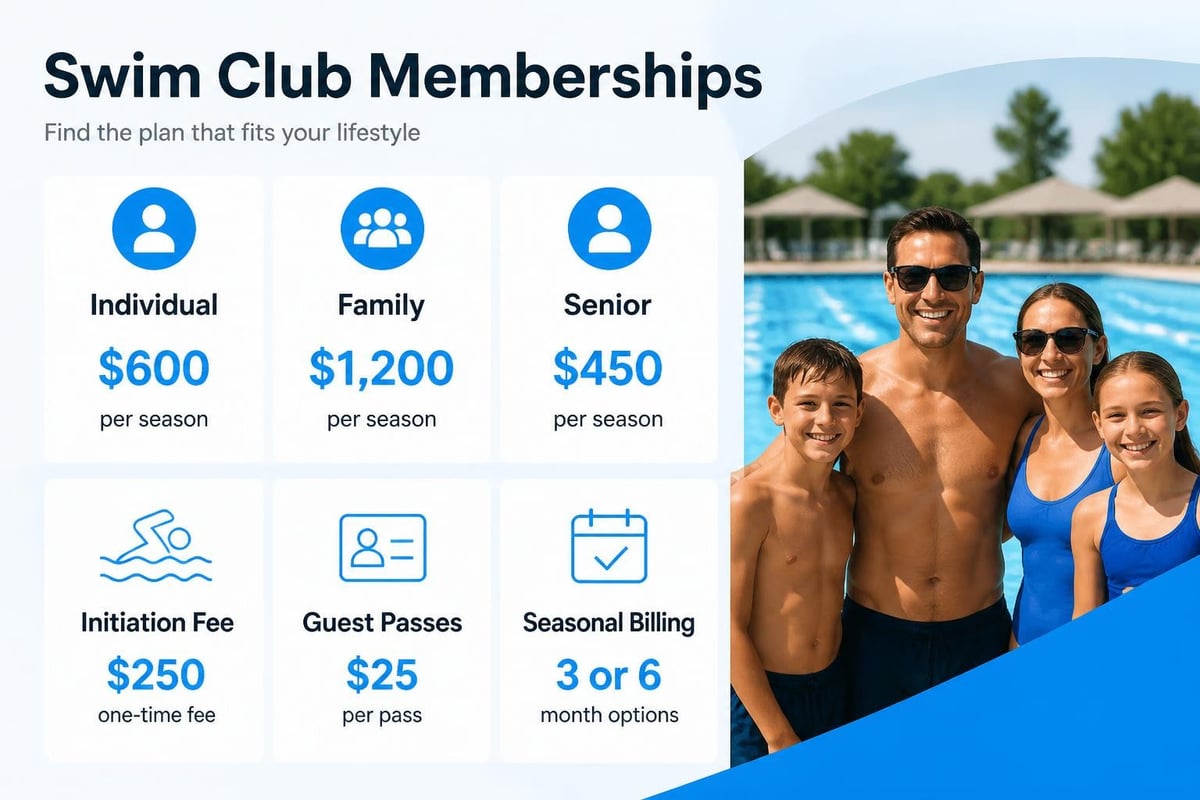
Start with your core membership categories. Most swim clubs have something like individual, couple, family, and senior memberships. Then add your initiation fees, guest passes, and any other standard charges.
Building Your Fee Schedule
Think through the full year and all the ways people pay you. You probably have:
- Initial membership fees (one-time or annual)
- Monthly or seasonal dues
- Initiation fees for new members
- Guest passes and day passes
- Late fees for overdue payments
- NSF fees for bounced payments
- Optional add-ons (lessons, events, lockers)
Create each fee type in your software with clear names and descriptions. "Family Membership Annual" is better than "FM-A" six months from now when you're trying to remember what you set up.
Best practices for configuring fee structures emphasize standardized naming and flexible configurations that accommodate growth.
Handling Special Cases
Every club has members who don't fit the standard mold. Maybe you offer board member discounts, volunteer credits, or scholarship memberships. Your fee management software should handle these exceptions without requiring workarounds.
Set up discount codes or membership modifiers that you can apply to specific accounts. This keeps your base fees consistent while accommodating the variations you actually need. When you change your regular family membership rate, it automatically updates for everyone except those with specific overrides.
Automating Payment Collection
The biggest advantage of fee management software is automation. Once you set up payment schedules, the software handles the actual collection without your involvement. Members get billed on time, every time, without you having to remember or manually process anything.
Automated payment workflows:
- System charges the member's stored payment method on the scheduled date
- If successful, receipt generates and emails automatically
- If failed, system retries after a set period (usually 3-5 days)
- After multiple failures, system sends notification to member and administrator
- Late fees apply automatically based on your rules
This automation eliminates the monthly billing crunch where you spend hours processing payments. It also improves your cash flow because payments happen on schedule instead of whenever members remember to pay.
Payment Retry and Recovery
Credit cards expire. Bank accounts close. Payments fail for all sorts of reasons that have nothing to do with whether someone wants to pay you. Good fee management software handles these situations gracefully.
When a payment fails, the system should automatically retry a few days later. Many failed payments succeed on retry because the issue was temporary (insufficient funds that day, card network glitch, etc.). This automatic retry recovers revenue you'd otherwise need to chase manually.
For payments that continue to fail, the software should notify both the member and your administrative team. The member gets a friendly reminder to update their payment information. Your team gets a list of accounts needing attention without having to review every transaction manually.
Managing Member Communication
Fee management software helps you communicate with members about money in ways that don't create awkward situations. Instead of you personally emailing families about late payments, the system sends standardized notifications that feel professional rather than personal.
You can set up automatic emails for:
- Upcoming payment reminders (3-5 days before charge)
- Successful payment confirmations
- Failed payment notices
- Past due account alerts
- Upcoming renewal notifications
- Payment plan installment reminders
These automated messages keep members informed without creating work for you. Members appreciate knowing when charges are coming instead of being surprised by a credit card charge they forgot about.
Customizing Your Communication
While automation handles routine messages, you still want these emails to sound like they come from your club, not a generic billing system. Good software lets you customize message templates with your club's name, logo, and tone.
You might want payment reminders to be friendly and helpful: "Just a heads up, your monthly dues of $50 will process on June 1st. Thanks for being part of the pool family!" Failed payment notices might be more direct but still professional: "We weren't able to process your payment. Please update your payment method in your account to avoid service interruption."
Automating payment reminders ranks among the top time-saving features that clubs should implement immediately.
Reporting and Financial Visibility
You need to know where your money is coming from and where it's going. Fee management software gives you that picture without requiring hours of spreadsheet work or waiting for your accountant to compile reports.
Revenue Reports You'll Actually Use
The reports that matter most show you practical information you can act on:
| Report Type | What It Shows | Why It Matters |
|---|---|---|
| Revenue by membership type | Income from each membership category | Identifies your most valuable member segments |
| Outstanding balances | Who owes money and how much | Helps you prioritize collection efforts |
| Payment method breakdown | How members prefer to pay | Informs your payment processing strategy |
| Failed payment summary | Accounts with collection issues | Catches problems before they grow |
| Monthly revenue comparison | Income trends over time | Spots seasonal patterns and growth |
These reports answer the questions your board members ask: Are we on track with budget? Which membership types generate the most revenue? How many members are behind on payments?
Real-Time Financial Dashboard
Instead of waiting until month-end to understand your financial position, modern fee management software gives you a real-time dashboard. Log in any time and see current revenue, outstanding balances, and recent transactions.
This visibility helps you make better decisions. When someone asks about adding a new program, you can quickly check if you have the budget headroom. When planning capital improvements, you can see actual revenue trends instead of guessing based on last year's numbers.

Integration With Club Operations
Fee management software works best when it connects to your other club systems. When someone's payment fails, your gate access system should know about it. When a family upgrades from individual to family membership, their billing should update automatically.
This integration prevents the awkward situations where members show up expecting access but their account isn't current. It also eliminates duplicate data entry where you update information in multiple places.
Member Portal Access
Give members access to their own account information through a portal. They can view payment history, update credit card information, download receipts, and see upcoming charges. This self-service capability reduces the number of questions your front desk staff needs to answer.
Members appreciate being able to handle routine account tasks themselves instead of having to call or email during business hours. You appreciate not having to field calls asking "When did I last pay?" or "Can you send me a receipt from March?"
For swim clubs specifically, features that streamline member management alongside billing create a unified experience that reduces administrative overhead.
Security and Compliance
When you're handling member payment information, security isn't optional. You need software that protects sensitive data and complies with payment card industry (PCI) standards. If there's a data breach involving your members' credit card numbers, the liability and reputation damage can devastate a small club.
Security features to require:
- PCI compliance certification
- Encrypted payment data storage
- Secure payment processing (no storing full card numbers)
- Role-based access controls (not everyone sees financial data)
- Audit logs showing who accessed what information
- Regular security updates and monitoring
Don't assume all software providers take security seriously. Ask specifically about their security practices and compliance certifications. If they can't give you clear answers, that's a red flag.
Payment Processing Standards
When members enter credit card information, it should go directly to your payment processor without your software storing the full card number. This tokenization approach means your system stores only a reference token, not actual payment details. If your database were compromised, the attacker wouldn't get usable credit card numbers.
Similarly, bank account information for ACH payments needs the same level of protection. Look for software that follows industry standards for handling sensitive financial data rather than building custom approaches that might have security gaps.
Common Implementation Challenges
Moving from manual billing to fee management software isn't always smooth. You'll hit some bumps, especially during the first few billing cycles. Knowing what to expect helps you plan around common issues.
Data Migration Headaches
Getting your existing member and payment data into new software takes more effort than you'd think. You need to export data from wherever it lives now (spreadsheets, old software, paper records), clean it up, format it correctly, and import it.
Budget extra time for this step. Your data probably has inconsistencies that need fixing: duplicate member records, incomplete payment histories, outdated contact information, formatting variations. Cleaning this up before migration prevents bigger problems later.
Migration checklist:
- Export current member data to CSV or Excel format
- Review for duplicates and merge records
- Standardize formatting (phone numbers, addresses, names)
- Verify membership types match your new fee structure
- Import in stages (test with 10-20 records first)
- Verify imported data accuracy before going live
- Run parallel systems for one billing cycle if possible
Organizations that automate fee processes typically see initial slowdowns during implementation before realizing efficiency gains.
Member Resistance to Change
Some members won't like the new system, especially if they're used to paying by check or prefer paper statements. You'll need to communicate why you're making the change and how it benefits them (easier account access, automatic receipts, fewer missed payments).
Give members options during the transition. If someone absolutely refuses to use automatic payment, don't force it. Most members will adapt quickly once they see how convenient the new system is, but fighting with the holdouts creates unnecessary friction.
Training Your Team
Your front desk staff, board members, and volunteers need to understand the new system. They'll field questions from members and need to access account information confidently. Poor training creates confusion that undermines the benefits of your new software.
Staff Training Priorities
Focus training on the tasks your team performs most often:
- Looking up member account status
- Processing manual payments (cash, checks)
- Updating member contact information
- Applying credits or refunds
- Running basic reports
- Troubleshooting common issues
Save advanced features (configuring new fee types, adjusting billing schedules, financial reporting) for your treasurer or club manager. Not everyone needs to know everything.
Creating Quick Reference Guides
Build simple one-page guides for common tasks. "How to check if a member's account is current" or "How to process a guest pass payment" with screenshots and numbered steps. Keep these at your front desk or in a shared online folder.
These guides reduce interruptions because staff can reference them instead of calling you with basic questions. They're especially helpful when training new volunteers or seasonal staff who only work a few months.
Measuring Success
How do you know if your fee management software is actually working? You should see measurable improvements in how much time you spend on billing, how quickly you collect payments, and how accurate your financial records are.
Metrics Worth Tracking
Before and after comparisons:
| Metric | Before Software | After Software | Improvement |
|---|---|---|---|
| Hours per month on billing | 15-20 hours | 2-4 hours | 75-85% reduction |
| Average days to collect payment | 45 days | 15 days | 67% faster |
| Payment errors per month | 8-12 errors | 1-2 errors | 85% reduction |
| Outstanding balance percentage | 15-20% | 5-8% | 60% improvement |
These numbers tell you whether the software is delivering value. If you're still spending 15 hours per month on billing three months after implementation, something isn't working right.
Return on Investment
Fee management software costs money, whether it's a monthly subscription or a one-time purchase. Calculate whether you're getting value by comparing the cost against what you're gaining.
Consider: time saved (valued at what you'd pay someone to do that work), revenue recovered through better collection, errors prevented, and late fees properly applied. For most clubs, the software pays for itself within a few months just through improved collection rates.
Staying Current With Updates
Software keeps evolving. Your fee management system will receive updates that add features, fix bugs, and improve security. Staying current with these updates ensures you benefit from improvements and maintain security.
Most cloud-based systems update automatically without requiring action from you. That's one advantage of software-as-a-service models. Desktop software might require manual updates, which means you need to check periodically for new versions.
Feature Announcements and Training
When your software provider adds new features, take time to learn about them. You might discover capabilities that solve problems you've been working around. Subscribe to update emails or check release notes quarterly.
Recent innovations in fee management include AI-powered payment predictions and enhanced automation that can further reduce administrative work.
Scaling With Growth
As your club grows, your fee management needs become more complex. More members mean more transactions, more exceptions, and more reporting requirements. Software that worked fine for 100 families might struggle with 300.
Choose software that scales with you. Ask potential vendors about their largest customers and how the system performs at higher volumes. You don't want to switch systems again in two years because you outgrew your initial choice.
Multi-Location Considerations
If you manage multiple pools or plan to expand, you need software that handles multiple locations without creating separate disconnected systems. You want consolidated reporting that shows performance across all facilities while still letting you drill down to individual pool data.
For organizations managing multiple facilities, multi-community amenity management capabilities become essential for maintaining operational efficiency.
Fee management software eliminates the repetitive work of tracking payments and chasing overdue accounts, giving you back hours every month while improving your cash flow. The right system handles billing automatically, communicates with members professionally, and gives you clear financial visibility without the spreadsheet headaches. PoolPulse combines fee management with complete member administration in a single platform built specifically for swim clubs, tennis clubs, and HOA pools, so you can spend less time on billing and more time running a great facility for your members.

Five Front-Desk Tasks Your Swim POS Should Handle
Your front desk shouldn't need three systems to check in a swimmer. Here's how modern swim POS systems save time and reduce errors.

The Swim Club Software Test Every Board Should Run
Run this simple test to see if your swim club software actually saves time or creates more work. Real scenarios, honest questions, better tools.

The Seven Signs You've Outgrown Your Club Operations
Your swim club is growing, but your tools aren't keeping up. These seven warning signs reveal when manual processes cost more than solutions.
Want to see if PoolPulse is a good fit for your club?
Book a walkthrough and we'll show you exactly how PoolPulse can help based on your club's needs, goals, and current processes.