

The Five-Minute Front Desk Test Every Club Fails
Most swim clubs fail this simple front desk test. Learn what slows down check-ins, confuses staff, and costs you money every weekend.


It's 10 AM on a Saturday in June. You've got a line of families snaking out the door, half your seasonal staff started last week, and someone's asking about their invoice from three months ago. Your front desk person is toggling between a spreadsheet, a binder, and a Post-it note system that made sense in April but definitely doesn't now. Sound familiar? Most swim clubs run some version of this chaos every weekend, and it's not because anyone's doing a bad job. It's because the tools at your front desk weren't built for the actual work you're trying to do.
What Actually Happens at Your Front Desk
Let's be honest about what front desk work looks like at a member-driven facility. You're not just checking people in. You're answering billing questions, looking up guest policies, verifying that someone's kid is actually on the approved pickup list, and trying to remember if the Johnsons paid their late fee yet.
Every interaction pulls from a different place. Member status lives in one system. The guest log is a clipboard. Payments might be in your email. And good luck finding last year's waiver if someone asks.
Here's what your front desk staff actually needs to do:
- Verify current membership status in under 10 seconds
- Check if someone has an outstanding balance
- Log guests against member limits
- Confirm who's authorized to pick up kids
- Answer questions about upcoming events or closures
- Handle walk-up inquiries about joining
When these tasks require three different logins or a filing cabinet, everything slows down. And slow doesn't just mean inconvenient. It means frustrated members, stressed staff, and mistakes that cost you money.
The Real Cost of Fragmented Systems
You might think your current setup works fine because people eventually get through the line. But what's actually happening behind the scenes?
Your staff spends 15 minutes every shift just getting oriented. They need to remember which binder has what, where the key to the filing cabinet is, and whether they should check the whiteboard or the group text for today's updates. Creating an amazing front desk experience starts with giving your team the right tools, not just better training.

Then there's the question accuracy problem. When someone asks if their payment went through, your staff shouldn't have to say "let me check and email you later." They need the answer right now. Same with guest passes. If a member's used four of their five guest visits, that information should be visible the moment they walk up.
Common Front Desk Mistakes That Add Up
| Mistake | Why It Happens | What It Costs |
|---|---|---|
| Letting in expired members | Status isn't visible at check-in | Lost renewal revenue |
| Miscounting guest visits | Manual logs get missed | Policy violations, member complaints |
| Missing outstanding balances | Payment info in separate system | Uncollected fees pile up |
| Can't verify authorized pickups | Lists are outdated or misplaced | Safety risks, liability concerns |
Every single one of these mistakes stems from the same root cause: your front desk doesn't have one place to see everything. And the clubs that figure this out first are the ones who stop hemorrhaging money on missed charges and staff overtime.
What Front Desk Software Actually Does
Here's where we need to talk about front desk software, but not in the way most software companies explain it. Forget about "digital transformation" or "seamless integration." Let's talk about what changes on Monday morning.
Good front desk software means your Saturday staff can check someone in without asking you three questions first. It means when someone walks up asking about their account, the answer is right there. No digging, no guessing, no "I'll have to get back to you."
The core jobs front desk software handles:
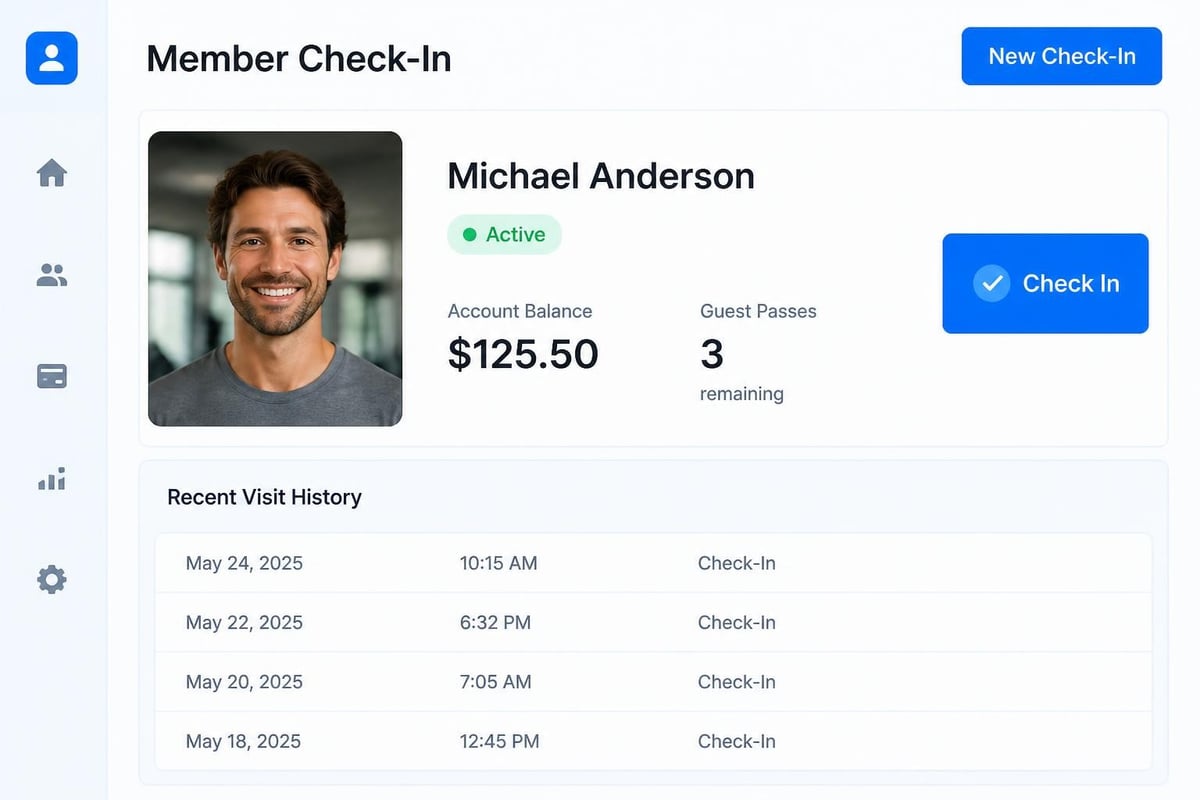
- Member lookup: Name, photo, status, balance, and guest count in one view
- Check-in logging: Time-stamped record of who's at the facility
- Guest management: Tracks visits against limits automatically
- Payment visibility: Shows what's owed, what's paid, what's overdue
- Quick reference info: Policies, hours, emergency contacts in one place
When these pieces work together, your front desk becomes the answer center instead of the question-forwarding desk. And that's when things get interesting.
The Features That Actually Matter
Not all front desk software is built the same, and a lot of what gets advertised doesn't help with the actual daily grind. You don't need fancy dashboards that look good in demos but slow down real work. You need tools that make the 47th check-in of the day just as smooth as the first.
Quick Member Verification
This is where most clubs waste the most time. Someone walks up, gives you their name, and then what? Are you scrolling through an alphabetical list? Searching a spreadsheet? Looking at a printed roster from last week?
The right system lets you type three letters and see the member. Their photo pops up so you know it's the right person. Status shows as active, expired, or suspended. Current balance displays right there. Guest count for the season is visible. All in about five seconds.
For member-driven facilities like swim clubs and HOA pools, understanding swim club member management means recognizing that the front desk is where management actually happens.
Guest Tracking That Doesn't Require Math
If your club allows members to bring guests, you know the headache. Was this their third visit or fourth? Did they already use up their allocation? Is this guest even allowed under your current policy?
Manual tracking fails because humans forget to write things down, especially when the line is 12 deep and someone's asking about the bathroom code. Software that automatically counts and enforces limits takes that decision off your staff's plate.
- Guest name captured at check-in
- Running count visible on member record
- Automatic alerts when limit is reached
- Historical log for dispute resolution
This isn't about being strict. It's about being consistent. When every member gets the same treatment because the system enforces the rules, you avoid the uncomfortable conversations about favoritism.
How Front Desk Software Connects to Everything Else
Here's where things get interesting for club operations. Your front desk isn't an island. It connects to billing, it informs your attendance reports, it feeds data to your board, and it affects how you schedule staff.
When your front desk software talks to your billing system, outstanding balances automatically show up at check-in. You don't have to remember who owes what. The system remembers for you. And more importantly, your front desk staff can politely mention it: "Looks like there's a small balance from last month. Would you like to take care of that today?"
The Data Your Board Actually Wants
Your board members ask the same questions every meeting. How many people are using the facility? What are peak times? Are we seeing more or fewer guests this year? Which membership types are most popular?
All of that information lives at the front desk. But if check-ins are happening on paper or in a basic spreadsheet, compiling those reports means hours of manual work. Modern systems track this automatically and can show you:
| Metric | Why It Matters | How It Helps |
|---|---|---|
| Daily attendance by hour | Staffing decisions | Right-size your coverage |
| Member vs. guest ratio | Policy effectiveness | Adjust guest limits if needed |
| Peak usage days | Facility planning | Schedule maintenance strategically |
| Member visit frequency | Engagement tracking | Identify at-risk renewals |
The clubs making smart decisions about rates, hours, and policies are the ones who can actually see what's happening. And that visibility starts with consistent check-in data.
Setting Up Your Front Desk for Success
Let's talk about the practical side of making your front desk work better. Software helps, but only if you set it up right and train your people properly.
First, your front desk area needs to be organized for efficiency. That means one computer or tablet that has everything, not three devices doing different jobs. It means clear sightlines so staff can greet people while also watching the door. And it means backup procedures that don't involve "call the manager."
Front desk setup checklist:
- Single login that gives access to all necessary systems
- Printed quick-reference guide for common questions
- Emergency contact list visible but secure
- Clear signage about policies (guests, hours, payment)
- Backup power for essential systems
- Clean workspace that projects professionalism
This might sound basic, but visit five swim clubs and you'll see five different interpretations of "front desk setup." The ones that work smoothest have thought through every interaction before it happens.
Training Staff Who Only Work Weekends
Here's a challenge unique to seasonal facilities: half your front desk team works 20 hours a year. They show up Memorial Day weekend, work Saturdays through August, and then you don't see them until next summer. How do you keep them effective when they have zero muscle memory for your systems?
The answer is ruthless simplification. Your front desk software needs to be so straightforward that someone who last used it four weeks ago can jump right back in. This is where modern club administration software separates itself from outdated systems that require constant retraining.
Write down the top 10 scenarios your front desk handles. Then test whether a new staff member can complete each one without asking questions. If they can't, your system is too complicated.
The Security Side Nobody Talks About
Front desk work isn't just about speed and accuracy. You're also the first line of security for your facility. You need to know who's supposed to be there, who they brought with them, and whether everyone's authorized.
Front desk security procedures extend beyond just checking IDs. For member facilities, you're often dealing with kids, authorized pickup lists, and guest restrictions. Your software needs to support those safety measures, not make them harder.
Consider what happens when a non-member tries to enter with a member. Your staff needs to see immediately if that person has already been logged as a guest earlier in the week. If your guest policy says no more than two guests per visit, the system should flag a violation before it becomes an awkward conversation.
Protecting Member Information
You're collecting names, addresses, payment information, and sometimes even photos. That data needs protection. This isn't just about compliance (though that matters too). It's about maintaining trust with your members.
Basic security practices for front desk operations:
- Screen positioning that prevents casual viewing by people in line
- Automatic logout after periods of inactivity
- Role-based access so staff only see what they need
- Secure storage of physical documents if you still use them
- Clear policies about discussing member accounts publicly
Think about how your current setup handles privacy. Can the person behind someone in line see their account balance on your screen? Can they hear your staff discussing overdue payments? These details matter more than most clubs realize.
Making the Switch Without the Drama
Okay, so maybe you're convinced your front desk needs better tools. Now comes the scary part: actually changing systems. How do you move from your current setup to something better without creating chaos during your busiest season?
First rule: don't switch systems in June. Make changes in the off-season when you can work through problems without a line of annoyed members watching. Spring (March or April) or fall (September or October) gives you breathing room.
Second rule: overlap your old and new systems for at least two weeks. Keep the old method as backup while everyone gets comfortable with the new approach. This isn't inefficient; it's insurance against Murphy's Law.
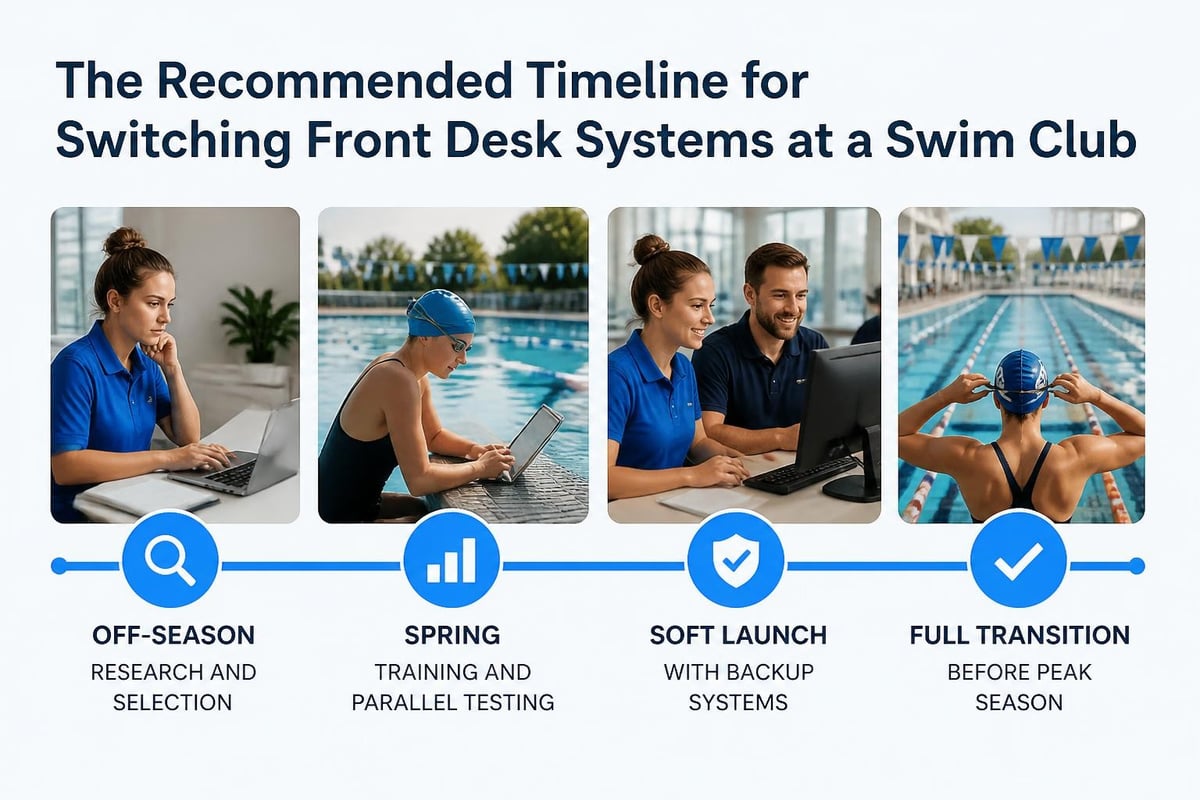
Transition timeline that actually works:
- Off-season research (January-February): Evaluate options, do demos
- Spring setup (March-April): Configure system, import data, train core staff
- Parallel testing (Early May): Run old and new systems simultaneously
- Soft launch (Mid-May): New system primary, old system backup
- Full transition (By Memorial Day): Commit to new system completely
This timeline assumes you're preparing for summer season at a swim club. Adjust based on your facility's calendar, but keep the principle: give yourself runway before your busy period hits.
The clubs that struggle with software transitions are the ones who try to implement during peak usage. You're asking staff to learn new systems while also handling their highest workload. That's a recipe for frustration on all sides.
What Integration Really Means
Software companies love talking about integration. Everything "seamlessly integrates" with everything else. But what does that actually mean for your front desk on a Tuesday afternoon?
Real integration means when someone pays their balance at the front desk, that payment immediately updates in your billing system. No manual entry later. No reconciliation spreadsheet. The money is recorded, the receipt prints, and the account reflects the payment. Done.
It means when you check someone in, that data flows to your attendance reports without export-import gymnastics. And when a membership expires, the front desk sees that status change automatically. You're not updating things in multiple places hoping you got them all.
For facilities managing multiple amenities or communities , integration becomes even more critical. Your front desk might be handling tennis court reservations, pool check-ins, and clubhouse bookings. Those systems need to talk to each other.
When Integration Breaks Down
Here's how you know your systems aren't truly integrated: your staff keeps a notebook of things to "update later" or "remember to add." That notebook is a symptom of disconnection.
Other warning signs include:
- End-of-day reconciliation that takes more than 10 minutes
- Discrepancies between check-in logs and billing records
- Members asking "didn't I already tell you that?" about their information
- Staff avoiding certain tasks because they're too complicated
- Frequent errors that require correction after the fact
These problems don't fix themselves. They compound until you either invest in better systems or accept that inefficiency is just part of how you operate. The clubs choosing the latter are the ones slowly losing ground to competitors who figured this out.
The Mobile Consideration
Should your front desk software work on phones and tablets, or is a desktop computer enough? The answer depends on your facility layout and how you operate.
If your check-in area is small and stationary, a desktop setup might work fine. But if you have events where you're checking people in at different entrances, or if you want to walk the deck with member information in hand, mobile access becomes valuable.
Mobile-friendly front desk software also helps with:
- Quick balance checks while walking around the facility
- Emergency contact lookup if something happens
- Temporary check-in stations during special events
- Backup access if your main computer has issues
The key is responsive design that actually works on smaller screens, not just a shrunken version of the desktop interface that requires pinching and zooming. If your staff needs reading glasses to use the mobile version, it's not truly mobile-friendly.
Measuring What Matters
How do you know if your front desk is actually improving? You need metrics that connect to real outcomes, not just software statistics that look impressive but don't mean anything.
Metrics that tell you if things are working:
- Average check-in time (should be under 30 seconds for members)
- Questions escalated to management (should decrease over time)
- Data entry errors requiring correction (should approach zero)
- End-of-day closeout time (should be under 15 minutes)
- Member complaints about front desk experience (track trends)
Notice none of these are about how many features your software has or how modern it looks. They're about whether the actual work is getting easier and more accurate.
Compare your current performance against these benchmarks quarterly. If you're not seeing improvement, either your system isn't right or your training needs work. Both are fixable, but you have to acknowledge the problem first.
The Real Question: Build or Buy?
Some clubs consider building their own front desk system. Maybe you've got a tech-savvy board member or a cousin who does web development. Before you go down that path, understand what you're really signing up for.
Custom development means you own the code, but you also own the maintenance, bug fixes, security updates, and feature additions. When something breaks at 9 AM on July 4th weekend, who fixes it? When you need to add a new feature next year, who builds it?
| Build It Yourself | Buy Purpose-Built Software |
|---|---|
| High upfront cost (development time) | Predictable monthly/annual cost |
| Ongoing maintenance responsibility | Updates and fixes included |
| Custom fit to current needs | Proven workflows from similar facilities |
| Risk of developer leaving | Vendor handles technical issues |
| No peer learning | Community of similar users |
For most swim clubs and HOA pools, buying purpose-built software makes more sense. You're not in the software business. You're in the business of running a great facility. Let someone else handle the technical complexity while you focus on members.
That said, if you do choose to buy, make sure you're buying from someone who understands your industry. Generic "front desk software" built for hotels or medical offices won't handle member-specific needs like seasonal passes, family plans, or guest policies the way facilities need.
Common Implementation Mistakes
Let's talk about what goes wrong when clubs upgrade their front desk systems. These mistakes are predictable and avoidable if you know to watch for them.
Mistake #1: Not cleaning your data first. You're moving from spreadsheets to proper software, so you just import everything as-is, right? Wrong. This is your chance to fix duplicate entries, standardize formats, and remove inactive records. Import garbage and you'll have a fancy database full of garbage.
Mistake #2: Skipping the training. You watch one demo, think you get it, and throw your staff into the deep end. Then you wonder why they're struggling three weeks later. Training isn't optional. Schedule it, require it, and make time for questions.
Mistake #3: Trying to customize too much. Yes, your club is unique. But you're probably not so unique that you need 47 custom fields and a completely non-standard workflow. Start with the default setup that works for hundreds of similar facilities. Only customize what truly doesn't work for your situation.
Mistake #4: Ignoring your staff's feedback. The people actually using the system every day will tell you what's not working if you listen. Create a feedback channel and actually respond to concerns. The best system in the world fails if your team won't use it.
Mistake #5: No backup plan. Technology breaks. Internet goes down. Tablets freeze. What's your procedure when the system isn't available? Having a paper backup process isn't admitting defeat; it's being realistic about technology.
How AI Changes Front Desk Work
Artificial intelligence sounds like science fiction, but it's already changing how front desk operations work in 2026. And we're not talking about robots replacing your staff. We're talking about tools that make your staff more effective.
AI-powered front desk features that actually help:
- Smart search: Type a partial name and the system figures out who you mean
- Predictive text: Start typing an answer to a common question and it suggests the full response
- Anomaly detection: Flags unusual patterns like the same guest being checked in by different members repeatedly
- Automated categorization: Sorts questions and issues without manual tagging
- Usage predictions: Estimates busy times based on historical patterns and weather
The key word is "powered." You're not asking your staff to become AI experts. The intelligence works behind the scenes, making their job easier without adding complexity they have to understand.
For facilities interested in staying current, exploring AI-powered club administration helps you understand what's real versus what's marketing hype.
Planning for Growth
Your front desk needs change as your facility grows. What works for 150 member families might not scale to 400. Planning ahead prevents painful transitions later.
Think about these growth indicators:
- Wait times at peak hours consistently exceeding 5 minutes
- Staff unable to answer questions without checking with management
- Increasing complaints about check-in confusion
- Difficulty tracking compliance with facility policies
- Your annual report taking weeks to compile
These symptoms suggest you've outgrown your current front desk setup. Addressing them early is cheaper and less disruptive than waiting until you're in crisis mode.
Also consider seasonal fluctuations. Maybe your current system handles October perfectly fine but collapses every June. That's still a problem that needs solving, even if it's only acute for part of the year.
What Your Members Actually Notice
Here's the thing about front desk improvements: your members might not consciously recognize when you upgrade your software, but they absolutely feel the difference in service.
They notice when check-in is fast. They appreciate when staff can answer their question immediately instead of saying "let me check on that." They remember when their guest pass count is tracked correctly without disputes. And they definitely notice when their kid is on the authorized pickup list without them having to explain it every single time.
These small improvements compound into an overall impression of professionalism and organization. The clubs that seem like they "have it together" often just have better systems supporting their front desk.
Conversely, members also notice dysfunction. Long waits, conflicting information, lost records, and billing confusion all erode trust. Every front desk failure is a small withdrawal from your credibility account with members.
Investing in proper front desk software isn't about technology for technology's sake. It's about creating consistent, reliable experiences that make members feel like their club is well-run and their money is being used wisely.
Running a smooth front desk operation comes down to giving your team the right tools and clear processes. When your front desk staff can check people in quickly, answer questions confidently, and handle problems without tracking you down, your entire facility runs better. PoolPulse brings all your member management, billing, and check-in data into one modern platform built specifically for swim clubs, HOA pools, and member-driven facilities. If you're tired of juggling multiple systems and want to see what truly integrated front desk software looks like, schedule a demo and we'll show you how other clubs are saving time and reducing errors every single day.

The Swim Club Software Test Every Board Should Run
Run this simple test to see if your swim club software actually saves time or creates more work. Real scenarios, honest questions, better tools.

The Seven Signs You've Outgrown Your Club Operations
Your swim club is growing, but your tools aren't keeping up. These seven warning signs reveal when manual processes cost more than solutions.

How to Answer Every Board Question in Under Two Minutes
Your swim club board asks tough questions. Learn how management reporting software helps you pull accurate answers in seconds, not hours.
Want to see if PoolPulse is a good fit for your club?
Book a walkthrough and we'll show you exactly how PoolPulse can help based on your club's needs, goals, and current processes.