

Invoices Report: A Swim Club Admin's Essential Guide
Learn how to create and use an invoices report to track revenue, catch billing errors, and keep your swim club's finances organized.


You know that feeling when your board asks about this year's revenue compared to last year, and you're scrambling through spreadsheets trying to piece together an answer? Or when a member insists they paid their annual dues, but you can't quickly verify it? That's where a solid invoices report becomes your best friend. It's not just a list of numbers. It's your window into the financial health of your swim club, and when you learn to use it properly, it saves you countless hours and prevents those awkward conversations with confused members.
What Actually Is an Invoices Report
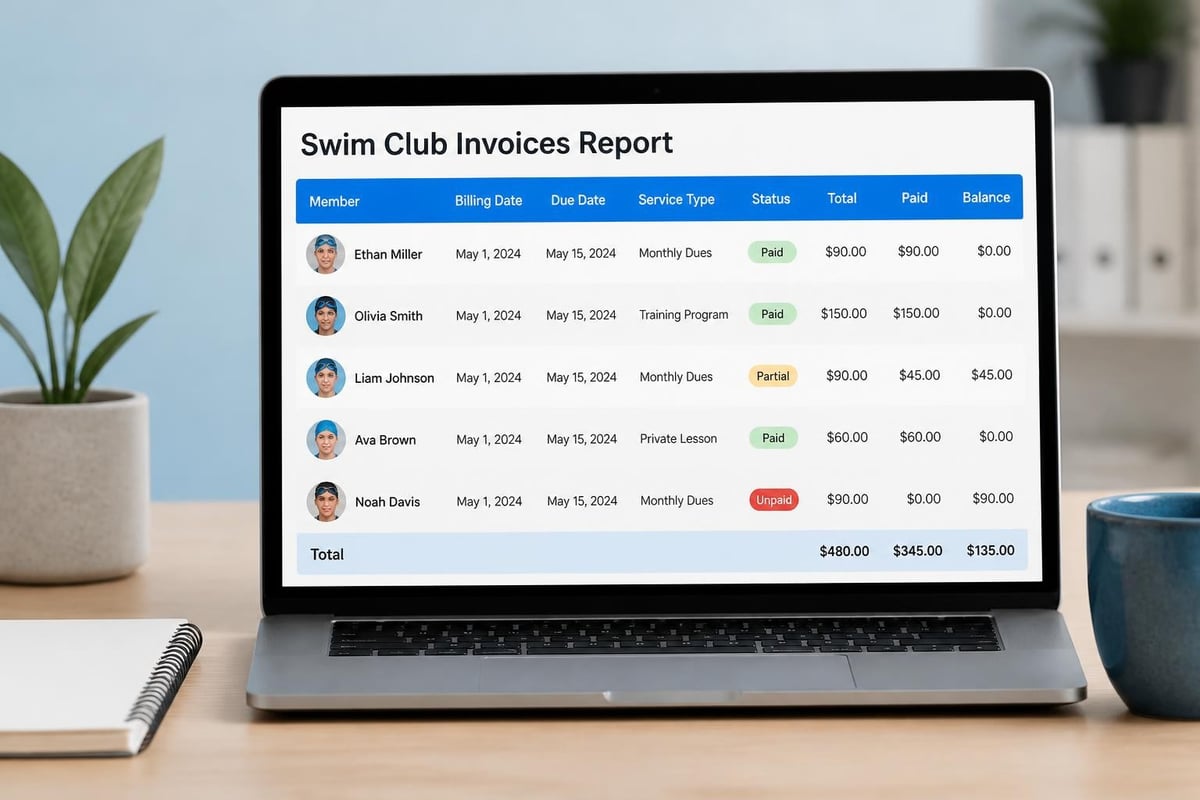
An invoices report is exactly what it sounds like: a detailed breakdown of all the invoices you've generated for your members. But here's where it gets useful. A good invoices report doesn't just show you what you billed. It shows you who paid, who didn't, when payments came in, and which revenue streams are actually working.
Think of it as your financial story. Every membership renewal, every swim lesson package, every late fee, it's all there. When you run an invoices report, you're creating a snapshot of your club's billing activity for whatever time period you need.
The Building Blocks of a Useful Report
Not all invoices reports are created equal. The ones that actually help you run your club better include specific information:
- Member identification (name, member ID, contact info)
- Invoice number and date issued
- Due date and payment status
- Amount billed and amount paid
- Service or membership type
- Payment method used
- Outstanding balance
Some clubs also track invoice aging (how long an invoice has been unpaid), which helps you spot problems before they become serious delinquencies. When you're looking at 200 member families, you can't rely on memory. The report does that work for you.
Why Every Swim Club Needs Regular Invoice Reporting
Here's a real scenario: Your club bills quarterly. Halfway through Q2, your treasurer mentions that revenue seems low. Without an invoices report, you're guessing. With one, you can immediately see that 40 families haven't paid Q1 yet, and 15 of those are now two quarters behind.
That's actionable information. You can send targeted reminders, make phone calls to families who might be struggling, and project your actual cash flow for the rest of the year.
Catching Problems Before They Grow
Small billing errors multiply fast. Maybe your system accidentally billed the Johnsons twice for swim lessons. Or the Smiths got charged the family rate when they should've gotten the single-member rate. When you review your invoices report regularly, you catch these issues while they're still easy to fix.
I've seen clubs where nobody looked at the invoice management best practices or ran reports for months. By the time they noticed problems, they had angry members, incorrect financial statements, and a mess that took weeks to untangle.
Tracking Revenue by Category
Your club probably has multiple revenue streams. Annual memberships. Monthly memberships. Swim lessons. Pool rentals. Guest fees. Special events. Without an invoices report broken down by category, you're flying blind.
Which programs actually make money? Which ones barely break even? Your invoices report tells you. Maybe you'll discover that your Sunday afternoon swim lessons consistently have high enrollment and payment rates, while Saturday morning sessions have terrible attendance and lots of unpaid invoices. That's information you can use to schedule smarter next season.
How to Build an Invoices Report That Actually Helps
Let's get practical. You don't need a finance degree to create a useful invoices report. You need to know what questions you're trying to answer.
Start With Your Time Frame
Are you looking at this month? This quarter? The full year? Each timeframe tells you different things:
- Monthly reports help you track immediate cash flow and catch current billing issues
- Quarterly reports show seasonal trends and help with board reporting
- Annual reports reveal year-over-year growth and inform budget planning
Most clubs find that running a monthly invoices report catches 90% of issues while they're still small. Then they do a deeper quarterly review to spot patterns.
Choose Your Filters Carefully
The power of an invoices report comes from filtering. You want to slice your data different ways:
| Filter Type | What It Shows You | Why It Matters |
|---|---|---|
| Payment Status | Paid vs. Unpaid | Immediate collection priorities |
| Member Type | Family vs. Individual vs. Student | Revenue by membership category |
| Service Type | Memberships vs. Lessons vs. Events | Program profitability |
| Date Range | Specific months or seasons | Seasonal revenue patterns |
| Amount Range | High-value vs. low-value invoices | Where to focus collection efforts |
When you combine filters, you get really useful insights. For example, filtering for "unpaid invoices over $500 from Q1" immediately shows you which collection calls will have the biggest impact on your cash flow.
Export and Share Appropriately
Your board treasurer needs different information than your front desk staff. Your invoices report should be flexible enough to share relevant data with the right people.
Board members typically want summary data: total invoices issued, total collected, outstanding balance, year-over-year comparison. Your office manager needs member-level details to follow up on specific unpaid invoices.
Common Invoice Report Mistakes (And How to Avoid Them)
Even experienced club administrators make these errors. Here's what trips people up.
Mistake One: Running Reports Too Infrequently
I know a club that only looked at their invoices report twice a year, before board meetings. By the time they reviewed their data, they had members who were six months behind on payments. Some had moved. Some had forgotten they even owed money. The club wrote off thousands in uncollectible revenue.
The fix: Set a recurring calendar reminder. Run your invoices report at least monthly. It takes 15 minutes and prevents massive headaches.
Mistake Two: Not Reconciling with Actual Payments
Your invoices report shows what you billed. Your bank account shows what you received. These should match, but they don't always.
Maybe a check bounced. Maybe a credit card was declined. Maybe you recorded a cash payment incorrectly. If you're not regularly comparing your invoices report to your actual deposits, you'll miss these discrepancies. Understanding invoice accuracy and acceptable error rates helps you maintain financial precision.
The fix: Monthly bank reconciliation. Match your deposited funds against your invoices report. Flag anything that doesn't line up.
Mistake Three: Ignoring Aging Receivables
Not all unpaid invoices are equally urgent. An invoice that's five days overdue is different from one that's 90 days overdue. Your invoices report should age your receivables:
- Current (0-30 days): Standard follow-up
- 30-60 days: Personal outreach required
- 60-90 days: Serious collection effort
- 90+ days: Potential write-off or formal collections
The longer an invoice sits unpaid, the less likely you'll collect it. Your report should make aging visible so you can act fast.

Using Invoice Reports for Better Decision Making
Here's where your invoices report stops being just a financial tool and becomes a strategic asset. The data you're collecting tells you how to run your club better.
Spotting Seasonal Patterns
Pull an invoices report covering the last three years, grouped by month. You'll see patterns. Maybe June and July are huge revenue months (summer memberships), while November and December are slow. That's normal for most swim clubs.
But what if your invoices report shows that August has consistently high billing but low payment rates? That might mean you're billing for fall sessions before families are ready to commit. Adjusting your billing calendar could improve your collection rate.
Identifying Problem Payment Methods
Your invoices report should show how members are paying. If you notice that cash and check payments have a significantly higher non-payment rate than automatic credit card billing, that's useful information.
Many clubs have moved to encouraging (or requiring) automatic payments for exactly this reason. The data in your invoices report can justify that decision to skeptical board members.
Evaluating Pricing Changes
Raised your rates this year? Your invoices report will tell you how members responded. Compare the number of invoices issued this year versus last year at this time. Compare payment rates. Compare cancellations.
If you see a significant drop in memberships after a price increase, your invoices report gives you the data to make informed decisions about next year's pricing.
Technical Considerations for Swim Club Software
Your club management software should make generating an invoices report easy. If you're wrestling with complicated exports or manually combining data from multiple systems, you're working too hard. Modern swim club management software should have built-in reporting that answers your questions without requiring a data science degree.
What to Look For in Reporting Features
When you're evaluating swim club software (or advocating for an upgrade), these reporting capabilities matter:
- Real-time data: Your invoices report should reflect today's payments, not last week's
- Customizable date ranges: Pick any start and end date, not just preset options
- Multiple export formats: PDF for board meetings, Excel for detailed analysis
- Automated scheduling: Set your invoices report to email you monthly automatically
- Filter and sort options: Drill down into exactly the data you need
Some clubs are still using systems built in the early 2000s. The software works, technically, but generating an invoices report requires exporting raw data and building spreadsheets manually. That might have been acceptable 15 years ago. In 2026, it's costing you time and increasing error rates.
Integration with Other Financial Tools
Your invoices report shouldn't live in isolation. The best club management systems integrate with accounting software, making it easy to keep your books current without double-entry.
When a payment comes in, it should update your invoices report and your accounting ledger automatically. When you refund a member, both systems should reflect that transaction. This integration, covered in detail in guides about invoice management processes , prevents the classic problem where your club software says you're owed $10,000, but your accounting software shows $8,000, and nobody knows which is correct.
Sharing Invoice Reports with Your Board
Your board has fiduciary responsibility for the club's finances, but most board members aren't financial experts. They're volunteers who want to make sure the club is healthy. Your job is to present your invoices report in a way that tells the story clearly.
Create a Dashboard View
Instead of dumping a 20-page detailed invoices report on your board, create a summary dashboard:
- Total invoices issued this period: $125,000
- Total collected: $118,000
- Outstanding balance: $7,000
- Comparison to last year same period: +8% revenue
Then add a brief narrative. "Outstanding balance is in line with historical averages for this time of year. We have 12 members with balances over 60 days that we're actively following up with."
That gives your board the big picture without overwhelming them with details.
Preparing for Common Board Questions
Smart board members ask good questions about your invoices report:
- "Why is our outstanding balance higher than last quarter?"
- "What percentage of members are on automatic payment?"
- "How many members are consistently late with payments?"
- "What's our average collection time?"
Have answers ready. Run your invoices report with different filters before the meeting so you can answer follow-up questions on the spot.
Handling Delinquent Accounts Based on Report Data
Your invoices report will always show some unpaid balances. That's normal. What matters is having a consistent process for addressing them.
The 30-Day Follow-Up
When your invoices report shows a balance that's 30 days past due, it's time for a friendly reminder. This can be an automated email: "Just a reminder that your invoice for $150 was due on May 15th. If you've already paid, thank you! If not, please log in to pay or contact us if there's an issue."
Most overdue payments at this stage are simple oversights. A gentle nudge gets them paid.
The 60-Day Conversation
At 60 days, automation isn't enough. Your invoices report should trigger a phone call. This is where you learn what's really happening.
Maybe the member lost their job and needs a payment plan. Maybe they're confused about what they're being charged for. Maybe there's actually a billing error you didn't catch. You won't know until you ask.
The 90-Day Decision Point
When your invoices report shows accounts at 90+ days, you need to decide: keep pursuing or write it off? For small balances (under $100), continuing to chase them costs more in staff time than you'll recover. For larger balances, you might need formal collection efforts.
Your policies should spell this out, and your invoices report should make it easy to identify which accounts need which level of attention.
Seasonal Adjustments to Your Reporting Schedule
Swim clubs are seasonal businesses, and your invoices report schedule should reflect that. The questions you're asking in March are different from the questions you need answered in July.
Pre-Season (January-March)
This is renewal season for most clubs. Your invoices report should focus on:
- How many members have renewed versus last year
- Early payment discount uptake
- New member enrollments
Run weekly reports during this period. Renewal season is when you set yourself up for the whole year. Missing even a few weeks of reporting can mean missed revenue opportunities.
Peak Season (April-August)
During peak season, your invoices report helps you track:
- Guest pass revenue
- Swim lesson enrollment and payment
- Event fees and facility rentals
- Mid-season membership additions
This is also when you'll see your highest payment volume, so reconciliation becomes even more important.
Off-Season (September-December)
Off-season reporting focuses on:
- Year-end revenue totals
- Member retention planning
- Budget preparation for next year
- Collection of outstanding balances before year-end
Many clubs also use this period to clean up their member database, and your invoices report helps identify inactive accounts that can be archived.

Advanced Invoice Report Analysis
Once you're comfortable with basic invoices report generation, you can dig deeper into the data to find insights that aren't obvious at first glance.
Cohort Analysis
Group members by when they joined and track their payment behavior over time. Do members who joined in 2024 have better payment rates than those who joined in 2023? This might tell you that your onboarding process improved, or that last year's recruitment attracted more committed members.
Your invoices report can break this down by creating filters for member join date and comparing payment patterns.
Payment Method Performance
Create a table in your invoices report comparing payment methods:
| Payment Method | Avg Days to Payment | Failed Payment Rate | Admin Time Required |
|---|---|---|---|
| Auto CC | 0 days | 3% | Low |
| Manual CC | 12 days | 8% | Medium |
| Check | 18 days | 12% | High |
| Cash | 15 days | 5% | High |
This data helps you make the case for pushing members toward automatic payments. It's not just about convenience, it's about the financial health of your club. Resources on invoice processing best practices often emphasize automation for exactly this reason.
Discount and Promotion Effectiveness
If you offered an early-bird discount for renewals, your invoices report can show you whether it worked. Compare the number of members who paid early this year versus last year. Calculate whether the revenue you gave up in discounts was worth the improved cash flow.
The same analysis works for family discounts, senior rates, and any other special pricing you offer.
Using AI and Automation to Enhance Invoice Reports
In 2026, you don't have to manually create every invoices report from scratch. Modern swim club management platforms use AI to help you spot patterns and anomalies you might miss.
Automated Anomaly Detection
AI can flag unusual patterns in your invoices report automatically:
- A member who always pays on time suddenly goes 45 days overdue
- A billing amount that's significantly different from that member's history
- A surge in failed payments for a specific membership type
Instead of you having to spot these issues by reviewing hundreds of lines in your invoices report, the system highlights them for you.
Predictive Payment Analytics
Some advanced systems analyze your historical invoices report data to predict future payment behavior. They might tell you: "Based on payment history, this member has a 75% probability of paying within 10 days of the due date."
This helps you prioritize your follow-up efforts. Focus on the members who are genuinely at risk of non-payment, not the ones who consistently pay a few days late but always pay.
Natural Language Reporting
The newest club management systems let you ask questions in plain English: "Show me unpaid invoices over $200 from the last quarter." The system generates the invoices report with those exact filters applied.
This makes reporting accessible to staff members who aren't comfortable with traditional database queries or complex filter menus.
Training Your Staff to Use Invoice Reports Effectively
Your invoices report is only useful if people actually use it. That means training your front desk staff, office manager, and treasurer on how to run reports and interpret the data.
Create Standard Operating Procedures
Document exactly how and when to run each type of invoices report:
- Daily: Outstanding balances for that day's expected payments
- Weekly: New invoices issued and payment collection rate
- Monthly: Full reconciliation and aging report
- Quarterly: Revenue analysis by category
Include screenshots and step-by-step instructions. When your office manager goes on vacation and someone else needs to cover, they should be able to follow your documented process without calling you at the beach.
Role-Based Report Access
Not everyone needs access to the same level of detail in your invoices report. Your front desk staff need to see whether a specific member has paid. They don't need access to club-wide financial summaries.
Set up permissions appropriately. This protects member privacy and prevents accidental data exposure.
Common Questions About Invoice Reporting
How Often Should I Back Up My Invoice Data?
Your invoices report contains critical financial records. Back up your data daily, and store backups in multiple locations. If your club management software is cloud-based, verify that your vendor handles automated backups. If it's on-premises, you're responsible for backup procedures.
How Long Should I Keep Invoice Records?
The IRS requires businesses to keep financial records for at least seven years. Your invoices report and all supporting documentation should be archived and accessible for that period. Many clubs keep records even longer, particularly for members with multi-year billing history.
Can I Customize My Invoice Report Layout?
Most modern swim club software lets you customize your invoices report layout. You can choose which columns to display, how to group data, and what summary calculations to include. If your current system doesn't offer customization, that's a sign you might need to evaluate better swim club management software options.
Should I Share Invoice Reports with Members?
Individual members should have access to their own invoice history through a member portal. They don't need access to club-wide invoices reports. However, some clubs do share summary financial information at annual meetings to demonstrate financial health and transparency.
Connecting Invoice Reports to Revenue Growth
Here's something many clubs miss: your invoices report isn't just about tracking what already happened. It's a tool for growing revenue.
When you analyze your invoices report data, you discover opportunities:
- High-value members: Who are your biggest spenders? Can you create a VIP program or additional services they'd value?
- Underutilized services: Which programs have low enrollment but high satisfaction? Better marketing might boost participation.
- Payment friction points: Are certain billing cycles causing payment issues? Adjusting timing could improve cash flow.
- Pricing opportunities: Are some services consistently at capacity with no payment issues? There might be room for strategic price increases.
Your invoices report transforms from a backward-looking accounting document into a forward-looking strategy tool.
Making Invoice Reports Part of Your Monthly Rhythm
The clubs that get the most value from their invoices report make it a regular habit. Here's a realistic monthly workflow:
Week One: Run your invoices report for the previous month. Reconcile with bank deposits. Flag any discrepancies for investigation.
Week Two: Review aging receivables. Make follow-up calls on accounts over 30 days. Send automated reminders for accounts 15-30 days overdue.
Week Three: Analyze the data. Look for patterns, compare to last month and last year, identify any concerning trends.
Week Four: Prepare summary report for board meeting. Update any policies or procedures based on what you learned this month.
This rhythm turns your invoices report from an occasional fire drill into a systematic practice that keeps your club's finances healthy.
Technology Migration and Invoice Report Continuity
If you're considering switching swim club management software, protecting your historical invoices report data is critical. When you migrate to new software , you need a plan for bringing over or archiving old invoice records.
Questions to Ask Before Migrating
- Will the new system import all historical invoice data?
- Can you run reports that span the transition period?
- How will you access old invoices report data if it doesn't migrate?
- What's the backup plan if the migration doesn't go smoothly?
Some clubs keep their old system running in read-only mode for a year after migration, just so they can pull historical invoices reports when needed. Others export all historical data to PDF archives before shutting down the old system.
Either way, don't lose access to your financial history. Your accountant will need it. Your board might ask for it. Members with billing disputes will reference it.
The Real Impact of Good Invoice Reporting
Let me tell you about a swim club that finally got their invoices report situation under control. For years, they'd been running an aging system that made reporting difficult. Their treasurer spent hours manually combining data for board meetings. They regularly discovered billing errors months after they happened.
They switched to modern club management software with built-in reporting. Within three months, they discovered they'd been underbilling their largest membership category by $15 per member for two years. That was $18,000 in lost annual revenue nobody noticed because they couldn't easily run detailed invoices reports.
They also found that 30% of their members were consistently paying late, but nobody had been following up because the old system didn't flag aging receivables. With automated reminders and better tracking, they improved their on-time payment rate by 25% in six months.
That's real money and real time saved. All from taking invoices reports seriously and using the right tools to generate them.
Getting control of your invoices report transforms how you run your swim club. When you know exactly who owes what, when they're likely to pay, and where your revenue is really coming from, you make better decisions. You spend less time putting out fires and more time actually improving your club. PoolPulse helps swim clubs automate invoice reporting, track payments in real-time, and spot billing issues before they become problems, all through an intuitive platform designed specifically for club administrators who want to spend less time on paperwork and more time serving their members.

What Your Billing and Invoices Are Telling You
Your swim club's billing and invoices reveal hidden patterns about late payments, refund requests, and cash flow. Here's how to read the signals.

The Swim Club Software Test Every Board Should Run
Run this simple test to see if your swim club software actually saves time or creates more work. Real scenarios, honest questions, better tools.

The Seven Signs You've Outgrown Your Club Operations
Your swim club is growing, but your tools aren't keeping up. These seven warning signs reveal when manual processes cost more than solutions.
Want to see if PoolPulse is a good fit for your club?
Book a walkthrough and we'll show you exactly how PoolPulse can help based on your club's needs, goals, and current processes.