

Your Five-Day Launch Checklist for Club Software
When you're ready to launch the software at your swim club, follow this tested five-day checklist to avoid common mistakes and keep members happy.

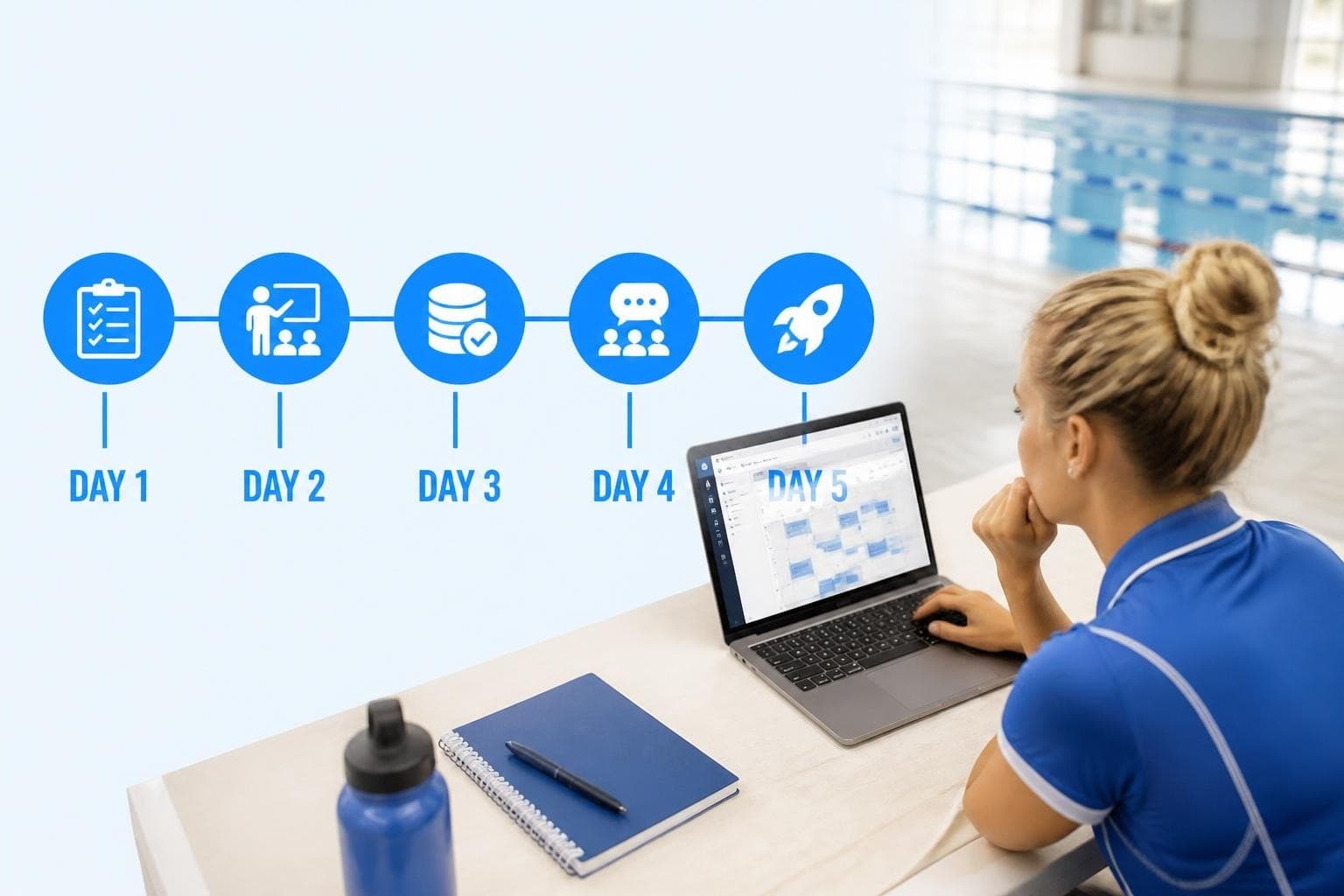
You've spent months evaluating software, comparing features, and negotiating contracts. Your board finally approved the budget. Your implementation team mapped out member data, configured billing rules, and customized check-in workflows. Now you're staring at a calendar, trying to figure out the safest week to actually launch the software and switch everyone over. The pressure is real. You know that one botched Saturday morning at the front desk could turn your entire membership against the new system before they even give it a chance.
I've watched dozens of clubs go through this transition, and the difference between a smooth launch and a chaotic one usually comes down to what happens in the five days before you flip the switch. Not the big strategic decisions you made months ago, but the small, practical steps you take in that final week. Let's walk through a realistic checklist that protects your weekend operations, keeps your front desk staff confident, and gives members a reason to trust the change.
Why the Final Five Days Matter More Than You Think
Most clubs focus all their energy on configuration and data migration, then treat launch day as a formality. That's backwards. Your software might be configured perfectly, but if your Saturday morning crew doesn't know how to handle a guest check-in or process a partial payment under pressure, none of that technical prep matters.
The final five days are when you shift from building the system to preparing the people who will use it. This is when you catch the edge cases your testing missed, verify that real member data looks right, and make sure everyone knows exactly what to do when things go sideways.
What Actually Goes Wrong During Launch Week
Here's what I've seen break at clubs that rushed their final week:
- Membership balances that looked fine in testing but showed weird amounts for actual families because someone forgot to account for mid-season prorations
- Front desk staff who panicked during their first real check-in because they'd only practiced on fake test accounts
- Angry emails from members who never got a heads-up that the old member portal was shutting down
- Payment processing delays because no one verified that the bank connection worked in production
- Guest registration confusion when the new workflow didn't match what signs at the front desk said
None of these are hard to prevent. They just require dedicated time in that final week to think through real scenarios and practice the actual workflows your team will use.
Day Five Before Launch: Lock Down Your Test Scenarios
Five days out, you need to stop configuring and start breaking things on purpose. This is your last chance to find problems while you still have time to fix them before members see the system.
Create a test plan that mirrors your busiest day. If Saturday mornings are chaos, your test scenarios should reflect Saturday morning chaos. Don't just test happy-path workflows.
Build these specific test cases:
- Family checking in with one child who has an expired waiver
- Guest registration where the member's guest limit is already maxed out
- Partial payment on an overdue balance with late fees
- Emergency contact update while a parent is already in the parking lot
- Membership renewal that includes both an upgrade and a prorated credit
Run through each scenario twice. Once where everything works perfectly, and once where you intentionally make mistakes to see how the system responds. Your front desk staff need to know what error messages mean and how to recover gracefully when something breaks.

The Front Desk Reality Check
Pull your most experienced front desk person into a room and ask them to check in 10 real member families using the new system. Not training accounts, real families with real billing histories and real quirks. Watch where they hesitate. Notice which buttons they can't find. Pay attention to the questions they ask.
If your veteran staff member gets confused, your weekend seasonal staff will be completely lost. Use what you learn here to create a one-page quick reference guide for the most common Saturday morning tasks. When you launch the software for real, that cheat sheet will be more valuable than any training manual.
Day Four: Verify Every Member Balance and Data Point
Four days before launch, run a complete member data audit. This isn't about checking that data migrated correctly (you should have done that weeks ago). This is about verifying that what members see matches what they expect to see.
Print out account summaries for 20 random families. Pick a mix of situations: new members, longtime members, people with credits, people with balances, families who pause memberships seasonally, and anyone with a complicated billing history.
| Member Type | What to Verify | Common Issues to Check |
|---|---|---|
| New members (joined this season) | Current balance, next billing date, membership tier | Make sure they're not showing balances from previous testing |
| Multi-year members | Full payment history, any carried credits, upcoming renewal date | Verify historical transactions migrated correctly |
| Members with paused accounts | Suspension dates, resumption terms, prorated charges | Confirm pause logic matches your policy |
| Families with multiple add-ons | Guest passes, locker rentals, lesson credits | Check that all ancillary services transferred |
| Members who recently upgraded | Tier changes, prorated adjustments, next charge amount | Ensure upgrade calculations are accurate |
Call three of those families and walk through their account with them on the phone. Yes, actually call them. Say you're doing a final verification before launching new software and want to make sure their account information is accurate. Ask them to confirm their membership level, balance, and next payment date.
This does two things. First, it catches data problems while you can still fix them quietly. Second, it gives those members a heads-up that change is coming, which makes them allies instead of complainers when launch day arrives.
The Balance Reconciliation That Everyone Skips
Here's the step that trips up most clubs: reconciling your total accounts receivable between the old system and the new one. If your old software says members owe you $47,000 collectively, and your new software says they owe $51,000, you have a serious problem.
Run both reports. Compare them line by line. Investigate every discrepancy over $10. You'll find prorated amounts that calculated differently, credits that didn't migrate, or late fees that applied inconsistently. Better to find these now than field angry calls from members who insist they don't owe what your new system claims.
Day Three: Train Your Team on Launch-Day Protocols
Three days out, gather everyone who will touch the system during the first week. Front desk staff, managers, whoever answers the phone, and anyone responsible for billing or admin tasks. This isn't general software training (they should already have that). This is launch-specific protocol training.
Walk through exactly what happens if common things go wrong:
- System is slow or unresponsive: Who do they call? What's the backup process? Do you revert to paper check-ins?
- Member disputes a balance: Where do they find transaction history? Who has authority to adjust accounts?
- Payment processing fails: What's the manual workaround? How do they document it for follow-up?
- Someone asks "why did you change systems?": What's the approved response? What benefits should they mention?
The One-Page Launch Day Guide
Create a single sheet that lives at every workstation. It should include:
- Emergency contacts (software vendor support, your internal tech lead, manager on duty)
- Common tasks quick reference (check-in, guest registration, payment entry)
- Approved talking points for member questions
- Escalation process for issues they can't solve in 30 seconds
- Backup plan if the system goes completely down
Print it on bright colored paper so it stands out. Laminate it if you can. This becomes your team's security blanket when things get hectic.
Practice role-playing difficult conversations. Have someone play an angry member whose balance looks wrong. Have another person practice explaining why the old member portal isn't working anymore. The more realistic these rehearsals feel, the calmer your team will be when real members ask real questions.
Day Two: Communicate with Your Members
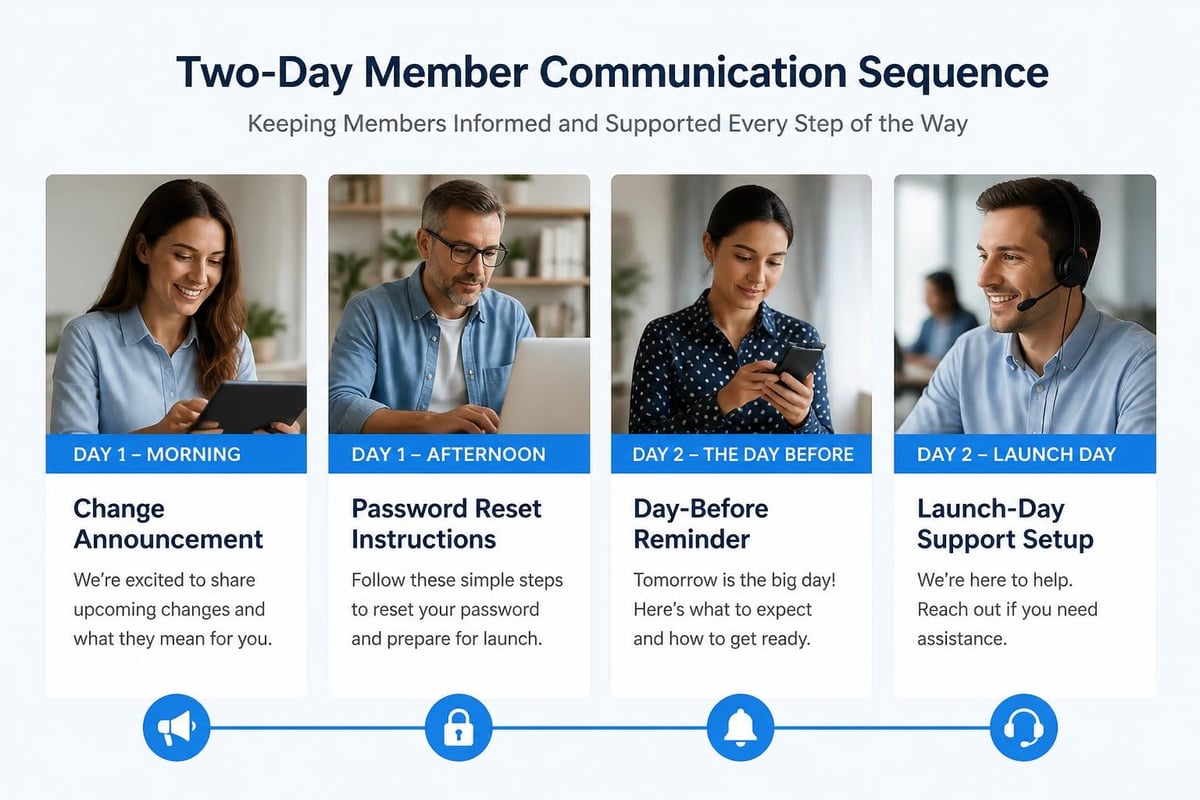
Two days before you launch the software, send a clear, simple email to every member explaining what's changing and when. This is not the time for marketing language about "exciting upgrades" and "enhanced features." Members don't care. They want to know what they need to do differently.
Your member email should answer exactly five questions:
- What's changing and when?
- How do I log in to the new system?
- Will my payment information carry over automatically?
- What should I do if something looks wrong?
- Who do I contact if I need help?
Keep it under 200 words. Include screenshots of the new login page. Provide a direct phone number and email address for questions. Make it as boring and factual as possible.
The Forgotten Member Portal Reset
Here's a detail that catches clubs off guard: if you're switching member portal systems, you need to walk members through password resets or new account creation. Don't assume they'll figure it out.
Send password reset instructions 48 hours before launch. Then send them again 24 hours before launch. Then post them prominently on your website and at the front desk. You'll still get calls from people who can't log in, but you'll reduce the volume significantly.
Consider setting up a dedicated "tech help" table during your first weekend after launch. Staff it with someone patient who can walk members through login and basic navigation on their phones. This one-on-one help turns frustrated members into advocates who then help their friends figure things out.
Day One Before Launch: Run Your Final Production Test
The day before you launch the software, run one complete end-to-end test in your actual production environment. Not a test environment, not a staging system, the real system that members will use tomorrow. This is your last chance to catch configuration issues that only show up in production.
Process a real transaction. Check in a real member. Run a real payment. Generate a real report. Then reverse everything out so your accounting stays clean. The goal is to prove that all the integrations and connections work exactly as expected when operating in the live environment.
The Production Checklist Everyone Needs
Go through this systematically:
- Payment processing: Run a $1 test charge and immediately refund it
- Email notifications: Trigger a membership confirmation email and verify it arrives
- Member portal: Log in as a test member and verify all features work
- Reporting: Generate your most common reports and verify data accuracy
- Backup systems: Confirm backups are running and you can restore data if needed
- Monitoring: Verify you have visibility into system performance and errors
Many clubs skip the backup verification step because it feels paranoid. Don't skip it. Knowing you can restore data if something catastrophic happens lets you sleep the night before launch.
The security controls and testing practices you implement before launch directly impact member data safety and your club's liability exposure, so treat security testing as a non-negotiable part of your final day checklist.
Coordinate Your Launch Timing
When exactly will you flip the switch? Most clubs make the mistake of launching Friday afternoon, which means any problems surface Saturday morning during peak hours. That's the worst possible timing.
Launch Sunday evening or Monday morning instead. This gives you weekday business hours to catch and fix problems before your busy weekend. You'll have your full team available, your software vendor's support team is fully staffed, and member traffic is lower so issues affect fewer people.
If you must launch before a weekend, do it no later than Wednesday. That gives you Thursday and Friday to shake out problems while you still have time to fix them or implement workarounds before Saturday morning chaos begins.
Launch Day: Your Go-Live Protocols
Launch day isn't about celebration. It's about vigilance. You've done all the preparation. Now you need to monitor everything closely and respond quickly to any issues that surface.
Start the day with a team standup. Fifteen minutes, everyone who will interact with the system. Review the day's plan, confirm everyone knows their role, verify emergency contacts are current, and remind people of escalation protocols.
Hour-by-hour launch day monitoring:
- First hour: Watch every transaction closely, verify payments process correctly, check that notifications send
- Hours 2-4: Spot-check member portal logins, monitor support requests, verify reports run accurately
- Afternoon: Review any issues that surfaced, document workarounds, update your quick reference guide if needed
- End of day: Reconcile all transactions, verify backup completed successfully, debrief with your team
Keep a running log of every issue, no matter how small. Document what happened, how you resolved it, and what time it occurred. This log becomes invaluable for troubleshooting patterns and training future staff.
The First Member Interaction Sets the Tone
Your first member check-in or transaction will set the emotional tone for how staff approaches the new system. Make it a positive experience even if things go slightly wrong.
Have your most experienced person handle the first few transactions while others watch. Talk through what you're doing out loud. Show confidence even if you're clicking around looking for a button. Members pick up on uncertainty, and it makes them nervous.
When something doesn't work perfectly, acknowledge it calmly: "I see the system handled that a little differently than expected. Let me make a quick adjustment here." Then fix it and move on. Don't apologize profusely or badmouth the new software. That erodes confidence before you've even started.
Week One After Launch: Monitoring and Quick Adjustments
The work doesn't end when you launch the software. The first week is when you discover all the edge cases your testing didn't cover. You'll find workflows that make sense in theory but feel clunky in practice. You'll identify reports that don't quite show what you need. You'll hear member feedback about features they expected but can't find.
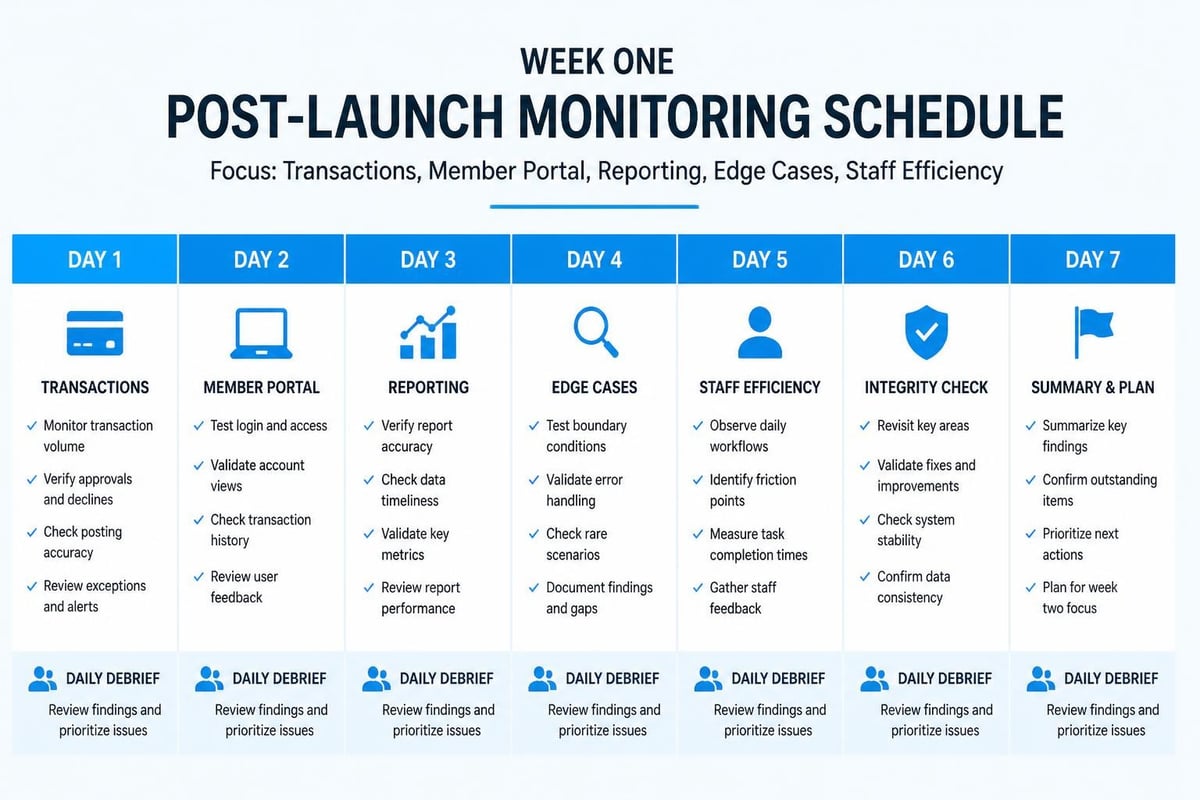
Set up a daily debrief for the first week. End of day, gather your core team for 20 minutes. Go around the room: What worked well today? What felt awkward or slow? What questions did members ask repeatedly? What broke that we need to fix?
| Day | Focus Area | Action Items |
|---|---|---|
| Day 1 | Core transactions (check-ins, payments) | Document every workflow hiccup, verify all payments processed |
| Day 2 | Member portal and self-service | Track login issues, collect portal navigation feedback |
| Day 3 | Reporting and admin tasks | Run all regular reports, verify accuracy, identify gaps |
| Day 4 | Edge cases and exceptions | Test unusual scenarios that came up, create workarounds |
| Day 5 | Staff confidence and efficiency | Measure transaction times, identify training needs |
By Friday of your first week, you should have a clear picture of what needs refinement. Some fixes will be quick configuration changes you can make yourself. Others might require support tickets to your vendor. Prioritize ruthlessly based on impact to daily operations.
Using Analytics to Validate Your Launch
Once you launch the software, tracking the right metrics helps you understand whether the transition actually improved operations or just changed them. The product launch metrics framework that product teams use applies equally well to internal software launches at membership organizations.
Watch these indicators during your first month:
- Check-in time per member: Should decrease as staff get comfortable
- Payment processing errors: Should drop as workflows stabilize
- Support ticket volume: Will spike initially, then decline sharply
- Member portal adoption: Should grow steadily week over week
- Staff confidence scores: Ask your team weekly how confident they feel
If any metric moves in the wrong direction after two weeks, investigate immediately. Sustained increases in check-in time or payment errors indicate training gaps or workflow problems you need to address.
Managing the Inevitable Post-Launch Issues
No matter how well you prepare, something will go wrong in the first few weeks. A payment batch will fail. A report will show incorrect data. A member will discover a feature that doesn't work like they expected. How you handle these issues determines whether your launch is remembered as successful or chaotic.
Create a clear issue tracking system from day one. It doesn't need to be sophisticated. A shared spreadsheet with these columns works fine:
- Date reported
- Who reported it
- Description of the issue
- Impact level (critical/high/medium/low)
- Status (new/in progress/resolved)
- Resolution and date
Triage issues by impact, not by who complains the loudest:
- Critical: Prevents member check-ins or payment processing - fix immediately
- High: Affects many members or creates significant staff workload - fix within 24 hours
- Medium: Inconvenient but has workarounds - fix within a week
- Low: Minor annoyances or nice-to-have improvements - batch and address monthly
The incident response and monitoring practices used by software reliability engineering teams provide valuable frameworks for categorizing and responding to post-launch issues, even at small membership organizations.
Document every resolution thoroughly. When you fix something, note exactly what was wrong and what you changed. Future you (or your successor) will thank you when a similar issue pops up six months later.
When to Escalate vs. When to Solve Internally
Know when you're in over your head. If a problem touches payment processing, data security, or integration with external systems, loop in your vendor immediately. Don't waste hours trying to troubleshoot complex technical issues yourself.
For workflow or configuration questions, check your vendor's documentation first. Most modern swim club management platforms, including systems focused on streamlining member management and billing , provide detailed knowledge bases and configuration guides that answer common post-launch questions.
Build a relationship with your vendor's support team during implementation. When you launch the software, you want them to already know your club, your setup, and your priorities. That familiarity speeds up issue resolution significantly.
Training Your Board and Key Stakeholders
Your board approved the software purchase, but most board members won't touch the system regularly. They don't need to know how to process payments or check in members. They do need to understand how to access the reports and insights that inform their governance decisions.
Schedule a board-level demo within two weeks of launch. Keep it under 30 minutes. Focus exclusively on what board members care about:
- Financial dashboards: Membership revenue, outstanding balances, payment trends
- Membership metrics: New members, renewals, cancellations, net growth
- Operational insights: Facility usage patterns, peak hours, capacity trends
- Compliance tracking: Waiver completion rates, insurance certificate status
Show them how to access these views themselves. Walk through the exact clicks to get from login to the reports they need. Send them a one-page reference guide afterward. The goal is to make board members self-sufficient for the basic reporting they need between meetings.
The Monthly Board Reporting Shift
One of the biggest benefits when you launch the software is how it changes board reporting. Instead of spending hours compiling data from multiple spreadsheets, you can generate comprehensive reports in minutes.
Use your first board meeting after launch to establish new reporting standards:
- What reports will you provide at every meeting?
- What timeframes should they cover (month, quarter, year-over-year)?
- Which metrics matter most for strategic decisions?
- How should exceptions or concerns be flagged?
Standardizing these expectations early prevents scope creep where board members request increasingly detailed custom reports every month. Agree on a core reporting package, then handle special requests as needed but not as routine deliverables.
Seasonal Staff Training and Knowledge Transfer
If you launch the software outside your busy season, you'll face a challenge when seasonal staff return: they'll need to learn the new system without the benefit of the gradual transition your year-round team experienced.
Create a seasonal staff onboarding program specifically for the software. Don't just point them at general training materials. Build a focused curriculum that covers exactly what they'll do in their role:
- Front desk seasonal staff: Check-in procedures, guest registration, basic member questions
- Swim lesson instructors: Roster access, attendance tracking, parent communication
- Lifeguards: Emergency contact lookup, incident reporting (if applicable)
- Seasonal managers: Staff scheduling, daily reporting, common issue resolution
For each role, create a 15-minute video walkthrough demonstrating the three most common tasks. Record your screen while explaining what you're doing and why. These videos become evergreen training resources that reduce the burden on your core team every season.
The Buddy System for New Staff
Pair each seasonal hire with an experienced staff member for their first three shifts. The buddy handles unusual situations while the new person watches and learns. By shift four, reverse the roles: new person handles transactions while the buddy observes and coaches.
This graduated responsibility approach builds confidence without throwing people into situations where they'll panic and create negative member experiences. It's worth the investment of having two people at the desk for a few shifts.
Continuous Improvement After Launch
Three months after you launch the software, schedule a formal retrospective with your team. By this point, the initial chaos has settled, workflows have stabilized, and you have enough data to evaluate whether the transition achieved what you hoped.
Structure your three-month retrospective around these questions:
- What's working better than the old system?
- What's working worse or differently than expected?
- What features are we underutilizing?
- What workarounds or manual processes persist?
- What training gaps still exist?
- What would we do differently if we launched again?
Use the product analytics approaches that software companies employ to evaluate feature adoption and user engagement. Look at which capabilities your team uses regularly versus which ones they ignore. Underutilized features might indicate training gaps or genuine workflow mismatches.
Don't just collect feedback. Act on it. Pick the top three improvements your team identified and create a 30-day action plan to address them. This demonstrates that their input matters and keeps momentum going for optimization.
Building Your Configuration Knowledge Base
As you make post-launch adjustments and solve unusual scenarios, document everything in an internal knowledge base. This doesn't need to be fancy. A shared document with a clear table of contents works fine.
Include entries for:
- How to handle unusual member situations
- Custom configurations and why they're set that way
- Workarounds for known limitations
- Seasonal processes and their timing
- Integration troubleshooting steps
This knowledge base becomes invaluable when you onboard new staff, when a key team member leaves, or when you need to troubleshoot an issue you solved once but can't quite remember how.
The Tech Stack Behind a Smooth Launch
While members and front desk staff only see the user interface when you launch the software, significant technical infrastructure operates behind the scenes to ensure reliable performance. Understanding the basics helps you ask better questions during vendor selection and troubleshoot issues more effectively.
Modern swim club management platforms should employ continuous integration and deployment practices that allow them to release updates and fixes safely without disrupting your operations. When evaluating platforms, ask vendors about their deployment process, update frequency, and how they handle rollbacks if an update causes problems.
Key technical capabilities to verify before and during launch:
- Automated backups: Daily backups with point-in-time recovery options
- Monitoring and alerting: Proactive detection of performance issues or outages
- Security controls: Following modern application security programs with regular security assessments
- API reliability: If you integrate with payment processors, email services, or other tools
- Mobile responsiveness: System works properly on phones and tablets
You don't need to be a technical expert, but understanding these elements helps you recognize whether your vendor has built a professional, reliable platform or if you're dealing with a system that might cause problems down the road.
Feature Flags and Gradual Rollouts
Some advanced platforms use feature flagging approaches that allow you to enable new capabilities for certain user groups before rolling them out organization-wide. This gradual release strategy reduces risk when adopting new features post-launch.
For example, you might enable a new member portal feature for just your board members and year-round staff first. Let them use it for a week, collect feedback, address any issues, then roll it out to all members. This staged approach prevents a single bad feature from affecting your entire membership simultaneously.
Cross-Functional Coordination During Launch
Successfully launching software requires coordination across multiple parts of your organization. It's not just a technology project. It touches operations, finance, communications, and member services.
Create a launch coordination team with representatives from each area:
| Function | Responsibilities | Launch Week Focus |
|---|---|---|
| Operations | Front desk readiness, workflow validation, staff training | Monitor check-in efficiency, support staff, document issues |
| Finance | Payment processing, balance reconciliation, reporting | Verify payment batches, reconcile transactions, generate financial reports |
| Communications | Member notifications, website updates, phone scripts | Field member questions, update messaging, handle escalations |
| Technology | System configuration, integrations, vendor liaison | Monitor performance, troubleshoot technical issues, coordinate fixes |
| Leadership | Decision authority, resource allocation, stakeholder updates | Resolve escalated issues, approve workarounds, communicate with board |
Each function should designate a single point of contact who attends daily standups during launch week. This keeps communication efficient and ensures issues get routed to the right people quickly.
The coordination practices used in product launch planning translate well to internal software deployments, providing frameworks for organizing cross-functional teams and managing handoffs between departments.
The Communication Cascade
Establish clear communication paths before you launch the software. When an issue arises, who tells whom, in what order, and through which channels?
A typical cascade looks like this:
- Front desk staff identify issue and note it in the daily log
- Shift supervisor assesses impact and escalates if needed
- Operations lead triages and assigns to appropriate function
- Function lead resolves or escalates to vendor
- Daily standup reviews all active issues and status
Avoid the temptation to set up a dedicated Slack channel or group chat for launch issues. Too many communication channels fragment information and create confusion about where to look for updates. Pick one system for tracking issues and stick with it.
Planning Your Next Software Update
Here's something most clubs don't think about until it's too late: the work doesn't end when you launch the software. Vendors release updates regularly. New features get added. Security patches get deployed. You need a sustainable process for evaluating and adopting these changes without disrupting operations.
Establish an update review cadence. Most clubs do this quarterly. Your software vendor announces what's coming in the next release. Your team reviews the changes, identifies which ones affect your workflows, and plans any necessary training or communication.
Create an update evaluation checklist:
- What's changing in features we use daily?
- Do any changes require staff retraining?
- Should we communicate anything to members?
- Are there new capabilities we should adopt?
- Do we need to update our documentation or quick reference guides?
Treat significant updates like mini-launches. If your vendor releases a completely redesigned member portal, you can't just flip it on without warning members. Follow a compressed version of your original launch checklist: test the new interface, train staff, communicate to members, monitor closely after the change.
The Update Strategy That Works
Not every vendor update requires immediate adoption. Some platforms using cloud-native architectures handle updates transparently in the background. Others give you control over when to apply major changes.
If your vendor gives you control over update timing, adopt this strategy:
- Security patches: Apply immediately or let vendor auto-apply
- Bug fixes: Apply within two weeks after testing
- Minor feature updates: Apply monthly during slow operational periods
- Major interface changes: Plan carefully, apply during off-season when possible
This tiered approach balances staying current with minimizing disruption to busy operational periods.
Measuring Long-Term Launch Success
Six months after you launch the software, conduct a formal success evaluation. Compare actual outcomes to the goals you set during vendor selection. Were the promised benefits realized? Did operational efficiency improve? Are staff more productive? Do members report higher satisfaction?
Quantitative metrics to review:
- Time spent on administrative tasks (member management, billing, reporting)
- Payment collection rates and outstanding balance trends
- Member portal adoption and self-service usage
- Staff turnover and training time for new hires
- Support request volume and resolution time
Qualitative feedback to gather:
- Staff satisfaction with tools and workflows
- Member feedback on ease of use and self-service
- Board confidence in reporting and insights
- Operational flexibility for trying new programs
Be honest about what didn't work as expected. Every software implementation has gaps between vision and reality. Identifying those gaps helps you advocate for improvements with your vendor and sets realistic expectations for future technology projects.
Setting Up Monitoring and Observability
Professional software teams use observability and monitoring tools to maintain visibility into system health and performance. While you don't need enterprise-grade monitoring for club software, basic observability practices help you spot problems before they impact members.
Work with your vendor to set up:
- Uptime monitoring: Alerts if the system goes down or becomes unresponsive
- Performance tracking: Notification if page load times degrade significantly
- Error logging: Visibility into application errors and their frequency
- Usage analytics: Understanding of which features members and staff use most
Many modern platforms include these capabilities built-in. If yours doesn't, ask about adding basic monitoring. The investment pays off by letting you address problems proactively instead of waiting for members to complain.
Launching new club software successfully comes down to preparation in the final week, clear communication with members and staff, and systematic monitoring after go-live. When you treat launch as a managed process rather than a single event, you protect member experience and build staff confidence in the new tools they'll use every day. PoolPulse understands that successful launches require more than just good software. Our team works alongside your club during implementation and launch, providing the guidance, training materials, and responsive support that turn a potentially stressful transition into a smooth evolution of how your club operates.

The Swim Club Software Test Every Board Should Run
Run this simple test to see if your swim club software actually saves time or creates more work. Real scenarios, honest questions, better tools.

The Seven Signs You've Outgrown Your Club Operations
Your swim club is growing, but your tools aren't keeping up. These seven warning signs reveal when manual processes cost more than solutions.

How to Answer Every Board Question in Under Two Minutes
Your swim club board asks tough questions. Learn how management reporting software helps you pull accurate answers in seconds, not hours.
Want to see if PoolPulse is a good fit for your club?
Book a walkthrough and we'll show you exactly how PoolPulse can help based on your club's needs, goals, and current processes.