

The Real Cost of "We'll Figure It Out Later"
Why swim clubs that skip requirement management pay more, work harder, and replace software faster. Learn how to get it right the first time.


You're three weeks into your new swim club software and nothing works the way you expected. The billing module doesn't match your tiered membership structure. The check-in system doesn't capture guest passes correctly. Your board is asking why they approved this budget when staff still spend hours fixing problems the old system didn't have. What went wrong? You skipped require management, and now you're paying for it with time, money, and frustration.
I've watched dozens of swim clubs make this same mistake. They know what they want in broad strokes but never write it down. They assume vendors understand their world. They think "member management" means the same thing to everyone. It doesn't. And that gap between what you expected and what you got? That's the price of skipping the hard work upfront.
Why Swim Clubs Think They Don't Need Require Management
Let me guess what happened when you started looking for new software. Your team sat around a table and said things like "we need better billing" and "check-in is a mess" and "can we please stop using three different spreadsheets?" Everyone nodded. You felt productive. Then you started looking at demos.
The problem is that "better billing" means something different to your treasurer, your front desk staff, and your head coach. Your treasurer wants detailed revenue reports by membership category. Your front desk needs to process payments quickly during Saturday rush. Your coach just wants to know which families have outstanding balances before competition season.
You didn't capture requirements. You captured wishes.
Here's what typically happens:
- You watch vendor demos and everything looks great
- You ask "can it do X?" and hear "yes" to everything
- You sign a contract based on what you saw, not what you documented
- Implementation starts and suddenly you're answering hundreds of questions
- Gaps appear between what you thought you were getting and what actually works
- You spend months in "configuration hell" trying to make the software fit your club
This isn't anyone's fault exactly. But it's everyone's problem. And it's completely avoidable with proper require management from the start.
What Require Management Actually Means for Your Club
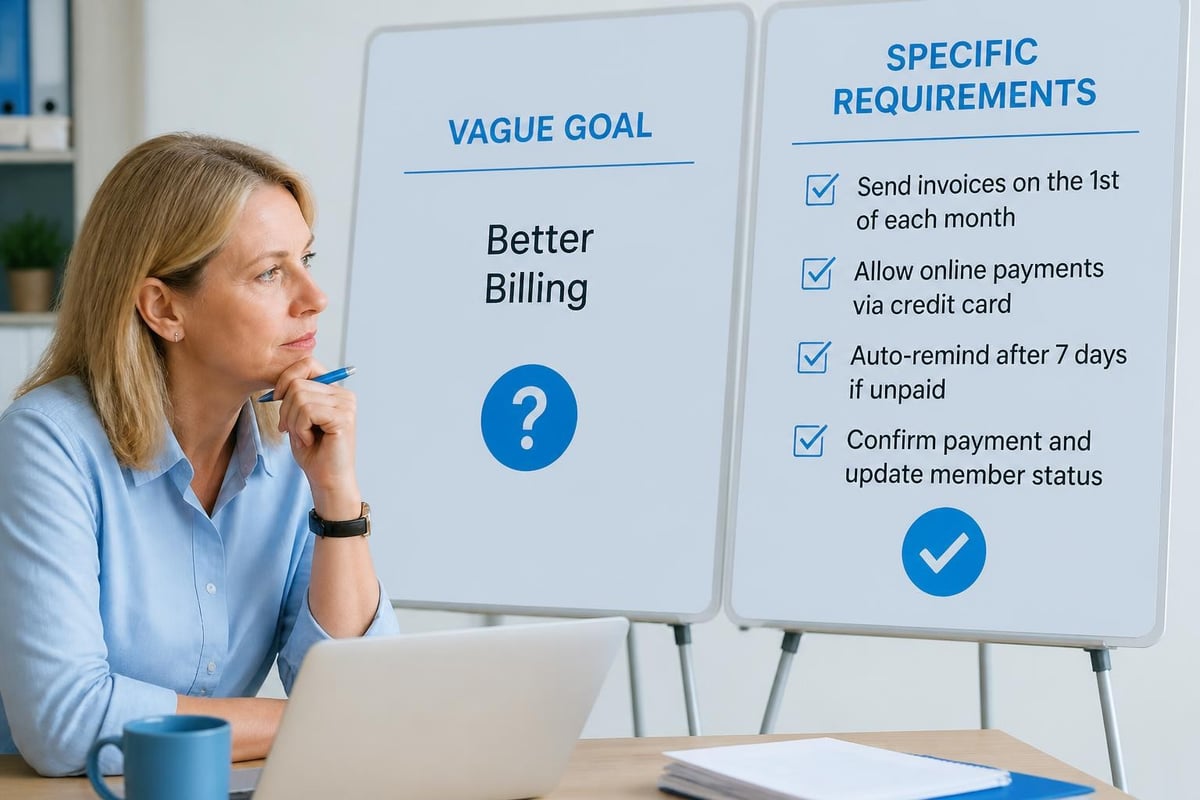
Strip away the business jargon and require management is simple: writing down exactly what you need your software to do, in enough detail that both you and your vendor can tell whether it's working. Not "handle memberships." That's too vague. Instead: "Process family memberships with up to two adults and four children, calculate the correct rate based on total household size, and apply early-bird discounts if registration occurs before March 15."
See the difference? One is a concept. The other is a testable requirement.
The Business Analysis Body of Knowledge breaks requirements into categories, but for swim clubs, you really need to focus on three types:
Functional Requirements
These describe what the software must do. They're action-oriented and specific:
- Accept online membership applications 24/7
- Send automatic renewal reminders 60 days before expiration
- Track which members have completed required waivers
- Generate daily revenue reports by payment method
- Allow front desk to check in members by scanning a barcode
- Block expired members from facility access
Business Requirements
These explain why you need the software and what outcomes you expect:
- Reduce time spent on manual billing from 12 hours/week to 2 hours/week
- Increase membership renewal rate from 78% to 85% through timely reminders
- Eliminate revenue loss from expired members accessing facilities
- Provide board with real-time financial visibility instead of month-end reports
Technical Requirements
These cover how the system needs to work in your environment:
- Integrate with QuickBooks Online for accounting
- Work on iPads at the front desk without installing software
- Support 200+ simultaneous check-ins during peak Saturday hours
- Store member data in compliance with state privacy regulations
You don't need a computer science degree to write these. You just need to think through your actual day-to-day work and translate it into clear statements.
The Saturday Morning Test: Does Your Vendor Really Understand Your Requirements?
Here's my favorite way to test whether you've done require management right. Pick your busiest morning, usually a Saturday during peak season. Now walk through every single thing that happens during that chaos, and ask whether your requirements document covers it.
At 8:45 AM, before the doors open, you already have 15 families waiting. What happens in the next two hours?
-
A family arrives for their first visit. Mom's filling out paperwork on her phone in the parking lot. Dad and three kids are waiting at the door. Does your system let her submit that waiver digitally? Can the front desk see it instantly? Can they check the family in before the waiver is fully processed if needed?
-
A regular member forgot his card. He's carrying his three-year-old who's about to have a meltdown. Your staff needs to verify him and get him through quickly. Can they search by name, phone, or email? Does the photo pop up for visual confirmation?
-
Someone's account shows past due but she insists she paid. Your front desk person is 19 years old and working her first summer here. Can she see the payment history herself or does she need to "ask the manager"?
-
A member wants to bring his nephew as a guest. Your guest policy allows two guests per member per day but only one guest under 18 without a parent present. Does the system know that rule? Will it stop the transaction if it violates policy?
If your requirements don't cover these real scenarios, you don't have requirements. You have abstractions.
The best require management documents I've seen from successful clubs include a "day in the life" section for each role: front desk during peak hours, administrator processing billing, treasurer reviewing reports, maintenance checking facility usage, coach accessing roster information. When you can map every requirement back to a real person doing real work, you know you're on the right track.
Building Your Requirements Document Without Losing Your Mind
You're busy running a swim club. You don't have time to create a 200-page requirements document. Good news: you don't need one. You need the right information organized clearly.
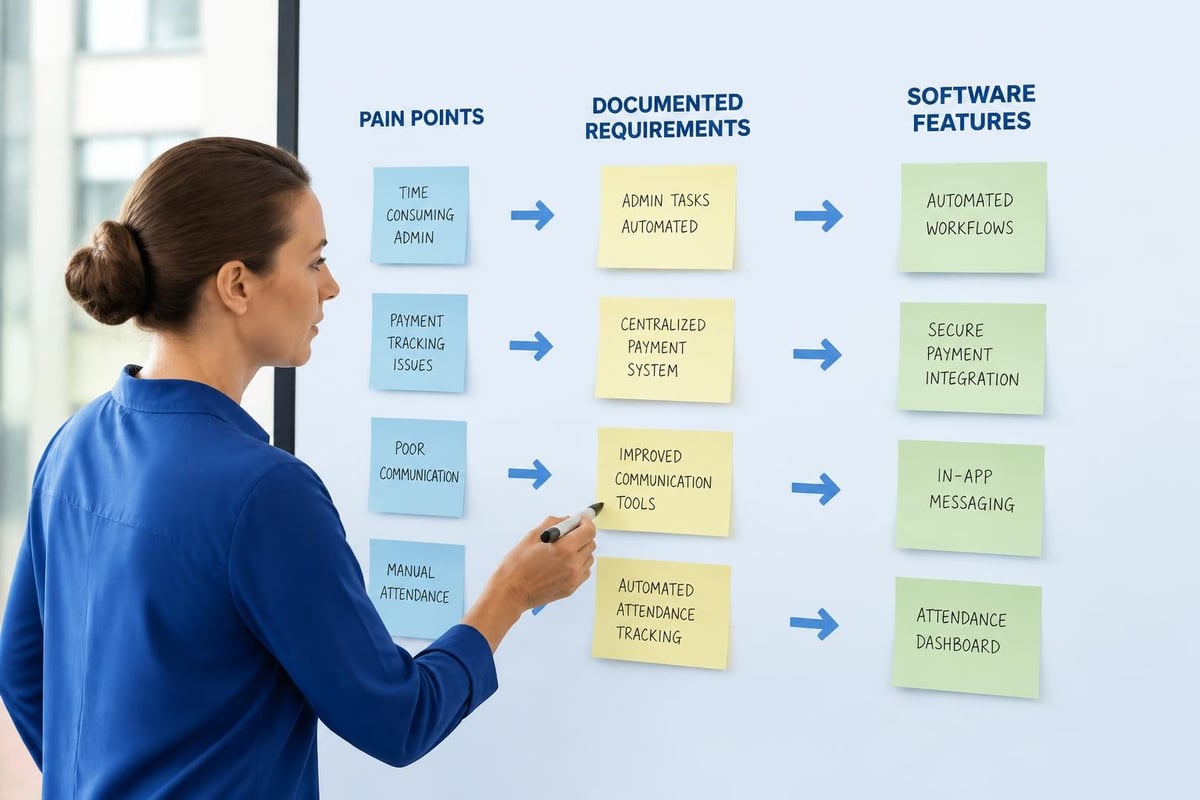
Start With Your Pain Points
Grab a whiteboard or shared document. Get your key people together: front desk lead, head coach, treasurer, membership coordinator, facilities manager. Ask one question: "What wastes your time every single week that software should handle?"
Write everything down. Don't edit, don't prioritize yet. Just capture the problems:
- Chasing down incomplete registration forms
- Answering "did I pay?" questions
- Manually tracking guest passes
- Creating reports the board actually wants
- Figuring out which families qualify for financial aid
- Managing waitlists when you hit capacity
- Coordinating swim team registration with facility membership
Now you have your requirement categories. Each pain point becomes a section.
Turn Problems Into Specific Requirements
Take "chasing down incomplete registration forms" and break it down:
Problem: Staff spend 3-4 hours per week emailing families about missing information, missing signatures, or incomplete emergency contact details.
Requirements:
- System must validate required fields before accepting registration submission
- Applicants must receive immediate error messages listing missing information
- System must send automated reminder emails every 48 hours until application is complete
- Dashboard must show all pending applications with missing items highlighted
- Staff must be able to approve applications with minor exceptions and note the reason
See what happened? You went from a vague complaint to testable requirements. Someone can look at software and confirm whether it does these specific things.
Use the Right Format
Government procurement folks have been doing require management forever. The Texas Department of Information Resources offers a practical requirements traceability matrix template that works surprisingly well for swim clubs. You don't need all the complexity, but the basic structure helps:
| Requirement ID | Category | Description | Priority | Source | Verification Method |
|---|---|---|---|---|---|
| REQ-001 | Registration | System blocks submission until all required fields completed | High | Front desk staff | Test with incomplete form |
| REQ-002 | Billing | Auto-calculate family discount for 3+ children | High | Treasurer | Compare manual vs. system calculation |
| REQ-003 | Check-in | Support barcode scan on mobile devices | Medium | Operations | Test with iOS and Android |
| REQ-004 | Reporting | Export member list to CSV with custom fields | Low | Marketing | Perform export, verify fields |
This format forces you to think through each requirement completely. The Priority column prevents scope creep. The Verification Method makes testing concrete instead of subjective.
Getting Vendor Buy-In: Making Require Management Work Both Ways
Here's something most clubs learn too late: require management protects both you and your vendor. Good vendors actually want your detailed requirements because it prevents the nightmare scenario where you're unhappy six months in and they're confused about what you expected.
When you're evaluating software like PoolPulse , share your requirements document early. Not as a checklist to "pass" but as a conversation starter. Watch what happens.
Red flags:
- "Yeah, we can do all that" without asking follow-up questions
- Reluctance to document which requirements are out-of-the-box vs. custom configuration
- Vague answers about timeline to deliver specific functionality
- Pushback on putting requirement commitments in writing
Green flags:
- Detailed questions about your specific workflows and policies
- Honest answers about what's standard, what needs configuration, what isn't possible
- Alternative solutions when your requirement doesn't match their approach
- Willingness to document what's included in your implementation scope
The difference between requirements and user stories in software development matters less than having clarity about what you need. Some modern platforms work better with user stories ("As a front desk clerk, I need to quickly verify member status so I can keep the line moving"). Traditional requirements work better for compliance or financial functions ("The system must retain member payment records for seven years per state law").
Use whichever format communicates clearly. The point is documentation and agreement, not methodology.
The Implementation Gap: When Require Management Saves You
Three months into implementation, you'll hit the gap. Always happens. You'll discover something you need that wasn't in your requirements. Maybe a board member mentions that you need to track which members voted in the annual election. Or your insurance company asks for an incident report log. Or your state suddenly requires background checks for all adult members.
This is exactly when require management saves your project.
If you documented your original requirements and got vendor agreement, you have a baseline. New requests are clearly additional scope. You can evaluate them rationally:
- Is this truly required or just nice to have?
- Can it wait until after go-live?
- What's the cost and timeline impact?
- How do we prioritize it against other additions?
Without documented requirements, everything feels equally urgent and equally vague. Your implementation drags on for months. Costs spiral. Staff gets frustrated. The board starts asking hard questions about why this is taking so long.
I've seen clubs operating pool management company software successfully who swear by a simple rule: requirements are frozen 30 days before go-live. Anything new goes on the Phase 2 list. Anything. No exceptions unless it's truly a legal requirement or safety issue.
This only works if you actually have documented requirements to freeze.
Common Require Management Mistakes Swim Clubs Make
Let me walk you through the mistakes I see most often, because you'll recognize yourself in at least one of these.
Mistake 1: Technology Requirements Disguised as Business Requirements
What clubs say: "We need cloud-based software with API integration and mobile-responsive design."
What they actually need: "We need staff to access the system from home and from tablets at the pool, without installing software or IT support."
See the difference? The first focuses on technology. The second focuses on the actual need. Let your vendor figure out the technical solution. You focus on what your people need to accomplish.
Mistake 2: Copying Someone Else's Requirements
Your neighboring club uses great software. They share their requirements document. You use it as your template. Bad idea. Their membership structure, pricing model, facility rules, and staffing are different from yours. Their requirements won't match your needs.
Use their document for ideas, not as a template. Every club is unique, and require management must reflect your specific situation.
Mistake 3: Requirements Without Owners
"The system must generate financial reports." Okay, for whom? Your treasurer needs different reports than your board president. Your accountant needs different data than your membership committee. Generic requirements produce generic software configuration.
Every requirement needs an owner, someone who will test it and confirm it works correctly for their role.
Mistake 4: Forgetting Seasonal Changes
Your requirements document perfectly describes operations during summer peak season. Then September hits and you realize the software doesn't handle your winter schedule, reduced hours, off-season pricing, or facility maintenance closures. Swim clubs are seasonal businesses. Your require management must cover the full annual cycle.
Mistake 5: No Acceptance Criteria
"The system must send renewal reminders." When? How often? To whom? What happens if someone already renewed? What if their email bounces?
Acceptance criteria turn requirements into testable checkpoints. Without them, you and your vendor will argue about whether the requirement is "met" or not.
Linking Requirements to Real ROI
Your board approved a software budget because you promised outcomes: save time, increase revenue, reduce errors, improve member experience. Require management is how you prove you delivered those outcomes.
Remember those business requirements? They're measurable. You said the new system would reduce billing time from 12 hours per week to 2 hours per week. That's 10 hours saved, every single week. At even $20/hour, that's $200 per week, over $10,000 annually. Document that in your requirements. Measure it after go-live. Report it to the board.
Track these metrics in your requirements document:
| Business Goal | Current State | Target State | Measurement Method | Timeline |
|---|---|---|---|---|
| Billing efficiency | 12 hrs/week | 2 hrs/week | Staff time logs | 3 months post-launch |
| Renewal rate | 78% | 85% | Annual renewal % | First full renewal cycle |
| Revenue leakage | ~$8K/year from expired members | $0 | Access logs vs. payment status | 6 months |
| Board satisfaction | Monthly reports delivered late | Real-time dashboards | Board survey | Ongoing |
When you connect requirements to measurable business outcomes, suddenly require management isn't bureaucratic paperwork. It's your proof that the investment worked. This becomes especially valuable when it's time for platform stability reviews or when you're advocating for additional features.

Testing Your Requirements: The 30-Day Verification Plan
You've documented requirements. Your vendor agreed. Implementation is complete. Now comes the moment of truth: does it actually work the way you needed?
Don't test everything on Day One of go-live. That's chaos. Plan a structured 30-day verification period where you methodically test requirements against real work.
Week 1: Critical Path Functions
Test the absolute must-have requirements first. These are the things that would shut down operations if they failed:
- Member check-in during peak hours
- Payment processing and receipt generation
- Emergency contact access
- Basic reporting for compliance
- Access control (keeping expired members out)
Pull your requirements document. For each critical requirement, run the verification method you documented. Check it off or note what's not working. No judgment, just facts.
Week 2: Daily Operations
Now test the requirements that support regular operations:
- New member registration process
- Guest pass management
- Schedule changes and communication
- Staff permissions and access levels
- Data export for external systems
This is when you'll discover configuration issues. Maybe staff roles aren't set up correctly. Maybe the email templates need adjustment. Maybe the QuickBooks integration is sending data but categorizing it wrong.
Week 3: Edge Cases and Exceptions
Test the weird stuff that doesn't happen every day but needs to work when it does:
- Refund processing
- Membership transfer between families
- Bulk operations (like renewing everyone in a specific category)
- Report generation with custom date ranges
- Override procedures when automated rules don't fit
This is where most software shows its limitations. Good require management included these scenarios upfront.
Week 4: User Acceptance
Get your actual users to verify requirements they care about:
- Front desk staff confirm check-in speed and simplicity
- Treasurer validates financial reports against known data
- Coaches test roster access and member information
- Board members review the dashboards they'll actually use
Their feedback matters more than technical compliance. If a requirement is technically met but practically unusable, it's not really met.
Keeping Requirements Current: The Living Document Approach
Here's what happens at most clubs: they create requirements for the initial software selection. They test everything at go-live. Then the document goes in a drawer and is never touched again.
Two years later, they're frustrated that the software "doesn't do what we need." Actually, it does exactly what the original requirements specified. But your club evolved. You added new membership categories. You started offering swim lessons. You partnered with the local school district. You changed your guest policy.
The software didn't fail. Your requirements became outdated.
Smart clubs treat requirements as a living document. Once a quarter, review and update:
- Are we using all the features we said we needed?
- Are we working around the system in ways that suggest missing requirements?
- Have club policies changed in ways that need software support?
- Are there new compliance or regulatory requirements?
- What did we add to the "Phase 2" list that should move to "Phase 1" now?
This quarterly review takes maybe 90 minutes. It prevents the slow drift where software and operations get out of sync. It also makes upgrade decisions easier because you have a documented gap between current functionality and current needs.
Modern platforms offering AI-powered insights can help identify patterns in your operations that suggest new requirements. Maybe the AI notices you're manually overriding the same automated rule repeatedly, signaling a requirement that needs refinement.
Require Management for Different Club Types
Swim clubs aren't one-size-fits-all, and neither are requirements. What you need depends on your club structure and business model.
Competitive Swim Teams
Your requirements heavily emphasize:
- Meet management and registration
- Practice schedule coordination
- Swimmer time tracking and improvement analysis
- Team placement and qualification rules
- Family volunteer hour tracking
- Fundraising and team account management
HOA Pool Communities
Your requirements focus on:
- Resident verification tied to property records
- Household-based access rather than individual membership
- Guest policies enforced through the system
- HOA pool management software integration with HOA dues collection
- Amenity reservation for pool parties and cabanas
- Compliance with community association governance
Private Membership Clubs
Your requirements prioritize:
- Initiation fees and equity structures
- Member categories with different privilege levels
- Waitlist management and member referrals
- Tennis and swim club management for multi-sport facilities
- Social event management and dining integration
- Legacy membership transfers and family accounts
Understanding your club type helps you prioritize requirements appropriately. Don't waste time on features other club types need but yours doesn't.
The Configuration vs. Customization Decision
Here's a require management trap: you document a requirement, the vendor says "we can do that," you assume it's included, then you discover it requires custom development at significant cost.
Modern configurable platforms handle most swim club requirements through configuration rather than customization. Understanding the difference saves money and prevents surprises.
Configuration means adjusting settings, rules, and options already built into the software:
- Setting up your membership categories and pricing
- Defining access rules and guest policies
- Creating custom fields for your specific data needs
- Adjusting automated email templates and timing
- Building custom reports from available data
Customization means writing new code to add functionality that doesn't exist:
- Integrating with proprietary third-party systems
- Building entirely new modules or workflows
- Changing how core functions operate
- Creating custom mobile apps or interfaces
When you document requirements, note which category each falls into. Ask vendors to be explicit about what's configurable versus what requires custom development. Get cost and timeline estimates for anything requiring customization.
Most clubs discover they can meet 90% of requirements through configuration alone if they choose the right platform. That last 10% requiring customization often isn't worth the cost and complexity.
When Requirements Conflict: Making Trade-off Decisions
Perfect software doesn't exist. At some point, you'll discover that two requirements conflict or that meeting one requirement makes another harder to achieve.
Example: Your treasurer wants detailed revenue reports broken down by membership category, payment method, and discount type. Your front desk wants super-fast check-in with minimal clicks. The more data you capture during registration and check-in, the slower those processes become.
How do you decide? Go back to your priority ratings. If fast check-in is "high" priority and detailed revenue reporting is "medium" priority, you optimize for speed and accept slightly less granular financial reporting. Or you find a middle path: capture minimal data at check-in but pull detailed financial data from nightly batch processing.
Use this framework for requirement conflicts:
- Identify the conflict clearly - Write down exactly why both requirements can't be fully met
- Review priorities - Which requirement supports your most critical business goals?
- Explore alternatives - Is there a different approach that mostly satisfies both?
- Quantify the trade-off - What do you gain and lose with each option?
- Get stakeholder input - The people affected by the decision should weigh in
- Document the decision - Explain why you chose this path for future reference
The NIST guidance on requirements emphasizes that requirements should be traceable not just to needs but also to decisions. When you made a trade-off, document why. Two years from now, someone will ask "why doesn't it do X?" and you'll want that answer recorded.
Requirements for Compliance and Data Security
Some requirements aren't optional. Legal compliance, data privacy, and security requirements must be met regardless of cost or convenience.
For swim clubs handling member data, payment information, and minor records, these requirements include:
Data Privacy Requirements
- Secure storage of personal information including addresses, phone numbers, emails
- Parental consent for minor member records
- Right to data deletion if member leaves
- Compliance with state privacy laws (California, Virginia, Colorado, etc.)
- Limited staff access based on role requirements
PoolPulse specifically addresses these through its data privacy commitments and security overview that swim club administrators can rely on.
Payment Security Requirements
- PCI compliance for credit card processing
- Encrypted transmission of payment data
- Secure storage of payment methods for recurring billing
- Transaction audit logs
- Chargeback and dispute documentation
Record Retention Requirements
- Payment history retention per tax requirements (typically 7 years)
- Liability waiver storage for statute of limitations period
- Incident and accident reports
- Member communication records
- Background check documentation where required
Don't guess at compliance requirements. Consult with your insurance provider, legal counsel, and CPA. Document these as non-negotiable requirements and verify that any software solution meets them completely.
Onboarding and Training: The Forgotten Requirements
Most requirement documents focus on what the software must do but forget about how people learn to use it. Training and onboarding requirements matter just as much as functional requirements.
Include these in your requirements document:
- Implementation timeline - How quickly can we go live without rushing?
- Data migration - What historical data must transfer from our old system?
- Training delivery - Remote, on-site, recorded videos, live sessions?
- Training schedule - Can staff train during normal hours or need evening/weekend sessions?
- Documentation - Written guides, video tutorials, searchable knowledge base?
- Support availability - What hours, what response time, what channels?
- Admin training depth - How much can we configure ourselves versus needing vendor help?
Consider the practical aspects of onboarding when your club is running with seasonal staff, volunteers, or board members who change annually. Your requirements should account for ongoing training needs, not just initial implementation.
Modern platforms with AI transparency and AI usage guidelines may introduce new training requirements as AI features evolve and expand.
Building Requirements for Future Growth
Your club isn't static. Maybe you're planning facility expansion. Maybe you're considering adding programs. Maybe you're thinking about merging with another club or adding tennis courts. Your requirements should anticipate growth.
Ask these questions:
Scalability Requirements:
- If membership doubles, will the system handle it without slowdown?
- Can we add locations or facilities without buying separate systems?
- Is pricing based on member count, and what happens when we hit the next tier?
- Can the data structure expand without migration?
Integration Requirements:
- What if we want to add scheduling software later?
- Can we connect marketing tools for email campaigns?
- Will accounting integration expand if we change our QBO setup?
- Can third-party developers access appropriate APIs?
Feature Expansion Requirements:
- Can we add new modules as needs arise?
- Is there a marketplace or plugin ecosystem?
- How does the vendor handle feature requests?
- What's the release cycle for new functionality?
Understanding the plugin-based approach some platforms take helps clubs add capabilities over time without complete system replacement.
The Cost of Poor Require Management
Let's talk numbers. What does it actually cost when you skip require management or do it poorly?
Direct costs:
- Custom development to add "missing" features: $5,000 to $50,000 depending on complexity
- Extended implementation timeline: 3-6 additional months of paying for both old and new systems
- Consultant fees to fix configuration issues: $150-$250 per hour
- Data cleanup and migration rework: $2,000-$10,000
- Additional training for features that don't work as expected: $1,000-$5,000
Indirect costs:
- Staff time spent on workarounds and manual processes: 5-10 hours per week
- Board frustration and loss of confidence in technology decisions
- Member complaints about confusing or broken processes
- Lost revenue from billing errors or access control failures
- Delayed return on investment while you fix issues
I've seen clubs spend more fixing a poorly implemented system than the original software cost. All because they started without clear requirements and ended up in a cycle of expensive customizations trying to make the software fit their needs retroactively.
Compare that to investing maybe 20-40 hours upfront in proper require management. The ROI is obvious.
Getting require management right at your swim club isn't about following corporate processes or creating bureaucratic paperwork. It's about clearly thinking through what you need, writing it down, and making sure everyone agrees before you commit time and money. Whether you're implementing software for the first time or switching from an outdated platform , documented requirements protect your investment and ensure the technology actually helps your team work smarter. PoolPulse offers swim clubs a highly configurable platform designed to meet the specific requirements of member-driven facilities, backed by transparent onboarding and implementation support that respects your unique operational needs.

The Swim Club Software Test Every Board Should Run
Run this simple test to see if your swim club software actually saves time or creates more work. Real scenarios, honest questions, better tools.

The Seven Signs You've Outgrown Your Club Operations
Your swim club is growing, but your tools aren't keeping up. These seven warning signs reveal when manual processes cost more than solutions.

How to Answer Every Board Question in Under Two Minutes
Your swim club board asks tough questions. Learn how management reporting software helps you pull accurate answers in seconds, not hours.
Want to see if PoolPulse is a good fit for your club?
Book a walkthrough and we'll show you exactly how PoolPulse can help based on your club's needs, goals, and current processes.