

Revenue Billing That Actually Works for Swim Clubs
Learn how to fix revenue billing chaos at your swim club. Real strategies for tracking payments, reducing late fees, and closing the books faster.


You're closing the books for July, and the numbers don't add up. Again. Three families swear they paid their monthly dues, but you can't find the transactions. Someone's kid took five guest passes this month, but nobody charged the account. Two dozen late fees should have posted on the 15th, but half of them never went through. You've spent four hours reconciling everything, and you're still $847 short. Sound familiar?
This is the reality of revenue billing when your systems don't talk to each other. Most swim clubs patch together spreadsheets, payment processors, and manual tracking. It works until it doesn't. Then you're stuck explaining to your board why revenue is down when membership is actually up.
Why Revenue Billing Breaks Down at Member Facilities
Revenue billing isn't just about collecting money. It's about tracking what you're owed, when payments come in, what's still outstanding, and whether your actual revenue matches what you budgeted. For swim clubs, tennis facilities, and HOA pools, this gets complicated fast.
You've got monthly dues, annual renewals, guest fees, swim lesson charges, locker rentals, and late penalties. Some families pay automatically. Others mail checks. A few show up with cash on Saturday morning. Each payment method creates its own trail, and someone has to follow all of them.
Here's what typically goes wrong:
- Charges post to member accounts, but the payment processor uses different member IDs
- Staff forgets to log guest fees during busy pool days
- Families dispute charges because nobody documented the swim lesson signup
- Late fees get waived inconsistently, creating precedent problems
- Reports show different numbers depending on which system you're looking at
The result? You're spending hours each month hunting down discrepancies instead of focusing on member experience or facility improvements.
The Hidden Cost of Manual Revenue Tracking
Let's talk about what this chaos actually costs you. Say you're spending six hours per month reconciling revenue across different systems. That's 72 hours per year. If your time is worth $40 per hour, you're burning $2,880 annually just chasing numbers.
But the real cost is bigger. You're missing revenue you should have collected. A study on billing cycle management found that organizations with disconnected billing processes lose 3-5% of potential revenue to tracking errors and uncollected charges.
For a swim club with $200,000 in annual revenue, that's $6,000 to $10,000 walking out the door. Most clubs never notice because they can't see what they're missing.

Setting Up Revenue Billing That Catches Everything
The fix starts with connecting your charges to your payments. Every time someone uses your facility, buys something, or owes a fee, that transaction needs to land in one place. Not three places. Not a spreadsheet plus a payment terminal. One unified system.
Building a Single Source of Truth
Think about how a restaurant point-of-sale system works. Order goes in, charge posts, payment processes, receipt prints. Everything's linked. Your swim club needs the same flow.
Here's what that looks like in practice:
- Member swipes in at the front desk
- System checks their account status and available guest passes
- They bring two guests, so the system automatically posts guest fees
- Charges appear on their account immediately
- Payment processes through the same platform
- Everything reconciles automatically
No manual entry. No forgetting to log the guests. No reconciliation headaches at month-end.
This is exactly what PoolPulse's unified platform was built to handle. When your check-in system, billing system, and payment processor are actually the same system, revenue billing becomes automatic instead of administrative.
Automating Recurring Revenue
Monthly dues are your most predictable revenue source. They should also be your easiest to manage. Yet many clubs still manually process recurring payments, send paper invoices, or rely on members to remember to pay.
Here's a better approach:
| Billing Component | Manual Method | Automated Method |
|---|---|---|
| Invoice generation | Created in spreadsheet, emailed monthly | Auto-generated based on membership tier |
| Payment processing | Members mail checks or pay in person | Auto-charged to saved payment method |
| Late fee application | Staff applies manually (or forgets) | System applies automatically based on grace period |
| Account status updates | Updated when staff has time | Updated instantly upon payment |
| Reporting | Compiled from multiple sources | Real-time dashboard shows all revenue |
The difference in workload is dramatic. One club administrator told us she went from spending two full days processing monthly billing to spending fifteen minutes reviewing exception reports.
Handling the Exceptions Without Creating Chaos
Automation handles the routine stuff. But swim clubs always have exceptions. The family that needs to pause their membership for medical reasons. The member who disputes a guest fee charge. The board member's account that needs special handling.
These exceptions are where revenue billing systems either shine or collapse.
Creating Clear Exception Workflows
You need defined processes for common exceptions. Not "handle it however you want," but actual steps that keep everything documented and consistent.
Common exception workflows:
- Payment plan requests: Who approves them? What payment schedule options exist? How are they tracked?
- Disputed charges: What documentation is required? Who makes the final call? How long do you have to resolve?
- Account holds: Under what circumstances can you freeze an account? How does that affect billing? Who gets notified?
- Refund requests: What's your refund policy? Who authorizes refunds over $50? How do you process them?
When these workflows live in your revenue billing system instead of someone's head, new staff can handle exceptions consistently. You avoid the "well, we did it for the Johnsons, so now we have to do it for everyone" problem.
Documenting Everything That Touches Money
Here's a scenario: A member calls six months later claiming they never authorized guest fees in February. Can you prove they did?
If your front desk staff is manually writing down guest names in a logbook, probably not. If your system automatically logs who checked in guests, at what time, and which staff member processed it, you've got documentation.
The best practices for revenue cycle management emphasize creating an audit trail for every transaction. This protects you during disputes and helps you track patterns.
For example, if the same family is regularly bringing guests beyond their allocation, you can see it immediately and have a conversation. That's both a revenue opportunity (sell them more guest passes) and a policy enforcement tool.
Tracking Revenue Across Multiple Categories
Your swim club isn't just collecting monthly dues. You've got multiple revenue streams, and each one needs proper tracking.
Let's break down a typical swim club's revenue sources:
- Membership dues: Monthly or annual recurring payments
- Initiation fees: One-time charges for new members
- Guest fees: Per-visit charges for non-members
- Swim lessons: Session-based programs with registration and payment
- Facility rentals: Private party bookings and special events
- Retail sales: Goggles, swim caps, sunscreen at the front desk
- Late fees: Penalties for overdue accounts
- Other charges: Locker rentals, lost card replacements, etc.
Each category behaves differently. Dues are predictable. Guest fees spike on summer weekends. Swim lessons bunch around session starts. Retail is opportunistic.
Organizing Revenue Categories That Make Sense
Your revenue billing system needs categories that match how you actually operate. Not generic categories from an accounting template, but ones that reflect your facility.
Here's how one swim club organized theirs:
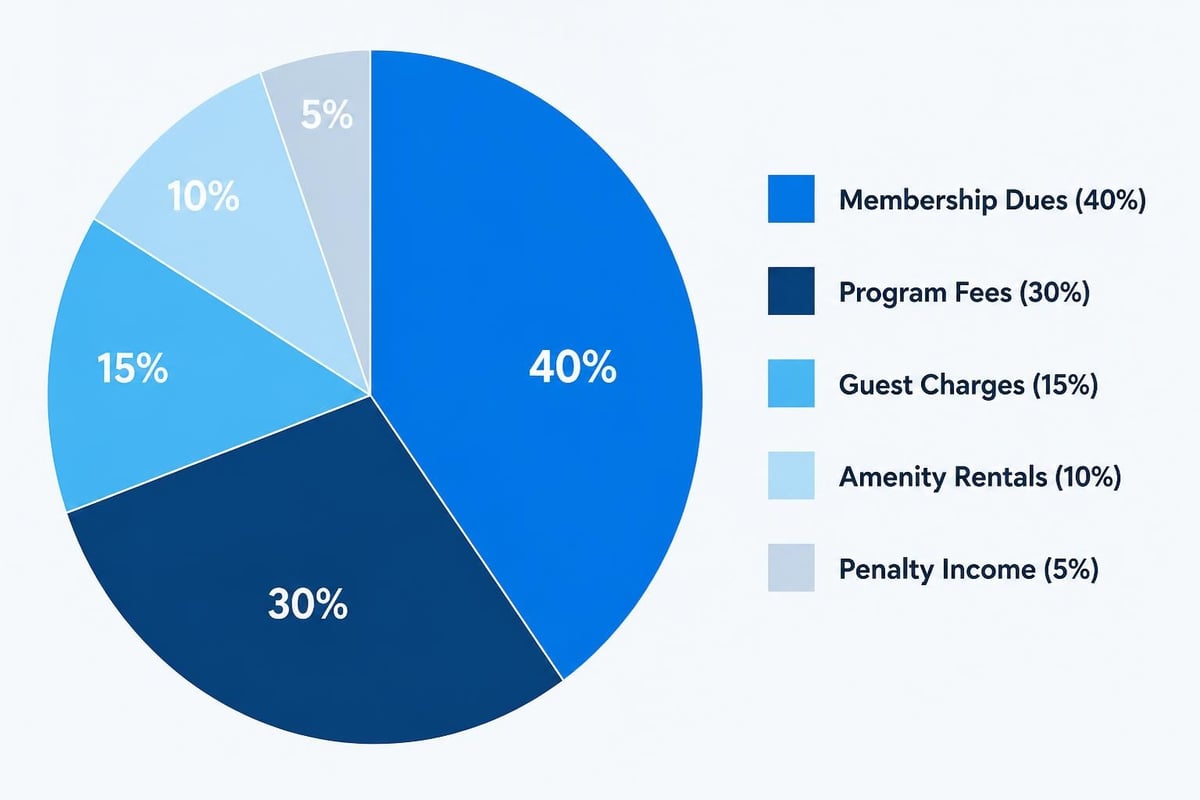
| Category | Subcategories | Billing Frequency | Collection Method |
|---|---|---|---|
| Memberships | Individual, Family, Senior | Monthly | Auto-pay |
| Programs | Swim lessons, Aqua fitness, Lifeguard training | Per session | Registration fee |
| Day Use | Guest passes, Daily admission | Per visit | Point-of-sale |
| Amenities | Locker annual, Towel service, Pool cabana | Monthly or annual | Auto-pay or upfront |
| Penalties | Late fees, NSF fees, Lock replacement | As incurred | Auto-charged |
This structure makes reporting actually useful. Instead of seeing "we made $18,000 in July," you see exactly where that revenue came from and how it compares to last July.
Making Revenue Billing Work During Your Busy Season
Everything runs smoothly in March. Your pool's half-empty, staff has time to double-check everything, and members aren't in a rush. Then June hits, and chaos returns.
Revenue billing systems that work in the off-season but fail during peak times aren't really working at all.
Preparing for Volume Surges
Summer Saturdays are when revenue billing mistakes multiply. You've got a line at the front desk, members scanning in with guests, swim lesson check-ins overlapping with general admission, and seasonal staff who are still learning your systems.
This is exactly when you need automation most. When your front desk is slammed, manual processes break down. Staff forgets to charge for guests. Guest pass balances don't get updated. Charges post to the wrong accounts.
Volume surge strategies:
- Pre-register guests online: Let members add guest names before they arrive, so check-in is just a scan
- Auto-apply charges at check-in: No manual entry required when guests swipe in
- Real-time balance visibility: Front desk can instantly see if someone's over their guest limit
- Self-service payment options: Members can update payment methods and pay balances without staff intervention
One club administrator described the difference: "Last summer, we had two staff at the desk all day just managing check-ins and payments. This year, we handled more volume with one person because the system does the work."
Handling Payment Failures Gracefully
Credit cards expire. Bank accounts get closed. Payment failures happen. The question is how quickly you catch them and what you do next.
Traditional payment failures go like this: Payment bounces on the 1st, you notice on the 5th when you run reports, you email the member on the 6th, they update their card on the 12th, you manually reprocess on the 13th, and the whole thing takes two weeks.
Better revenue billing works differently. Payment fails on the 1st, system automatically retries on the 3rd, sends the member an alert, offers one-click payment update, and notifies your front desk. Most failures get resolved in 48 hours without staff involvement.
Following best practices for billing cycles means having automatic retry logic and clear member communication built into your revenue billing process.
Reconciling Revenue Without the Monthly Nightmare
End-of-month reconciliation is where most swim clubs discover their revenue billing problems. You're trying to match your payment processor deposits against your member accounts, tracking down missing transactions, and explaining variances to your treasurer.
It shouldn't be this hard.
Daily Reconciliation vs. Monthly Chaos
Here's the secret: Don't wait until month-end to reconcile. Check your numbers daily, when discrepancies are small and fresh in everyone's memory.
A quick daily check takes five minutes:
- Compare today's payment processor deposits to today's billed charges
- Check for any rejected payments
- Verify that guest fees posted correctly
- Confirm swim lesson session payments match registrations
- Note any manual adjustments that were made
When something doesn't match, you investigate immediately while everyone remembers what happened. The member who paid cash is still around. The staff member who processed the weird transaction is on shift.
By month-end, you're just summing up 30 days of verified data instead of hunting for problems.
Reports That Actually Help You Make Decisions
Most club management systems generate reports. Lots of them. But how many actually help you run your facility better?
Revenue reports that matter:
- Revenue by category over time: Are swim lessons growing? Is guest revenue seasonal?
- Collection rates: What percentage of billed charges actually get paid?
- Aging receivables: Who's been past due for 30, 60, 90 days?
- Payment method breakdown: How many members use auto-pay vs. manual payment?
- Revenue per member: Which membership tiers generate the most total revenue?
The AI-powered insights in PoolPulse take this further, automatically flagging unusual patterns and suggesting actions. Like noticing that your guest revenue drops 40% during swim lesson weeks because the pool's too crowded, or identifying members who consistently pay late and might be good candidates for switching to auto-pay.
Protecting Revenue With Smart Access Controls
Revenue billing isn't just about collecting money. It's about protecting it. You need to know who can waive fees, issue refunds, adjust accounts, and access financial information.
Building Appropriate Permission Levels
Your teenage front desk attendant shouldn't have the same system access as your facility manager. But many clubs give everyone admin access because it's easier than setting up proper permissions.
This creates risk. Well-meaning staff might waive fees they shouldn't, or accidentally delete payment records, or view financial information they don't need to see.
A better permission structure:
| Role | Can View | Can Process | Can Adjust | Can Report |
|---|---|---|---|---|
| Front Desk | Member balances, guest limits | Check-ins, guest fees | None | Daily activity |
| Program Coordinator | Lesson registrations, program revenue | Program payments, registration | Lesson transfers | Program performance |
| Manager | All revenue, member accounts | All transactions | Fees under $100, payment plans | Full financial reports |
| Administrator | Complete system access | All financial operations | All adjustments, refunds | All reports, exports |
Clear permissions prevent mistakes and create accountability. When a disputed charge comes up six months later, you can see exactly who processed it and whether it followed proper procedures.
Staying Compliant With Financial Regulations
Swim clubs handle payment card information, bank account details, and personal financial data. This means you're subject to regulations around data security and privacy.
Most club administrators don't realize their revenue billing system needs to be PCI compliant if they're storing or processing credit cards. Using spreadsheets with payment information or writing down card numbers creates serious liability.
Understanding compliance requirements for billing helps you avoid problems. Modern revenue billing systems handle compliance automatically by tokenizing payment methods, encrypting sensitive data, and maintaining secure audit trails.
Reducing Late Payments and Improving Cash Flow
Late payments mess up your cash flow projections and create extra work. The best approach is preventing them in the first place.
Making Auto-Pay the Default Option
Here's a simple change that dramatically improves revenue collection: Make auto-pay the default during signup, with an opt-out for members who prefer manual payment.
Most people stick with defaults. When manual payment is the default, you end up with 60% of members on auto-pay. When auto-pay is the default, that number flips to 85% or higher.
The difference in your workload:
- With 60% auto-pay: You're chasing 40% of members for payment each month, sending reminders, applying late fees, updating account statuses
- With 85% auto-pay: You're only managing 15% manually, and most of those pay on time anyway
Your collection rate improves, your cash flow becomes predictable, and you spend less time on billing administration.
Strategies for optimizing revenue cycle management emphasize making payment as frictionless as possible. Auto-pay achieves this perfectly for recurring revenue.
Communication That Prevents Payment Issues
Most payment problems start with communication breakdowns. Members don't know when payment is due, what they're being charged for, or that their card was declined.
Your revenue billing system should handle routine communication automatically:
- Payment confirmation receipts
- Upcoming charge notifications (3-5 days before)
- Payment failure alerts with one-click resolution
- Past due reminders with current balance
- Monthly statements showing all activity
Notice what's missing from that list? Threatening late notices. By the time you're sending those, you've already lost the payment timing battle.

Configuring Revenue Billing for Your Club's Unique Needs
Every swim club operates differently. Your membership structure, pricing model, guest policies, and program offerings are unique to your facility and community.
Generic billing systems force you to adapt your operations to match their limitations. Configurable revenue billing does the opposite.
Customizing for Different Membership Tiers
Maybe you've got five membership levels, each with different benefits, pricing, and guest privileges. One club we work with has Individual, Family, Executive, Lifetime, and Social memberships.
Each tier needs different revenue billing rules:
- Individual members pay $75/month, no guests included, must pay for each guest visit
- Family members pay $150/month, includes 10 guest passes per month, additional guests at reduced rate
- Executive members pay $300/month, unlimited guests, priority swim lesson registration
- Lifetime members paid upfront years ago, no monthly charges, limited guest privileges
- Social members pay $50/month, pool access only during adult swim hours, no guest privileges
Your revenue billing system needs to know these rules and apply them automatically. When a Lifetime member checks in with a guest, the system should know whether to charge for it. When a Family member brings their 11th guest this month, it should apply the right rate.
The configurable features in PoolPulse let you define these rules once, and the system enforces them consistently forever. No staff training required on complex pricing matrices.
Seasonal Adjustments and Special Situations
What happens during your off-season? Some clubs pause billing November through March. Others continue monthly charges but at a reduced rate. A few require annual payment upfront.
Your revenue billing needs to handle your specific approach without requiring manual intervention every time seasons change.
Common seasonal billing scenarios:
- Seasonal clubs: Active billing May-September, frozen accounts October-April, annual renewal cycle
- Year-round outdoor facilities: Higher rates in summer, reduced rates in winter, weather-related closures
- Indoor/outdoor combinations: Different membership types for different facility access, seasonal tier changes
- Climate-dependent scheduling: Flexible billing that adapts to actual operating schedules
You might also need special billing rules for staff families, board members, founding members, or scholarship recipients. These exceptions shouldn't require workarounds or manual overrides each month.
Measuring What Matters in Revenue Billing
You can't improve what you don't measure. But measuring everything creates data overload. Focus on the metrics that actually help you run your club better.
Key Performance Indicators for Club Revenue
These are the numbers worth watching:
Collection efficiency: What percentage of billed charges actually get collected? Healthy clubs run above 98%. If you're below 95%, you've got collection problems.
Days sales outstanding: How long does it take to collect payment after charging an account? Should be under 5 days for auto-pay members, under 15 days overall.
Auto-pay adoption rate: Percentage of members using automatic payment. Target 80% or higher.
Late fee revenue as percentage of total: Should be under 2%. Higher suggests payment friction or collection problems.
Revenue variance from budget: Are you hitting your revenue targets? Where are the gaps?
Spotting Revenue Trends Before They Become Problems
Real-time revenue billing gives you early warning signs. You can see developing problems while there's still time to fix them.
For example:
- Guest revenue down 20% this month compared to last year? Maybe your guest pricing is too high, or maybe you need better marketing.
- Three members requested payment plans this week? Could signal economic stress in your community, or confusion about your pricing structure.
- Late fees spiking? Might mean your payment timing doesn't match when members get paid, or your reminder emails aren't working.
Smart revenue billing systems don't just collect the data. They help you understand what it means and what to do about it. The revenue recovery features in modern club management software actively identify at-risk revenue and suggest interventions.
Moving From Chaos to Clarity
Revenue billing doesn't have to be your monthly nightmare. When charges, payments, and reconciliation all happen in one connected system, the chaos disappears.
You'll spend less time hunting down discrepancies and more time on things that actually matter. Like improving member experience, planning programs, and growing your facility.
The difference between clubs that struggle with revenue billing and clubs that have it figured out isn't size or sophistication. It's having systems that match how you actually operate.
Avoiding common mistakes in billing systems means choosing software built specifically for your type of facility, with the flexibility to adapt as your needs change.
Your revenue billing should be predictable, automated, and accurate. It should take minutes per month instead of hours. And it should give you confidence that you're capturing every dollar you've earned.
Most importantly, it should let you focus on running a great swim club instead of chasing payment problems.
Revenue billing doesn't have to drain your time and create constant stress. When your check-ins, member management, and payment processing work together seamlessly, billing becomes automatic instead of administrative. PoolPulse was built specifically for swim clubs, tennis facilities, and HOA pools that need revenue billing that actually works. Our configurable platform handles your unique membership tiers, seasonal adjustments, and program registrations while giving you real-time visibility into every dollar flowing through your facility. Stop piecing together spreadsheets and disconnected systems, and start capturing the revenue you've earned.

The Monthly Billing Chaos Test for Swim Clubs
Running monthly billing at your swim club shouldn't feel like chaos. Take this test to find billing mistakes before they cost you time and money.

The True Cost of Messy Billing: What Your Club Loses
Manual billing costs more than you think. Learn how swim clubs lose revenue, waste staff time, and frustrate members with outdated systems.

Guest Check-In Without the Saturday Morning Chaos
Learn how to check in guest visitors at your swim club without slowing down member access or creating bottlenecks during peak hours.
Want to see if PoolPulse is a good fit for your club?
Book a walkthrough and we'll show you exactly how PoolPulse can help based on your club's needs, goals, and current processes.