

Can Your Front Desk Run Without You? The Automation Test
Find the club tasks that depend on someone remembering. Check what software can handle, give staff a clear way to manage exceptions, and reduce the daily chasing.


You're halfway through a Sunday morning when a message arrives: a member paid, but the front desk still sees an outstanding balance. Someone needs to check the payment, update the account, and tell the desk what to do. Somehow, that someone is you again.
A club can have good software and still depend on one person to keep routine work moving. Invoices wait for someone to send them. Renewal reminders live on a personal checklist. Staff answer the same question from three different screens.
Automation helps when it takes a clear, repeatable job off that list. The software follows the rules you've set, records what happened, and makes exceptions easy to find. Your team still handles decisions, unusual requests, and member service.
The question isn't whether the front desk can run without people. It's whether your staff can get through an ordinary shift without calling the manager to connect information that should already be available.
Look for the jobs someone has to remember
Start with a busy day at the desk. A family needs its membership checked. A guest needs a pass. Someone asks whether a payment arrived. A lesson parent wants to know where to find the registration details.
For each task, ask what makes it happen. Does the next step follow from a recorded event, or does it depend on someone remembering to send a message or update another file?
A saved email template helps with writing, but a person may still need to select recipients and send it. A payment record helps with checking a balance, but someone may still need to enter a check received in the office. Understand those steps before deciding what to automate.
Keep a short list for a week. Record the task, roughly how long it took, how often it happened, and what required judgment. That gives you a practical starting point based on your club's work.
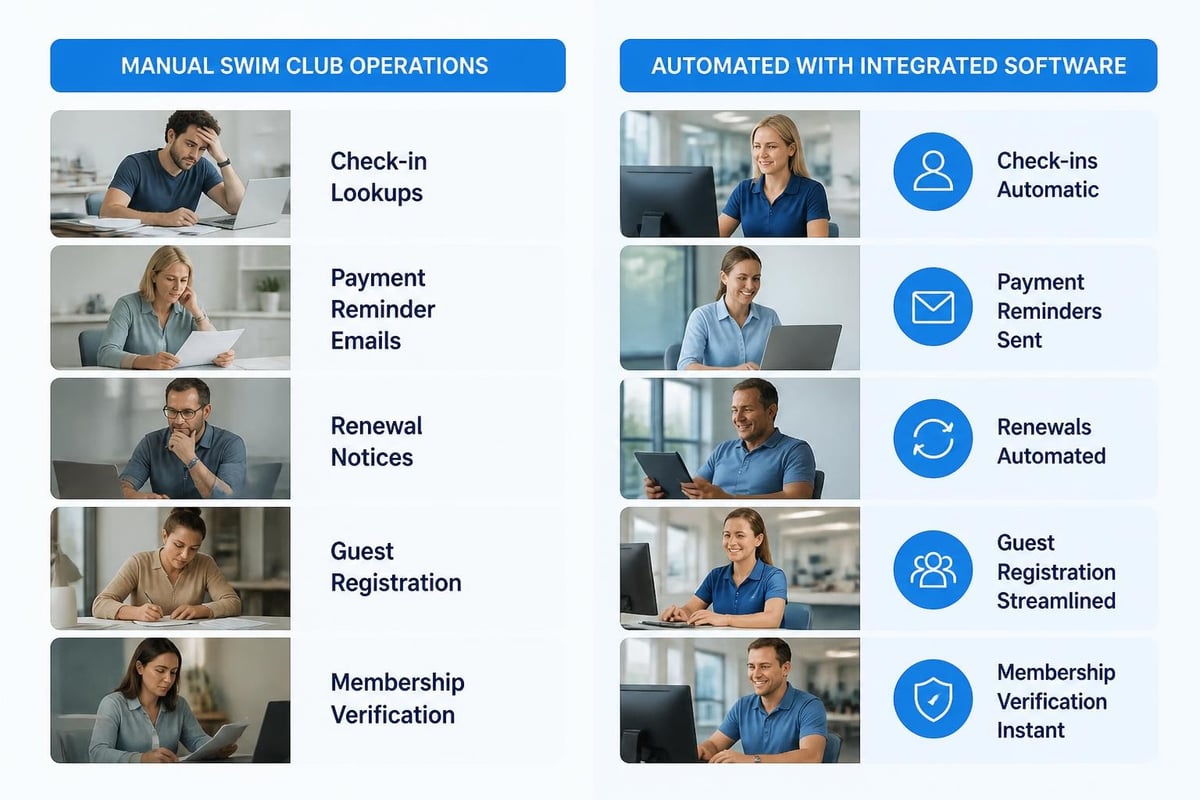
Be clear about what automation should do
A useful automated process has a starting event, an action, and a way to see the result. A renewal date might trigger a reminder. An online payment might update the account and send a receipt.
Ask what happens when the normal step can't finish. Does a failed payment appear where staff will see it? Who reviews a message that couldn't be delivered? Can the manager pause the process if a setting is wrong?
Automatic doesn't mean unattended forever. Someone should own the settings and check the exceptions. That's different from manually doing every ordinary task, but it is still part of running the club.
Start with rules you can explain plainly. If the team can't agree when a reminder should go out or which accounts should receive it, settle that question before turning it on. Software will repeat a confusing instruction just as faithfully as a clear one.
Begin with billing and renewals that follow a pattern
Billing and renewals are useful places to look because the same steps come around again. The dates, membership categories, charges, and reminder wording should be clear before the next cycle starts.
Write down the usual path: prepare the charge, send the invoice or renewal notice, accept payment, record the result, and follow up on unfinished accounts. Then ask which steps your system can handle and which still need a person.
Check payment methods separately. An online payment may update automatically, while a check or another offline payment may need staff to record it. Your reminder rules should account for that work so a family isn't chased for money the club has already received.
Give failed payments and unusual arrangements a clear review path. A declined card, an approved payment plan, and a disputed charge need different responses. Sending the same stronger reminder to all three is unlikely to help.
When reviewing renewal and payment follow-up , start with the records your club already has. Look for reminders that weren't sent, accounts awaiting correction, and members who need an answer before they can finish. Work from those details rather than assuming every unpaid balance has the same cause.
| Routine task | What to ask the software to handle | What staff still check |
|---|---|---|
| Renewal notices | Send the right message on the agreed date | Membership categories, dates, and exceptions |
| Payment receipts | Confirm recorded online payments | Missing or disputed transactions |
| Overdue reminders | Use the account's current status | Offline payments and approved arrangements |
| Account updates | Show changes in the record staff use | Corrections and unresolved questions |
Give the desk the current answer at check-in
At arrival, staff need to know whether the membership is current, who belongs to the household, and what applies to the visit. If guest rules or a missing form matter, those details should be easy to find.
Ask to see the information available after a card or code is scanned. Does the employee have enough context to welcome the family or explain the next step? How does the screen show a request that needs review?
Try an ordinary visit and a few common complications. Use a recently renewed household, a guest visit, and a record needing a staff check. The normal path should be easy, and the unusual path should be understandable.
Software won't remove every awkward conversation. It can give staff a clear record so they don't have to improvise an answer. Keep the manager's review route available when a member questions the result.
Stop rewriting the same member messages
Welcome messages, payment receipts, and renewal reminders often follow a pattern. Write clear versions, decide when each should be sent, and check the information the message pulls from the account.
Keep announcements that need a current decision separate. A closure message, for example, needs the confirmed operating status. A saved outline can help, but someone still needs to check what is closed and what members should do.
For every automated message, ask who receives it and what stops it. If a member finishes the task, should reminders stop? If the club pauses renewals, what happens to messages already queued?
Preview the actual message before using it widely. Check the name, date, amount where relevant, link, and reply address. Make sure replies reach a person who can help. A polished email is less useful if every answer lands in an unattended inbox.
Make reports easier to use, not just faster to open
A report should answer a question the club needs to make a decision. How many memberships have renewed? Which balances are overdue? Which program sessions are full? Start with the question, then check the report.
Find out how current the information is and what is included. An invoice total, payments received, and money deposited into the bank are different numbers. Staff and the board need to understand which one they're looking at.
Ask whether the report can be filtered for the period and membership group you use. If someone has to export it and rebuild the same spreadsheet every month, include that work in the review.
Check the source records behind a few entries. A clear report depends on the information going into it. Automation can make a current mistake appear quickly in several places, so record checks still matter.

Keep required records close to the work
Waivers, member changes, and staff actions are easier to review when the relevant records are kept together. Ask where a signed form appears, which version it covers, and who can find it when a question arises.
Check what the system records automatically and what staff must enter. An activity log may show a change, while the reason for a manager's decision may still need a note.
Keep responsibility for the club's policies with the people who manage them. A feature name doesn't settle how long the club should retain a record or who should have access. Set those requirements and check how the platform supports them.
Use the PoolPulse security overview as a starting point for questions about access and records. Bring the documents and decisions your team needs to review so the conversation stays tied to daily work.
Choose one process to improve first
Pick a task that repeats, takes staff time, and has rules the team understands. A renewal reminder may be a better first project than a complicated exception involving several departments.
Name the person responsible, write the current steps, and agree on what should change. Include who will review the first results and who can stop the process if something is wrong.
Clean the records the process will use. Check dates, duplicate households, contact details, and any fields that decide who receives a message or charge. The first run shouldn't be the moment you discover two versions of the same account.
Work through a small set of test records before the full group. Include a normal account, a completed account that should be excluded, and a case that should go to staff for review. Those checks tell you more than testing only the easiest path.
Ask to see the whole process in a demo
“Yes, we automate billing” leaves a lot unanswered. Ask to follow one account from the starting event to the final result. See the message, the account update, and the staff view of any exception.
Useful questions include:
- What starts this process?
- Which accounts are included or left out?
- Who can change the rules?
- What happens when a step fails?
- Where does staff see unfinished work?
- Can we pause it and review what already happened?
- What still needs to be done outside the system?
Bring a task from your own club. A club management platform should be evaluated against the work you need it to support. The useful question is how your staff would use it on a normal day.
Keep future features separate from what is available in the demonstration. If a required step is planned, ask what your team would do until it is ready and whether that fits your timing.

Check the connections between your tools
The club may use a website, accounting software, payment processing, and other systems alongside its main platform. Write down which information needs to move between them and why.
Ask what each connection actually does. Does it send information one way or both ways? How often does it update? What happens if the receiving system is unavailable?
Follow one record through the connection. A payment shown in the club account may still need checking in the accounting system. Know where staff can see an error and who handles it.
If you're reviewing website integration, check the member's path from the public page into the account. A connected system should make that path clearer, with less retyping and fewer places for information to fall out of date.
Give staff control over the parts they own
Show staff what the process does, how to check it, and what needs their attention. People are more comfortable relying on a system when they can see what happened and understand how to get help.
Use examples from their work. Show a successful payment, a failed one, and an account that needs review. Practice the member explanation as well as the screen steps.
Give permissions according to the job. Staff may need to review a result without being able to change every rule. Managers may need to approve adjustments. Make those responsibilities clear before the process starts.
Ask what still feels awkward after the first few uses. The desk team may find that the right information is present but hard to locate. A small change to the instructions or layout may matter more than adding another automated step.
Keep a plan for unusual requests
A family may need a different payment arrangement. A membership may be on hold while the manager reviews a question. A recorded balance may need correction. Decide how those cases leave the normal path.
Make exceptions visible to the people who need them. Staff shouldn't have to remember that a member has a separate agreement buried in an email.
Record who approved the arrangement, what it covers, and when it should be reviewed. A one-time decision shouldn't quietly become an indefinite rule.
Check how the exception affects reminders and other automatic steps. If someone is reviewing a disputed charge, make sure the communication follows the club's chosen process rather than continuing as though nothing changed.
Measure the work your club actually saved
Before the change, note the time spent on the task and how often it happens. Afterward, count setup, review, corrections, and follow-up as well as the step that now runs automatically.
Use the same kind of work for the comparison. A quiet week and opening weekend won't tell you much if you treat them as identical. Keep enough context to explain the difference.
| What to review | Before the change | After the change |
|---|---|---|
| Staff time | Time spent completing the whole task | Time spent reviewing and finishing it |
| Unfinished work | Requests or reminders still waiting | Exceptions still needing a person |
| Corrections | Errors staff had to fix | Errors and their causes |
| Member questions | What members needed explained | Which questions remain or are new |
Share the result in plain terms. “The notices went out on the agreed date, and staff reviewed the five accounts needing attention” tells the board what happened. Add measured time savings when you have them, rather than borrowing a target from another club.
Make a practical case to the board
Explain the problem, the proposed change, and the work needed to get it running. Include the cost, staff preparation, and who will maintain it.
Use the club's own numbers where possible. If you're estimating savings, show the assumptions: how often the task happens, the time it takes, and the work expected to remain.
Keep recovered revenue separate from faster collection. Money paid earlier is useful, but it isn't automatically new revenue. Likewise, staff time freed for other work isn't necessarily a reduction in payroll.
A clear case for the board doesn't need an impressive promise. It needs a believable problem, a workable change, and a date when the board can review the result.
Keep a backup plan without keeping two competing records
During a change, staff need to know which system is the main record. If people keep updating an old spreadsheet and the new platform independently, the accounts can drift apart.
Agree on when the new process takes over and how any transition checks will work. Reconcile the old and new records before ending the temporary comparison.
Still keep a sensible plan for an outage or failed process. Staff need to know what they can do, what they should record, and how the information will be entered or checked afterward.
Ask about support, backups, and recovery in the platform stability discussion. You don't need to run the infrastructure, but you do need a clear answer about how the club gets help.
Review the process when the season changes
Before the next renewal period, check dates, charges, message wording, and staff responsibilities. A process that worked last year can send the wrong information if nobody updates the seasonal details.
Review recurring exceptions. If the same situation needs manual attention every week, decide whether the rule needs changing or whether it should remain a staff decision.
Read platform updates with your current problems in mind. A new feature is useful when it helps your club's work, not simply because it is available.
Keep the instructions current and give a backup person enough knowledge to review the process. The manager should be able to take a day off without becoming the only person who can explain what the software is doing.
Make the first live run easy to review
Choose a time when the person responsible can watch the first run and staff know where to ask questions. Avoid introducing an unfamiliar process at the busiest point of the day if you have a quieter option.
Before it starts, check the selected group, the date, the message, and the account conditions. Save the settings or notes your system provides so you can compare the intended run with what happened.
Afterward, review the completed steps and exceptions. Look at a few ordinary accounts as well as the ones flagged for attention. A process can finish without an error message and still use the wrong wording or include an account you meant to leave out.
Give each unresolved item to someone who can act on it. A failed delivery may need a contact check. An unexpected balance may need the treasurer. A question about an approved arrangement may belong to the manager.
Keep the front desk informed about anything members are likely to ask. If a receipt looks different or a renewal message has a new link, staff should see it before the first call arrives. A quick preview can save them from trying to explain a message they've never read.
If something important is wrong, pause the remaining steps where the system allows it and review the cause. Check who has already been affected before sending a correction or restarting. Repeating the whole run without that check can create duplicate messages or extra work.
Once the process is working, write a short routine review for future runs. Note where to check results, who handles exceptions, and what seasonal details need updating. That turns the first run's lessons into instructions another manager can use.
Then decide whether to expand. Start the next improvement after the team understands this one and the remaining work is manageable. A steady series of useful changes is easier to maintain than several new processes nobody has had time to learn.
The front-desk automation check
- Choose one routine task that depends on someone remembering.
- Agree on the rules and clean up the records it uses.
- Test the normal case and a few common exceptions.
- Check what staff and members see afterward.
- Name the person who reviews unfinished work.
- Show staff how to get help and pause the process when needed.
- Measure the whole task before and after the change.
- Review the settings before the next season.
Start with one job your team is tired of chasing. Book a PoolPulse walkthrough and ask to follow that job from beginning to end. The useful result is a clearer process, less repeated work, and a front desk that can handle an ordinary day with the information it needs.

The Saturday Morning Front Desk Test for Self Check Ins
Self check ins at your swim club save hours every Saturday and reduce errors. Test your setup, avoid common mistakes, and improve member flow.

Is Your Swim Club Ready for an Emergency? The Ready Club Test
Can your swim club handle an emergency? Test your readiness with this practical checklist for club operators, from staff training to member communication.

How Your Current Reservations System Costs You Revenue
Your reservations management might be leaking revenue every weekend. Learn the practical fixes that swim club operators use to protect income.
Want to see if PoolPulse is a good fit for your club?
Book a walkthrough and we'll show you exactly how PoolPulse can help based on your club's needs, goals, and current processes.