

The Saturday Morning Workflow Plan Test
Learn how to build a workflow plan that actually works during your busiest club hours. Practical steps from identifying bottlenecks to automation.


It's 8:45 on a Saturday morning. Your front desk has a line of families waiting to check in for swim lessons. The phone is ringing with questions about billing. A parent wants to add a guest pass. Your seasonal staff member looks panicked because they can't remember the steps for processing a family membership renewal. Sound familiar? This chaos happens when you don't have a clear workflow plan.
A workflow plan is your written guide for how things get done at your club. It maps out each step, shows who handles what, and explains how tasks flow from start to finish. Without one, you're constantly reinventing the wheel and hoping everyone remembers what to do.
Why Your Busy Mornings Reveal Workflow Problems
Saturday mornings are the ultimate stress test for your club operations. When you have multiple things happening at once, weak spots in your processes become obvious fast.
Common Saturday morning breakdowns:
- Front desk staff switching between three different screens to complete one check-in
- No clear handoff when one person needs help and another takes over
- Members asking questions that require hunting through old emails or text messages
- Billing issues that can't be resolved on the spot because the process lives in someone's head
- Guest registration taking five minutes when it should take thirty seconds
These aren't technology problems. They're workflow problems. You can have the best software in the world, but if your team doesn't know the steps or the steps don't make sense, you'll still have chaos.
A solid workflow plan turns your busiest hours into smooth operations. It gives everyone a playbook to follow, reduces training time for new staff, and helps you spot where automation can save the most time.
Breaking Down What Goes Into a Workflow Plan
Think of a workflow plan as a recipe. It needs ingredients, steps, timing, and people assigned to each task. For swim clubs, your workflows touch almost everything: member sign-ups, check-ins, billing cycles, facility reservations, guest passes, and seasonal renewals.
Start With Your Most Common Tasks
Don't try to map every single thing your club does. Start with the workflows that happen most often or cause the most frustration.
High-priority workflows for most clubs:
- New member registration and onboarding
- Daily check-ins and access verification
- Monthly billing and payment processing
- Seasonal membership renewals
- Guest pass purchases and validation
- Class or lane reservation management
Pick one workflow to map first. Member check-in is usually a good starting point because it happens every single day and involves multiple decision points.
Map Each Step From Start to Finish
For your chosen workflow, write down every single step that happens. Don't skip the small stuff. Those little steps often create the biggest delays.
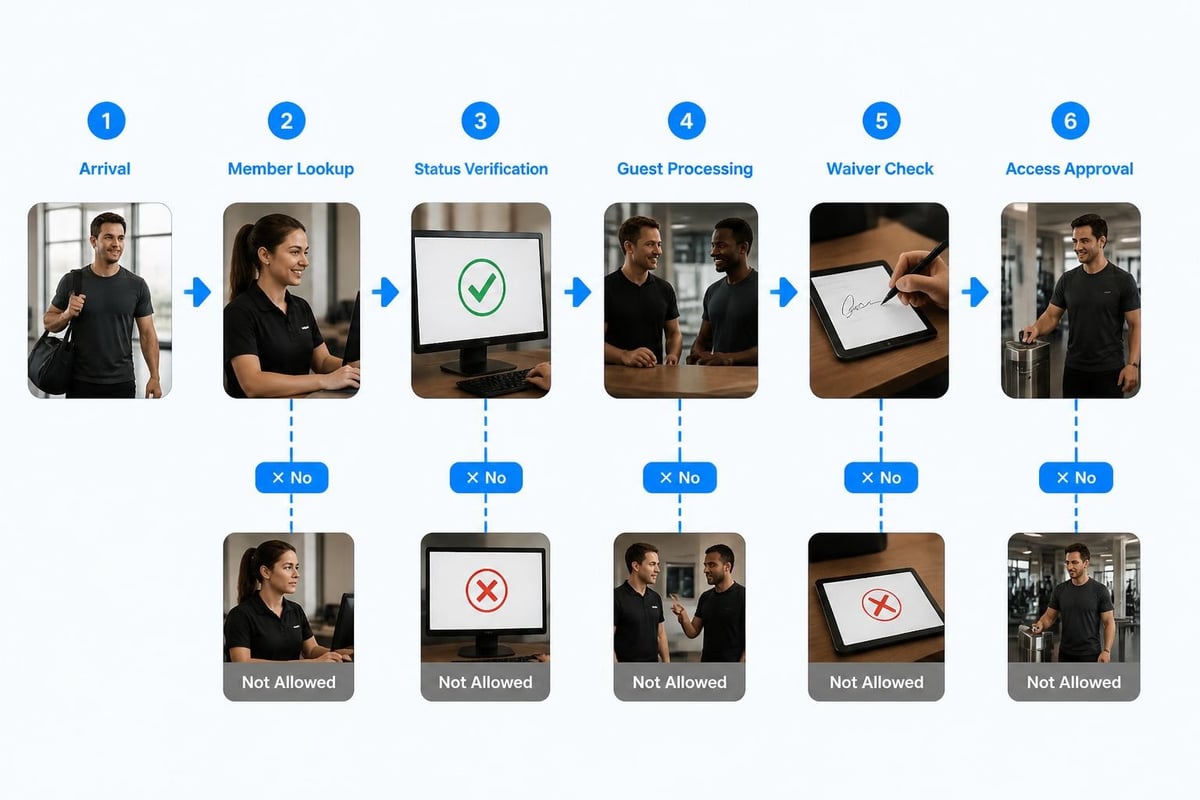
Let's use member check-in as an example:
- Member arrives at front desk or entrance
- Staff asks for member ID or name
- Staff looks up member in system
- System shows membership status (active, expired, suspended, balance due)
- Staff checks for guest additions
- Staff verifies waiver status
- Staff processes guest fee if applicable
- Staff grants access
- Staff notes any issues for follow-up
That's nine steps for something that should take less than a minute. Now ask yourself: where do things slow down? Which steps require looking in multiple places? Where do staff members get confused?
Identify Decision Points and Exceptions
Every workflow has "if this, then that" moments. These decision points are where your workflow plan needs the most detail.
Decision points in member check-in:
- If membership is expired: do we allow access and flag for billing, or deny entry?
- If member has an outstanding balance: what's the threshold that blocks access?
- If waiver is missing or expired: can they check in and sign later, or must they sign first?
- If they're bringing a guest: what's the process for guest limits and fees?
Document exactly what should happen in each scenario. This is where workflow planning becomes execution inside workflow software , because you're building decision logic that can eventually be automated.
Building Your Workflow Plan Step by Step
Now that you understand the components, let's build an actual workflow plan you can use at your club.
Step One: Choose Your Starting Workflow
Pick the workflow that either happens most frequently or causes the biggest headaches. For most swim clubs, this is either check-ins or billing.
If you're not sure where to start, spend two days tracking how your front desk staff spends their time. You'll quickly see which processes eat up the most hours or generate the most questions.
Step Two: Gather Your Current Process Information
Talk to the people who actually do the work. Your front desk staff know where the process breaks down better than anyone. Sit with them during a busy shift and watch what they do.
Ask these questions:
- What takes longer than it should?
- Where do you get stuck waiting for information?
- What questions do members ask that you can't answer quickly?
- What tasks require calling or texting someone else?
- What do new staff members struggle to learn?
Write everything down. Don't judge or try to fix things yet. Just capture the current reality.
Step Three: Draw the Flow
Use a simple format to map your workflow. You don't need fancy software. A workflow visualization can be as basic as boxes and arrows on a whiteboard or a Google Doc with numbered steps.
For each step, include:
- What triggers this step (time, action, condition)
- Who is responsible
- What information or access they need
- Where they find that information
- What decision points exist
- What happens next
Here's a simple table format that works well:
| Step | Trigger | Who | Action | Decision Point | Next Step |
|---|---|---|---|---|---|
| 1 | Member arrives | Front desk | Look up member | Active/Inactive? | If active: Step 2; If inactive: Step 6 |
| 2 | Status confirmed | Front desk | Check balance | Balance due? | If no: Step 3; If yes: Step 7 |
| 3 | Balance clear | Front desk | Verify waiver | Current waiver? | If yes: Step 4; If no: Step 8 |
Step Four: Identify Your Bottlenecks
Look at your mapped workflow and circle anywhere that:
- Requires switching between multiple systems or screens
- Depends on someone's memory rather than written procedure
- Has unclear decision criteria ("usually we..." or "it depends...")
- Creates waiting time while information is gathered
- Happens differently depending on who's working
These bottlenecks are your opportunities for improvement. Some can be fixed with clearer documentation. Others need process redesign or automation. Understanding best practices for workflow design helps you distinguish between what needs better documentation versus what needs fundamental change.
Step Five: Document Your Ideal Process
Now redesign the workflow with your bottlenecks in mind. What should the process look like if everything worked smoothly?
Questions to ask while redesigning:
- Can we eliminate steps that don't add value?
- Can we combine steps that require the same information?
- Can we standardize decisions with clear rules?
- Can we automate routine tasks?
- Can we give staff the information they need in one place?
Your ideal workflow might look very different from your current one. That's okay. The goal is to create something that actually works during your Saturday morning rush.

Turning Your Workflow Plan Into Daily Operations
A workflow plan only helps if people actually use it. This is where documentation meets training and technology.
Create Quick Reference Guides
Your detailed workflow plan is important for training and troubleshooting. But your front desk staff need something they can glance at during a busy moment.
Create one-page quick reference guides for each major workflow. Use:
- Numbered steps in plain language
- Decision trees for common scenarios
- Screenshots showing where to click
- Contact info for escalation
Laminate these guides and keep them at every workstation. Make digital versions accessible on staff phones or tablets.
Build It Into Your Software
The best workflow plan becomes part of your system, not a separate document to remember. Modern swim club management software should guide staff through workflows automatically.
Look for features like:
- Automatic status checks during check-in
- Prompted actions based on member account conditions
- Built-in decision logic for common scenarios
- Flagged items that need attention
- Guided processes for complex tasks like renewals
When you're evaluating swim club management software , ask how it handles workflow guidance. Can it walk a new staff member through processing a family membership? Does it automatically flag expired waivers? Does it prevent common mistakes before they happen?
Train With Realistic Scenarios
Don't just hand someone a workflow document and wish them luck. Train your staff using the actual scenarios they'll encounter.
Effective training scenarios:
- Active member checking in with one guest
- Expired membership trying to access the facility
- Family adding a new child to their membership
- Member disputing a charge on their account
- Guest pass purchase during a busy Saturday morning
- Seasonal renewal with payment plan setup
Role-play these scenarios during training. Have your experienced staff play the members while trainees practice the workflow. This reveals gaps in understanding before they happen in front of actual members.
Making Your Workflow Plan Work With Real People
Here's the truth: no workflow plan survives contact with reality unchanged. People forget steps, unexpected situations arise, and what made sense on paper doesn't work in practice. That's normal.
Build in Regular Review Points
Schedule monthly workflow reviews with your team. Not long meetings, just quick check-ins: what's working, what's not, and what needs adjustment?
Track these metrics to guide your reviews:
- Average time to complete each major workflow
- Number of questions or escalations by workflow
- Member complaints related to specific processes
- Staff confidence ratings for each workflow
This data shows you where your workflow plan needs refinement. Maybe check-in is smooth but billing renewals are still confusing. Now you know where to focus.
Handle Exceptions Without Breaking the System
Every club has unique situations that don't fit the standard workflow. The member who pays six months ahead. The family that shares custody and needs special access rules. The VIP member who doesn't follow normal guest policies.
Your workflow plan should include an exception handling process:
- Staff identifies situation that doesn't fit standard workflow
- Staff documents the situation and pauses the process
- Manager reviews and makes decision
- Decision is documented with rationale
- If exception happens frequently, standard workflow is updated
Don't let exceptions become the new normal without documentation. That's how you end up with ten different ways of doing the same thing.
Keep Documentation Current
Your workflow plan should be a living document. When you change a process, update the documentation immediately. When you add a new workflow, document it before it goes live.
Assign someone to be the documentation owner. This person doesn't have to write everything, but they're responsible for making sure updates happen and everyone knows where to find current versions. Understanding the importance of workflow documentation helps reinforce why this role matters so much.
Connecting Workflows Across Your Club
Individual workflows matter, but the magic happens when they connect smoothly. Your billing workflow needs to talk to your access workflow. Your renewal workflow needs to update your registration workflow.
Map Your Workflow Dependencies
List all your major workflows, then draw lines showing how they connect:
Workflow connection example:
- Registration creates member record
- Member record enables access workflow
- Access workflow checks current status from billing workflow
- Billing workflow triggers renewal workflow at set intervals
- Renewal workflow updates registration information
When you see these connections, you understand why a problem in one area creates ripples elsewhere. A delayed billing run affects access decisions. An incomplete registration blocks proper check-in. This project management workflow approach helps you see the bigger operational picture.
Automate the Handoffs
The point where one workflow hands off to another is where things fall through the cracks. Manual handoffs require someone to remember to do something.
Handoffs that should be automated:
- New registration triggers welcome email and waiver request
- Completed payment triggers access status update
- Upcoming renewal triggers member notification
- Failed payment triggers account status change and staff alert
- Guest pass purchase triggers temporary access credential
Modern club management platforms like PoolPulse handle these handoffs automatically. When workflows are properly connected, staff doesn't have to remember to update multiple systems or send reminder emails.

Common Workflow Plan Mistakes (and How to Avoid Them)
After watching swim clubs implement workflow plans for years, I've seen the same mistakes repeated over and over. Here's what to watch out for.
Mistake One: Making It Too Complicated
Your workflow plan should make life easier, not create a bureaucratic nightmare. If your check-in workflow has twenty-seven steps and requires three different approvals, nobody will follow it.
Keep it simple by:
- Combining related steps into single actions
- Removing steps that don't change the outcome
- Trusting your staff to make small decisions
- Automating anything that happens the same way every time
The goal is smooth operations, not perfect documentation.
Mistake Two: Building It Without Input From Your Team
You might run the club, but your front desk staff live in these workflows every day. They know what actually works and what sounds good in theory but fails in practice.
Involve your team from the start. Ask them to help map current processes. Let them test new workflows before you roll them out to everyone. Listen when they say something won't work.
The best workflow plans come from collaboration, not top-down mandates.
Mistake Three: Forgetting About Peak Times
A workflow that works fine on Tuesday afternoon might collapse on Saturday morning. Always test your workflow plans during your busiest hours.
Watch what happens when you have:
- Multiple check-ins happening simultaneously
- Phone calls interrupting front desk tasks
- Unexpected situations requiring immediate attention
- Limited staff covering multiple responsibilities
If your workflow breaks under normal busy conditions, it needs redesign before you implement it.
Mistake Four: No Clear Ownership
Every workflow needs someone responsible for making sure it happens correctly. Not to blame when things go wrong, but to own the process and drive improvements.
Assign workflow owners who:
- Train new staff on their workflows
- Answer questions about proper procedures
- Track metrics and identify problems
- Suggest improvements based on frontline experience
- Keep documentation current
This doesn't have to be a manager. Often your most experienced front desk person is the perfect workflow owner.
Mistake Five: Set It and Forget It
Your club changes. Your members change. Your staff changes. Your workflows need to change too.
Set quarterly reviews for each major workflow. Look at your metrics, talk to your team, listen to member feedback, and adjust. What worked last summer might not work this summer.
The workflow management techniques that serve you best are the ones you continuously refine based on real operational data.
Using Technology to Support Your Workflow Plan
Technology should support your workflows, not dictate them. Design your processes first, then find tools that make them easier.
What Good Club Management Software Does for Workflows
The right software doesn't just track information. It guides people through workflows, prevents mistakes, and handles routine tasks automatically.
Essential workflow features:
- Status checking built into every transaction
- Automatic calculations (fees, prorating, balances)
- Prompted next steps based on current situation
- Required field validation before moving forward
- Automatic notifications and reminders
- Exception flagging for manager review
When you're looking at PoolPulse's features , pay attention to how the software guides workflows rather than just storing data.
AI-Powered Workflow Assistance
Modern club management platforms are starting to use AI to make workflows even smoother. AI can suggest next actions, predict common member questions, flag unusual patterns, and automate routine decisions.
For example, AI might:
- Suggest renewal discount offers based on payment history
- Predict which members are likely to cancel and trigger retention workflows
- Automatically categorize member questions for proper routing
- Flag suspicious activity patterns for security review
This isn't replacing your workflow plan. It's making your plan work better by handling the routine stuff so staff can focus on the situations that need human judgment.
Integration Between Workflows and Communication
Your workflow plan shouldn't exist in isolation from how you communicate with members. When a workflow triggers an action, members should be notified automatically.
Workflow communication touchpoints:
- Registration completion confirmation
- Payment receipt and upcoming billing notices
- Access credential delivery
- Renewal reminders at 60, 30, and 7 days
- Balance due notifications
- Facility reservation confirmations
These communications should happen automatically as part of your workflow, not as separate tasks someone has to remember. When evaluating platforms, ask about workflow-triggered communications and how customizable they are.
Measuring Whether Your Workflow Plan Actually Works
How do you know if your workflow plan is making a difference? Track specific metrics that matter to daily operations.
Time-Based Metrics
Measure how long key workflows take before and after implementing your plan:
| Workflow | Before Plan | After Plan | Improvement |
|---|---|---|---|
| Member check-in | 2.5 minutes | 45 seconds | 70% faster |
| New registration | 18 minutes | 8 minutes | 56% faster |
| Guest pass purchase | 4 minutes | 90 seconds | 63% faster |
| Renewal processing | 12 minutes | 5 minutes | 58% faster |
Time savings add up fast when you multiply them across hundreds of transactions per week.
Error and Question Metrics
A good workflow plan reduces mistakes and confusion:
- Number of incomplete registrations per week
- Billing disputes related to process errors
- Staff questions about "how do I..."
- Escalations to managers for clarification
- Member complaints about inconsistent treatment
Track these monthly. You should see steady decreases as your workflow plan becomes standard practice.
Staff Confidence and Satisfaction
Ask your team directly: do they feel confident handling common situations? How often do they feel lost or unsure? How much stress do they feel during busy shifts?
This qualitative feedback matters just as much as the numbers. A workflow plan that makes staff miserable isn't sustainable, even if it saves time.
Member Experience Indicators
Ultimately, good workflows create better member experiences:
- Wait times during peak hours
- Member satisfaction scores
- Renewal rates (members staying vs. leaving)
- Positive mentions in feedback about service quality
- Referrals and word-of-mouth growth
When your operations are smooth, members notice. They feel taken care of. They stay longer and recommend you to friends.
Adapting Your Workflow Plan for Different Seasons
Swim clubs aren't the same year-round. Your workflow plan needs to flex with seasonal changes.
Summer Peak Season Workflows
During your busiest months, workflows need to be faster and handle higher volume:
- Simplified check-in with fewer verification steps
- Batch processing for common transactions
- Self-service options for routine tasks
- Additional staff trained on core workflows
- Extended hours requiring clear shift handoffs
Build your summer workflow variations in the spring. Test them before you actually need them.
Off-Season and Maintenance Periods
Slower months are perfect for workflow improvements:
- Deep training on complex processes
- Workflow plan updates based on summer learnings
- System maintenance that can't happen during peak hours
- Documentation reviews and updates
- Testing new workflow variations
Don't waste your off-season. Use it to make next summer even smoother.
Special Events and Programs
Swim meets, social events, and special programs need their own workflow plans:
- Event registration and check-in procedures
- Volunteer coordination workflows
- Equipment setup and breakdown processes
- Guest management during events
- Post-event cleanup and reconciliation
Document these seasonal workflows separately. Pull them out and refresh them each year before you need them.
Getting Your Board and Leadership on Board
If you need approval or budget for workflow improvements, you'll need to make the case to your board or leadership team.
Show the Business Impact
Boards care about numbers. Calculate the real cost of poor workflows:
Current state:
- 20 staff hours per week spent on manual tasks that could be automated
- 5 hours per week spent answering questions about procedures
- 3 billing errors per month requiring refunds or adjustments
- 15% member survey mentions about slow or inconsistent service
Projected state with workflow improvements:
- 12 hours per week saved through automation
- 1 hour per week on procedural questions (better documentation)
- Less than 1 billing error per month
- 5% or less service consistency complaints
Multiply those time savings by your staff's hourly cost. Add the cost of errors and member churn. The business case builds itself.
Start Small and Show Results
You don't need to overhaul everything at once. Pick one high-impact workflow, fix it, measure the results, then show your board what happened.
"We redesigned our check-in workflow. It now takes 45 seconds instead of 2.5 minutes. We're processing 40% more check-ins per hour with the same staff. Here's what we learned and what we want to tackle next."
Results speak louder than proposals.
Connect to Strategic Goals
Every club has goals around growth, retention, efficiency, or member satisfaction. Show how workflow improvements support those goals directly.
If your strategic plan includes growing membership by 15%, explain how streamlined registration and onboarding workflows make that growth manageable without proportional staff increases.
When you're ready to present solutions, having tools like PoolPulse that demonstrate how modern platforms support workflow efficiency makes your case more concrete. You're not asking for theoretical improvements, you're showing proven approaches.
Building Workflow Plans That Scale With Growth
Your club probably won't stay the same size forever. Good workflow plans accommodate growth without breaking.
Design for Volume Changes
What works for 200 members might not work for 500. Build scalability into your workflow plans:
- Identify which steps become bottlenecks with volume
- Plan for batch processing of routine tasks
- Build in automation before you absolutely need it
- Create clear criteria for when to add staff or hours
Test your workflows at different volume levels. Can your check-in process handle twice as many members? Four times? Where does it break?
Plan for Multiple Locations or Facilities
If you manage multiple pools or might expand, your workflow plans need to work across locations:
- Standardized core processes with room for local variations
- Centralized data with distributed access
- Clear escalation paths that work across sites
- Reporting that rolls up across all locations
Multi-facility operations need multi-community amenity management capabilities built into both workflows and software from the start.
Build in Knowledge Transfer
As you grow, you'll hire more staff. Your workflow plans become your training system:
- New hire onboarding workflows
- Certification or skill-level progressions
- Documentation that new people can actually follow
- Mentoring processes for complex workflows
When your workflow documentation is good enough to train new staff without constant supervision, you know you've built something that scales.
A workflow plan isn't about creating more paperwork or making simple things complicated. It's about figuring out the best way to do something once, writing it down, and making it easy for everyone to follow. When you map your processes, eliminate bottlenecks, and give your team clear guidance, those chaotic Saturday mornings become manageable. Your staff feels confident, your members get consistent service, and you spend less time firefighting. If you're ready to transform your club operations with modern, AI-powered software that supports smart workflows, PoolPulse offers the configurable platform swim clubs, tennis clubs, and HOA facilities need to streamline everything from check-ins to billing.

The Swim Club Software Test Every Board Should Run
Run this simple test to see if your swim club software actually saves time or creates more work. Real scenarios, honest questions, better tools.

The Seven Signs You've Outgrown Your Club Operations
Your swim club is growing, but your tools aren't keeping up. These seven warning signs reveal when manual processes cost more than solutions.

How to Answer Every Board Question in Under Two Minutes
Your swim club board asks tough questions. Learn how management reporting software helps you pull accurate answers in seconds, not hours.
Want to see if PoolPulse is a good fit for your club?
Book a walkthrough and we'll show you exactly how PoolPulse can help based on your club's needs, goals, and current processes.