

The Monthly Billing Headache Test for Swim Clubs
Does your swim club spend hours each month chasing payments? Learn how automated billing saves time and catches missed revenue.


It's the last week of the month, and you're sitting at your desk with three spreadsheets open, trying to figure out why the Johnsons haven't paid their May dues while also emailing the Martins about their declined credit card. Meanwhile, your phone keeps ringing because families want to know when their next payment is due. You've spent four hours on billing tasks today, and you're not even halfway done. Sound familiar?
This monthly routine drains time you could spend improving programs, training staff, or actually enjoying the facility you work so hard to manage. The solution isn't working faster or hiring more help. It's rethinking how payments happen in the first place.
Why Manual Billing Creates More Problems Than It Solves
When you handle billing manually, every month brings the same predictable chaos. You're pulling data from different places, creating invoices one by one, and sending individual emails. Then comes the follow-up: tracking who paid, who didn't, and who needs a reminder.
The real cost isn't just your time. Manual processes create gaps where revenue slips through. A family's credit card expires, and nobody notices for two months. A seasonal membership should have renewed, but it fell off your radar. These aren't rare exceptions. They happen constantly when humans manage repetitive tasks.
Here's what typically goes wrong:
- Payment dates get missed because reminders live in your head, not a system
- Card declines require manual follow-up that takes days
- Partial payments create tracking nightmares across multiple spreadsheets
- Family accounts with multiple members require separate calculations
- Seasonal rate changes need manual updates for every affected member
You end up spending more time managing the billing process than the actual club operations. And when questions arise, you're digging through old emails and bank statements trying to piece together what happened three months ago.
The Hidden Cost of Delayed Payments
Every day a payment sits uncollected represents real money your club can't use. When you wait until the end of the month to send invoices, you're already starting behind. Then families take another week or two to pay, and suddenly you're running operations on last month's revenue.
This delay affects everything from cash flow planning to your ability to handle unexpected repairs. You can't budget properly when you don't know which payments will actually arrive on time.
How Automated Billing Actually Works in Practice
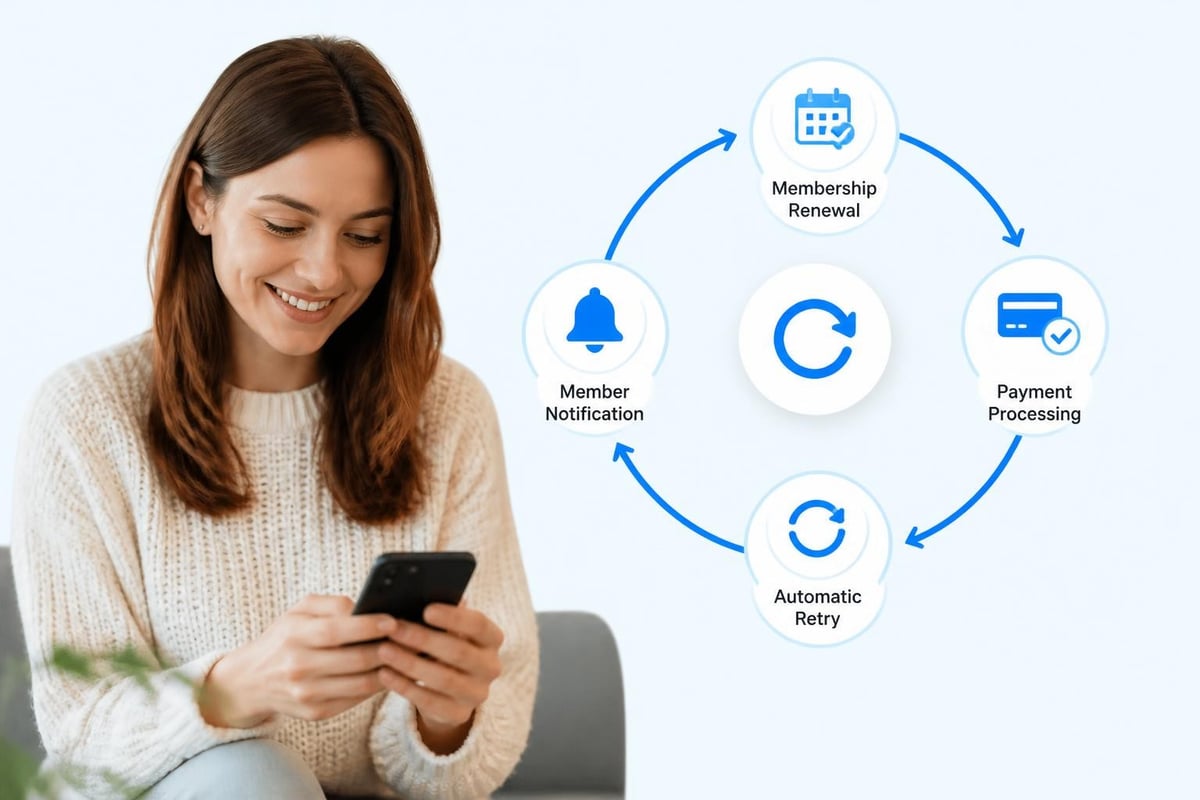
Automated billing handles the entire payment cycle without you touching each transaction. The system knows when payments are due, processes them automatically, and follows up when something goes wrong. You set the rules once, and the software executes them consistently.
Think of it like setting up direct deposit for your own paycheck. You don't manually request payment every two weeks. The system knows the schedule and handles it automatically. Automated billing systems work the same way for your members.
Setting Up Payment Schedules
You configure how often each membership type gets charged. Monthly dues might process on the first of every month. Seasonal passes charge once at the start of summer. Family plans with multiple payment options follow their selected schedule.
The system stores payment information securely and charges cards on schedule. No manual entry. No remembering who pays when. The software tracks everything and executes according to the rules you've set.
| Payment Type | Frequency | Auto-Charge Date | Grace Period |
|---|---|---|---|
| Monthly Dues | Monthly | 1st of month | 5 days |
| Quarterly Plans | Every 3 months | Same date as signup | 7 days |
| Annual Memberships | Yearly | Anniversary date | 10 days |
| Seasonal Passes | Once per season | Season start date | 3 days |
Handling Failed Payments Automatically
Cards decline for dozens of reasons. Maybe the member got a new card with a different expiration date. Maybe they hit their credit limit. Maybe the bank flagged it as suspicious because it's a new charge.
Manual follow-up means you notice the decline days later, send an email, wait for a response, and hope the member updates their information. Automated systems retry failed payments according to a schedule you control. They send notifications immediately and keep trying based on your preferences.
Typical retry sequence:
- Payment attempt fails on scheduled date
- System sends automated notification to member
- First retry occurs 24 hours later
- Second retry occurs 72 hours after first attempt
- Final retry occurs one week after initial failure
- Account status changes if all attempts fail
This happens without you checking bank reports or sending manual emails. You only get involved when the automated retries don't work, which is a fraction of total payment issues.
The Real Time Savings from Automated Billing
Let's do the math on what you're currently spending. Take last month's billing cycle. How many hours did you spend creating invoices, sending them out, tracking payments, and following up on issues?
Most swim club administrators estimate they spend 15-20 hours monthly on billing tasks. That's almost three full workdays dedicated to getting money you're already owed. Now multiply that by twelve months, and you're spending nearly a month each year just processing payments.
Automated billing reduces this to maybe two hours monthly. You spend time reviewing exception reports and handling the few cases that need personal attention. Everything else runs automatically according to the schedules and rules you configured.
What You Do With the Extra Time
Those recovered hours represent serious operational value. You can focus on member experience instead of administrative tasks. Maybe you finally launch that weekend swim lesson program you've been planning. Or you tackle the facility improvement project that keeps getting delayed.
The time savings compound throughout the year. Small daily wins add up when you're not constantly interrupted by billing questions and payment tracking.
- Review financial reports in minutes instead of hours
- Handle member inquiries faster with instant payment history access
- Plan programs confidently knowing revenue will arrive on schedule
- Reduce month-end stress dramatically
- Spend time on growth instead of administration
Modern swim club management software integrates automated billing directly into member management, so everything lives in one place instead of scattered across multiple tools.

Reducing Revenue Leakage Through Automation
Revenue leakage happens when payments fall through the cracks. A membership expires without renewing. A payment method fails and nobody notices for weeks. A family's account status changes but their billing rate doesn't update.
These small losses add up dramatically over a year. A typical swim club with 300 member families might lose $15,000 to $25,000 annually just from billing gaps and missed payments. That's real money that could fund new equipment, additional staff, or facility improvements.
Common Sources of Lost Revenue
Expired payment methods top the list. Credit cards typically expire every three to four years. When members get new cards, they often forget to update payment information. Manual systems might not catch this until you notice missing payments.
Membership renewal gaps represent another major source. A member's annual pass expires in June, but renewal reminders don't go out automatically. They show up in July expecting access, and you have an awkward conversation about the lapsed membership.
Proration errors cost money when members join mid-cycle or change membership levels. Calculating the correct amount manually invites mistakes, and members usually don't complain when they're undercharged.
Guest pass tracking creates revenue loss when manual systems don't enforce limits. A member is supposed to bring guests twice per month, but without automated tracking, they might use five guest passes because nobody's counting.
Implementing automated billing workflows helps plug these leaks systematically.
Automatic Card Updater Features
Many payment processors now offer card updater services that work behind the scenes. When a member's credit card expires and the bank issues a new one, the updater service automatically retrieves the new card information and updates it in your system.
This happens without the member doing anything. Without you doing anything. The next scheduled payment just works because the current card information is always on file.
Better Member Experience Through Predictable Billing
Your members want to know when payments will happen and how much they'll be. They don't want surprise charges or confusing invoices. They definitely don't want to spend time tracking down payment issues or updating card information manually.
Automated billing creates predictability. Members know exactly when charges occur because they happen on the same schedule every time. They receive notifications before payments process, so there are no surprises. If something goes wrong, they get immediate alerts instead of finding out weeks later.
Transparency That Builds Trust
When members can log into their account and see their complete payment history, upcoming charges, and current balance, they feel in control. They're not wondering whether a payment went through or guessing when the next charge will hit their card.
This transparency reduces support questions dramatically. Instead of calling to ask "Did my May payment go through?" they check their account portal and see the answer immediately. That's one less interruption in your day and one less frustration in theirs.
Members appreciate:
- Email confirmations immediately after each successful payment
- Advance notices before upcoming charges
- Clear receipts showing exactly what they paid for
- Easy access to payment history
- Simple card update processes when they get new cards
The features that enable this transparency need to be built into your management platform from the start, not bolted on as an afterthought.
Choosing the Right Automated Billing Approach
Not all automated billing works the same way. You've got several options, each with different complexity levels and capabilities. The right choice depends on your club's size, membership structure, and how much flexibility you need.
All-in-One Club Management Software
The simplest approach uses club management software with built-in billing automation. You manage members, schedule facilities, track check-ins, and process payments all in one system. Everything talks to everything else automatically.
When someone signs up for a membership, their billing schedule starts automatically based on the membership type. When they check in, the system knows their account status. When they email asking about their last payment, you see their complete history in seconds.
This integrated approach eliminates data sync issues between separate systems. You're not exporting member lists from one tool and importing them into another. Changes in one area flow automatically to related functions.
| Approach | Setup Complexity | Monthly Cost Range | Best For |
|---|---|---|---|
| Integrated Platform | Low | $100-$400 | Most swim clubs |
| Payment Gateway + Spreadsheets | Medium | $30-$100 | Very small clubs |
| Custom Integration | High | $500+ | Large organizations |
| Standalone Billing Software | Medium | $200-$600 | Multi-facility operations |
Standalone Payment Processors
You could use a dedicated payment processor and manually manage the membership side separately. This costs less upfront but creates more work long-term. You're constantly syncing data between your member database and the payment system.
This approach makes sense if you have very simple billing needs and a small membership base. But as you grow, the manual coordination becomes increasingly painful.
The Configuration Question
Whatever system you choose needs flexibility to handle your specific membership structure. Cookie-cutter solutions that only support monthly billing won't work if you offer quarterly plans, seasonal passes, and custom family rates.
Look for systems that let you configure payment schedules, membership types, proration rules, and discount structures without requiring custom development. The software should adapt to how you run your club, not force you to change your operations to fit the software.
Implementation Without Disrupting Operations
Switching to automated billing doesn't mean shutting down for a week while you reconfigure everything. You transition gradually, often running parallel systems initially until you're confident everything works correctly.
The Migration Process
Start by setting up new members on the automated system while continuing to handle existing members manually. This lets you learn the system without risking problems for your entire membership base.
Week 1-2: Setup and testing
- Configure membership types and billing rules
- Set up payment processor integration
- Test with a few volunteer members
- Train staff on the new workflows
Week 3-4: Soft launch
- Enroll all new members automatically
- Migrate 10-15 existing members who volunteer
- Monitor closely for any issues
- Refine configurations based on real usage
Month 2: Expanding rollout
- Migrate one membership tier at a time
- Send clear communication to each group before migration
- Provide support during transition period
- Continue manual billing for remaining members
Month 3: Full transition
- Complete migration of all members
- Phase out manual billing processes
- Document new procedures
- Celebrate recovered time
Most clubs complete full transitions within 90 days. Smaller clubs often finish faster. The key is moving deliberately rather than trying to flip everything at once.
Training Your Team
Your front desk staff needs to understand how automated billing works even though they won't manage it daily. They'll still get questions from members about payments, and they need to access payment information quickly.
Focus training on the member-facing aspects. How to look up someone's payment history. How to update a card on file. How to handle a member reporting a failed payment. These scenarios happen regularly, and staff should feel confident resolving them.
Administrative staff needs deeper training on configuring rules, running reports, and handling exception cases. But that's typically just one or two people, not your entire team.
Reporting and Financial Visibility
One underrated benefit of automated billing is the financial reporting that comes with it. When payments flow through an integrated system, you get real-time visibility into revenue, outstanding balances, and payment trends.
Manual billing means waiting until month-end to really understand your financial position. You know roughly what should have come in, but you're not certain until you reconcile everything. Automated systems show you exactly where you stand right now.
Reports That Actually Help
Daily revenue dashboards show money coming in as it happens. You see successful payments, failed attempts, and outstanding balances updated continuously. No more waiting for bank deposits to clear before knowing what you collected.
Aging reports highlight accounts with outstanding balances organized by how old the debt is. Thirty days overdue requires different handling than ninety days overdue. The system categorizes automatically so you know where to focus collection efforts.
Renewal forecasting projects upcoming revenue based on scheduled renewals. You can see that $45,000 in annual memberships renew next month and plan accordingly. This visibility helps with budgeting and staffing decisions.
Payment method analysis shows which members use which payment types. This matters when payment processors charge different fees for credit cards versus ACH transfers. You might want to encourage more members toward lower-fee payment methods.
Looking at automated billing best practices reveals how successful organizations use these reports to drive decisions rather than just reviewing them passively.
Connecting to Accounting Systems
Your accountant or bookkeeper needs clean data for tax filing, financial statements, and budget planning. Automated billing systems typically integrate with accounting software like QuickBooks, reducing manual data entry and preventing errors.
Payments flow automatically from your club management software to your accounting system. Revenue gets categorized correctly. Member balances stay synchronized. Your books stay current without constant manual reconciliation.
This integration saves hours during tax season and makes financial audits much less painful. Everything's documented, timestamped, and traceable.
Handling Special Situations and Exceptions
Automated billing handles routine payments brilliantly, but what about the edge cases? The family that needs to skip July payment while they're on vacation. The member switching from individual to family plan mid-month. The scholarship recipient with custom billing terms.
Good systems let you configure exceptions without breaking automation. You can pause a member's billing temporarily, adjust rates for specific accounts, or apply one-time credits as needed.
Seasonal Membership Challenges
Swim clubs face unique seasonal patterns. Summer memberships might run June through August with a single upfront payment. Year-round members pay monthly. Off-season rates differ from peak season pricing.
Your billing automation needs to handle these variations without you manually adjusting hundreds of accounts each time seasons change. Configure the seasonal rules once, and let the system execute them year after year.
Members who pause during winter should automatically resume billing when they reactivate in spring. The system should know which rate applies based on the current season and the member's plan type.
Family Account Complications
Family memberships create billing complexity. You might have different rates for two-person, four-person, and six-person families. Add-on members might cost a flat rate or a percentage of the base membership.
Some clubs bill the primary member for everything. Others split charges across multiple family members. Your automated system needs flexibility to support whatever structure makes sense for your operations.
When a family adds a member mid-cycle, the system should prorate appropriately. When they downgrade because a child aged out, billing should adjust automatically at the next cycle.
Security and Compliance Considerations
Storing payment information and processing transactions automatically creates serious security responsibilities. You're handling sensitive financial data that requires proper protection.
Modern automated billing systems use tokenization to protect card numbers. Instead of storing actual card details, the system stores a token that references the real information secured by the payment processor. Even if your database got compromised, attackers wouldn't get usable card numbers.
PCI Compliance Made Easier
Payment Card Industry (PCI) compliance requirements are extensive when you store and process card data. Most swim clubs don't have the technical expertise or resources to maintain PCI compliance independently.
Using a billing system with payment processor integration shifts most compliance burden to the processor. They maintain the secure environment where card data lives. You interact with tokens, not raw card numbers. This dramatically simplifies your compliance requirements.
You still have responsibilities around access controls and data handling, but the heaviest security lifting happens elsewhere.
Member Privacy Protections
Payment data falls under various privacy regulations depending on your location. Members expect you to protect their financial information responsibly.
Automated billing systems should include:
- Encryption for data in transit and at rest
- Role-based access controls limiting who sees payment information
- Audit logs tracking who accessed what data when
- Automatic session timeouts preventing unauthorized access
- Secure password requirements for member portals
These protections should be built-in, not optional add-ons you configure separately.
Cost Analysis and ROI
Implementing automated billing costs money upfront and ongoing. You need to evaluate whether the investment makes financial sense for your specific situation.
Direct Costs to Consider
Software subscription fees typically range from $100 to $400 monthly for integrated club management platforms with built-in billing automation. Standalone billing tools might cost less but require separate member management software.
Payment processing fees run 2.5% to 3.5% per transaction for credit cards, plus 20-30 cents per transaction. ACH bank transfers cost significantly less, usually under 1% or a flat fee per transaction. These fees apply whether you bill manually or automatically, so they're not new costs.
Setup and migration time represents real cost even if you handle it internally. Expect to invest 20-40 hours configuring the system, migrating data, and training staff initially.
Calculating Your Return
The ROI calculation depends on your current costs and the problems you're solving. Start with time savings. If you're spending 20 hours monthly on manual billing tasks, that's 240 hours annually. At $25/hour, that's $6,000 in labor costs.
Add recovered revenue from reduced payment failures and better collection follow-up. Even capturing an additional $10,000 annually from previously missed payments significantly impacts ROI.
| Cost/Benefit Factor | Annual Impact |
|---|---|
| Staff time saved (240 hrs @ $25/hr) | +$6,000 |
| Reduced payment failures | +$8,000 |
| Faster collections | +$4,000 |
| Better renewal capture | +$6,000 |
| Software subscription ($250/mo) | -$3,000 |
| Setup costs (one-time) | -$1,000 |
| Net First Year Benefit | +$20,000 |
These numbers vary significantly based on your club size and current efficiency, but most clubs see positive ROI within six months.
AI and Automation Working Together
Newer automated billing systems incorporate AI to optimize payment timing, predict payment failures, and personalize member communications. This goes beyond simple automation into intelligent decision-making.
AI might analyze payment patterns and recommend optimal billing dates for specific members. Maybe the Johnsons always pay successfully when charged on the 5th but frequently have failures when charged on the 1st. The system learns this pattern and adjusts automatically.
Predictive models can identify accounts likely to fail payment before they actually decline. This allows proactive outreach. "Hey, we noticed your card on file expires next month. Would you like to update it now to avoid any interruption?"
The revenue recovery capabilities of AI-enhanced systems help you collect money that would otherwise slip away.
Personalized Communication
Generic billing emails feel impersonal and get ignored. AI helps customize messages based on member behavior and preferences. Someone who always pays on time gets different communication than someone with frequent payment issues.
The system might adjust reminder timing based on past response patterns. If a member typically updates their card within 24 hours of notification, they get one reminder. If they usually take several days, the system sends additional nudges at optimal intervals.
This personalization happens automatically based on data patterns, not because you manually segment members into different communication tracks.
Common Implementation Mistakes to Avoid
Clubs switching to automated billing sometimes create new problems by configuring things incorrectly or moving too fast. Learn from others' mistakes to smooth your own transition.
Insufficient Testing Before Launch
The biggest mistake is rolling out automated billing to all members without thorough testing. You discover configuration errors after hundreds of members get incorrect charges. Now you're issuing refunds, apologizing, and dealing with frustrated members who wonder whether they can trust your new system.
Always test with a small group first. Volunteer members who understand they're helping you validate the system. Run through multiple billing cycles. Try different scenarios. Only expand when you're confident everything works correctly.
Poor Communication With Members
Changing how billing works affects every member. They need clear explanation before the change happens, not a surprise charge from a new system they didn't know about.
Send notices at least two weeks before transitioning any member. Explain what's changing, why it's better for them, and exactly what they need to do (usually nothing, but they need to hear that). Provide clear instructions for updating payment information if needed.
Ignoring Edge Cases
Your system needs to handle the 90% of straightforward situations automatically. But you also need plans for the 10% of exceptions. The member who pays by check. The scholarship recipient with custom terms. The lifetime member who doesn't pay dues.
Configure these exceptions properly from the start rather than discovering mid-month that your automation just tried to charge someone who shouldn't be billed.
Not Training Staff Adequately
Your team will field questions and handle issues even though the system runs automatically. They need to know how to access payment information, process refunds, update member payment details, and explain how automated billing works.
Underprepared staff creates member frustration and generates more work for you as questions get escalated because front-line staff can't answer basic questions.
Scaling Automated Billing as You Grow
Starting with 100 members looks different from managing 500 or 1,000 members. Your automated billing system needs to scale without requiring complete replacement as you grow.
Multi-Facility Considerations
Some swim clubs expand to multiple locations or manage several different facilities. Your billing system should handle this complexity without creating separate databases for each location.
You might need different billing rules by facility. The downtown location charges premium rates while the suburban facility costs less. Members at one location shouldn't accidentally get access to another. Payment processing should work identically across all locations even though rates and terms differ.
Centralized reporting across facilities helps you understand overall financial performance while still tracking individual location metrics.
Integration With Other Systems
As clubs grow, they often add specialized tools for scheduling, marketing, or facility management. Your automated billing system needs to integrate with these other platforms to avoid data silos.
When someone registers through your website, their payment information should flow automatically to your billing system. When you run an email campaign promoting summer passes, the marketing platform should know who's already enrolled versus who's a prospect. When an instructor uses scheduling software to book private lessons, billing should capture those fees automatically.
These integrations require planning. Choosing systems that work well together from the start prevents painful migrations later when you discover your tools don't communicate.
Exploring a demo of integrated club management software shows how these pieces fit together in practice.
Automated billing transforms swim club operations by eliminating repetitive payment tasks and catching revenue that would otherwise slip away. The time you save, the money you recover, and the stress you avoid all compound to create measurable operational improvements. PoolPulse brings all these benefits together in a unified platform designed specifically for swim clubs, combining intelligent billing automation with member management, check-ins, and AI-powered insights that help you run your facility more efficiently while spending less time on administrative tasks.

Five Front-Desk Tasks Your Swim POS Should Handle
Your front desk shouldn't need three systems to check in a swimmer. Here's how modern swim POS systems save time and reduce errors.

What Your Billing and Invoices Are Telling You
Your swim club's billing and invoices reveal hidden patterns about late payments, refund requests, and cash flow. Here's how to read the signals.

The Swim Club Software Test Every Board Should Run
Run this simple test to see if your swim club software actually saves time or creates more work. Real scenarios, honest questions, better tools.
Want to see if PoolPulse is a good fit for your club?
Book a walkthrough and we'll show you exactly how PoolPulse can help based on your club's needs, goals, and current processes.