

Automated Payment System for Swim Clubs: Complete Guide
Learn how an automated payment system helps swim clubs collect dues on time, reduce billing errors, and spend less time chasing payments in 2026.


Running a swim club means juggling a lot of moving parts. You've got members to manage, facilities to maintain, swim meets to coordinate, and somehow you need to make sure everyone pays their dues on time. If you're still manually processing payments or sending out monthly invoices by hand, you're probably spending way more time on billing than you'd like. That's where an automated payment system comes in. It handles the repetitive payment tasks so you can focus on what really matters-creating a great experience for your members and their families.
Why Manual Payment Processing Creates Headaches
Let's be honest. Manual billing is a grind.
You know the routine. Every month, you pull up your spreadsheet, check who owes what, send out invoices, wait for payments to arrive, match them to accounts, follow up with the people who forgot or whose cards declined, and then do it all over again next month. It's time-consuming, and mistakes happen. Someone enters the wrong amount, a payment gets lost in the shuffle, or you forget to follow up on a declined card until it's two months overdue.
The real problem isn't just the time you spend. It's the money you lose when payments slip through the cracks. A member's card expires and nobody notices for three months. That's three months of dues you might never collect. Multiply that by even a handful of members, and you're looking at significant revenue loss.
Here's what typically goes wrong with manual processes:
- Cards expire and members forget to update them
- Payment reminders don't go out consistently
- Failed payments take days or weeks to notice
- Members call asking about payment status and you have to hunt for answers
- Reconciliation eats up hours every month
- Late payments pile up without a clear collection process
What an Automated Payment System Actually Does
An automated payment system takes over the repetitive parts of collecting money from your members. Instead of you manually processing each transaction, the system handles everything based on rules you set up once.
When a member joins your swim club, they provide their payment information. The system stores it securely and charges them automatically according to whatever schedule you've established-monthly, quarterly, annually, whatever works for your club. If a payment fails, the system tries again automatically. It sends receipts, updates account balances, and keeps everything organized without you lifting a finger.
The Core Components That Make It Work
Think of an automated payment system like having an assistant who never takes a day off. This assistant needs a few key tools to do the job right.
Payment Gateway: This is the bridge between your club and the banks. It securely processes credit cards, debit cards, and bank transfers. When someone pays, the gateway makes sure the money moves from their account to yours safely.
Recurring Billing Engine: This component remembers when each member needs to be charged and executes those charges automatically. It's like a calendar that actually does something instead of just reminding you to do it.
Retry Logic: When a payment fails-and they will fail sometimes-the system doesn't just give up. It tries again based on rules you configure. Maybe it waits three days and tries again. Then five days. Then seven. This alone can improve renewal rates significantly .
Member Portal: Your members need a way to update their payment information, view their payment history, and manage their account. A good member portal makes this self-service so they're not calling you every time something changes.
| Feature | What It Does For You | What It Does For Members |
|---|---|---|
| Auto-billing | Saves hours each month | Never miss a payment deadline |
| Failed payment recovery | Captures revenue you'd otherwise lose | Automatic fixes without embarrassment |
| Payment receipts | Automatic proof for your records | Instant confirmation in their inbox |
| Member portal | Fewer "did I pay?" phone calls | Update card info anytime |

Setting Up Payment Automation for Your Club
Getting started with an automated payment system isn't as complicated as it might sound. You're basically making a series of decisions about how you want payments to work, then letting the system execute those decisions consistently.
Deciding on Your Billing Schedule
First, figure out when and how often you want to charge members. Most swim clubs bill monthly because it keeps the amounts manageable for families. But you might offer options-monthly, quarterly, or annual payments with a discount for paying upfront.
Whatever you choose, make sure it aligns with how your club operates. If you have a summer-only season, maybe you do three monthly payments starting in May. If you're year-round with different programs, you might need different billing schedules for different membership types.
Choosing Your Payment Methods
You'll need to decide which payment methods to accept. Credit cards and debit cards are standard, but many clubs also offer ACH bank transfers (direct debit). ACH usually has lower processing fees, which adds up when you're collecting thousands of dollars in dues every month.
Some clubs make ACH the default and charge a small convenience fee for credit cards. Others absorb the fees as a cost of doing business. There's no right answer-it depends on your members' preferences and your club's financial situation.
Here's a quick breakdown of the tradeoffs:
Credit/Debit Cards
- Higher processing fees (usually 2-3%)
- Instant processing
- Members prefer the flexibility
- Better fraud protection
ACH/Bank Transfers
- Lower fees (often under 1%)
- Takes 2-4 days to process
- Requires bank account info
- Some members are hesitant to share banking details
Handling Failed Payments Before They Become Problems
This is where an automated payment system really earns its keep. Set up a clear sequence for what happens when a payment fails. The best practices for payment operations suggest having multiple retry attempts spread over time.
Here's a typical sequence that works well:
- Day 0: Payment fails. System sends immediate email notification to member.
- Day 3: First automatic retry. If it succeeds, member gets a "payment successful" email.
- Day 7: Second retry if needed. Another notification sent.
- Day 14: Final automatic retry. Member gets urgent notice about account status.
- Day 21: If still failing, account flagged for manual follow-up.
You can adjust these timeframes based on your needs, but the key is having something automatic happen instead of relying on someone to remember to follow up.
How Automation Prevents Revenue Loss
Let's talk numbers for a second. Say you have 200 member families paying $150 per month. That's $30,000 in monthly revenue. If just 5% of payments fail each month and you don't catch them right away, you're potentially losing $1,500 monthly or $18,000 annually.
An automated payment system doesn't prevent cards from declining, but it catches those failures immediately and recovers most of them before they turn into real losses.
The Failed Payment Recovery Process
When a payment fails, you need to know why. The most common reasons are:
- Expired card: The member forgot to update their information
- Insufficient funds: Temporary cash flow issue
- Changed card number: Bank reissued the card for security reasons
- Billing address mismatch: Member moved and didn't update their info
Smart retry logic handles these differently. For insufficient funds, waiting a few days makes sense-the member might get paid on Friday. For expired cards, you need the member to take action, so the system should send them straight to a portal where they can update their information.
Some modern payment processors even offer account updater services that automatically get new card numbers when banks reissue them. This alone can eliminate a huge chunk of failed payments.
Integrating Payments With Your Club Management
An automated payment system works best when it talks to your other systems. If you're using swim club management software to handle member records, facility access, and program registration, your payment system should connect directly to it.
Why does this matter? Because you want one source of truth. When someone pays their dues, their account status should update automatically. When their payment fails repeatedly and their account gets suspended, your check-in system should know not to let them in until they sort it out.
Connecting Payments to Member Access
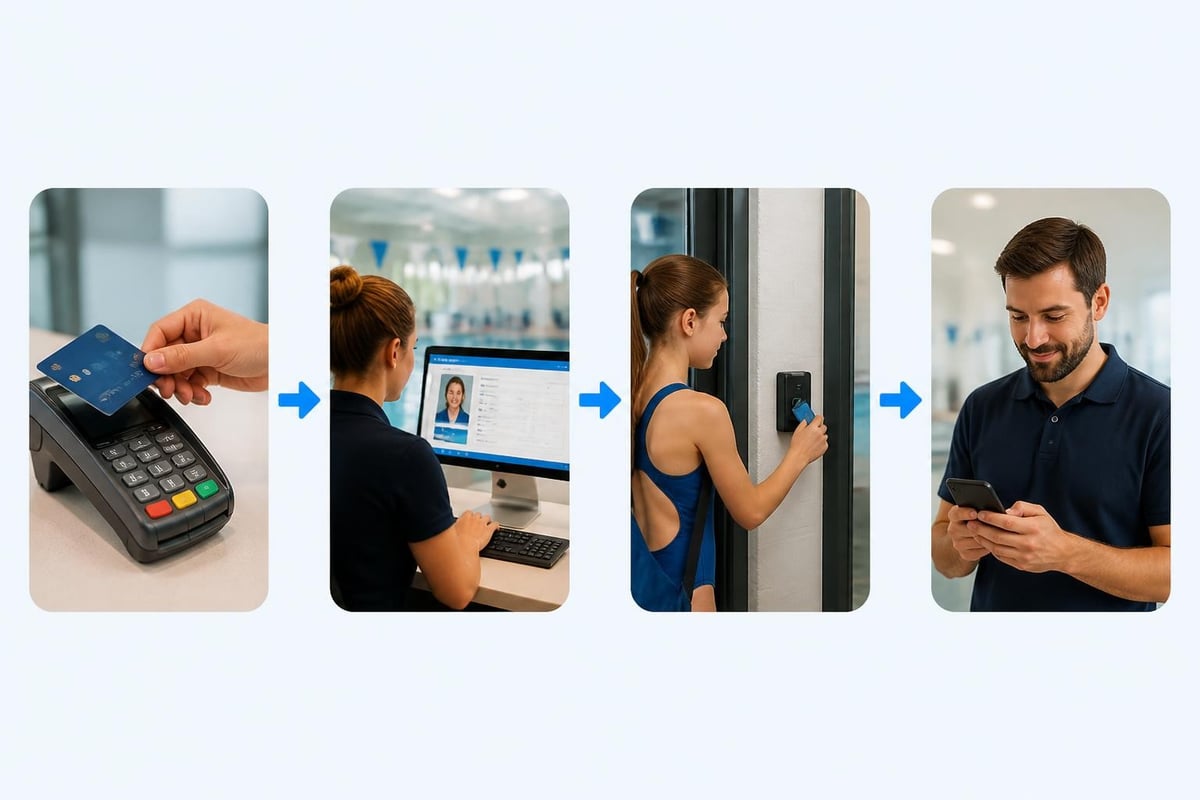
This is probably the most important integration. Your front desk staff shouldn't have to check multiple systems to know if someone is paid up. When a member scans their card or checks in with their phone, the system should instantly verify their payment status.
Here's how it flows in an integrated system:
- Member arrives at pool for morning swim
- Scans membership card or app at check-in kiosk
- System checks payment status in real-time
- If paid up: Welcome message, gate opens
- If payment failed: Friendly message to see front desk
- Front desk can immediately see the issue and help them fix it
No awkward conversations. No uncertainty. Just clear information that helps you enforce your policies consistently while keeping things friendly.
Making Self-Service Work for You and Your Members
One of the biggest time-savers with an automated payment system is giving members the ability to handle their own account management. When someone can update their credit card, view their payment history, or download a receipt without calling your office, that's time you get back in your day.
But self-service only works if it's actually easy to use. You don't want to trade phone calls for emails from confused members who can't figure out your portal.
What Members Should Be Able to Do Themselves
Keep it simple. Focus on the most common requests:
- Update payment method
- View payment history and upcoming charges
- Download receipts for tax or expense purposes
- Pause membership (if you allow it)
- Change billing plan or membership level
- Update contact information
The portal should work on phones, not just computers. Most people will try to update their card while they're thinking about it, which is usually when they get your email notification on their phone.
Automatic Notifications That Actually Help
Your automated payment system should send emails that people actually want to receive. Not corporate-speak notifications that end up in spam, but clear, helpful messages that tell members exactly what's happening and what they need to do.
Payment Confirmation: "Your $150 payment for July 2026 was processed successfully. Thanks for being part of [club name]!"
Upcoming Charge Reminder: "Your monthly dues of $150 will be charged on July 25, 2026. Questions? Just reply to this email."
Failed Payment Alert: "We couldn't process your payment of $150. Please update your payment info at [link] to keep your account active."
Successful Retry: "Good news! We were able to process your payment of $150. You're all set."
Notice these aren't long, formal letters. They're quick, friendly, and tell people exactly what's happening.
Security and Compliance You Can't Ignore
When you're storing credit card information and processing payments automatically, security isn't optional. You need to protect your members' financial data, and you need to follow the rules that govern payment processing.
The good news is that if you're using a reputable payment processor, they handle most of the heavy lifting. You don't store raw credit card numbers on your own servers. The payment processor handles that in a secure, encrypted environment.
PCI Compliance Made Simple
PCI DSS (Payment Card Industry Data Security Standard) sounds intimidating, but for most swim clubs, compliance is straightforward. If you're using a payment processor that hosts the payment forms and stores the card data, you typically only need to complete a simple self-assessment questionnaire annually.
The key is never storing sensitive card data in your own systems. When members enter their payment information, they do it on forms provided by your payment processor, not forms you built yourself. This dramatically reduces your compliance burden and security risk.
Protecting Member Information
Beyond PCI compliance, you want to follow general best practices for securing card-not-present transactions . This includes:
- Requiring strong passwords for member portals
- Using two-factor authentication for admin access
- Encrypting data in transit and at rest
- Monitoring for suspicious activity
- Having a clear process for handling security incidents
Most modern swim club management software platforms include these security features out of the box. You just need to make sure they're turned on and your staff follows the protocols.
| Security Measure | Why It Matters | How to Implement |
|---|---|---|
| Tokenization | Card numbers never stored in your system | Use payment processor's hosted forms |
| Encrypted connections | Prevents data interception | Require HTTPS everywhere |
| Access controls | Limits who can see payment data | Role-based permissions for staff |
| Audit logs | Track all payment activities | Automatic logging in your system |
| Regular updates | Patches security vulnerabilities | Keep software current |
Common Mistakes to Avoid
Even with a good automated payment system, clubs can run into problems if they don't set things up thoughtfully. Here are the mistakes you want to avoid.
Over-Automating Without Human Touch
Automation is great, but you still need human oversight. Don't set up your system to automatically suspend accounts or send threatening messages without someone reviewing the situation first. A member might have a legitimate issue-maybe their card was stolen and they're waiting for a new one, or they're dealing with a family emergency.
Build in checkpoints where staff review accounts before taking action. After the third failed payment retry, flag the account for a personal phone call instead of automatically locking them out.
Ignoring Failed Payment Data
Your automated payment system generates valuable data about why payments fail and when. Pay attention to it. If you notice that 30% of failures happen on the first of the month, maybe that's when your members' accounts are tight. Consider moving billing dates to mid-month or letting members choose their billing date.
If certain card types fail more often, investigate why. Sometimes it's a technical issue with how your processor handles specific banks or card issuers.
Making It Hard to Get Help
When someone has a payment problem, they need to reach a real person quickly. Don't hide your contact information behind layers of automated menus or chatbots. Make it easy to call or email someone who can actually fix the issue.
Include your phone number and email in every payment notification. When someone calls about a payment problem, your staff should be able to pull up their account instantly and see exactly what's happening.
Measuring the Impact on Your Club
Once you've implemented an automated payment system, track how it's actually performing. You want to know if it's solving the problems you set out to fix.
Key Metrics That Tell the Story
Focus on a few important numbers:
Collection Rate: What percentage of expected revenue are you actually collecting? Before automation, you might have been at 92-95%. After implementing a good system with retry logic, you should be hitting 97-99%.
Time Spent on Billing: Track how many hours per month your staff spends on payment-related tasks. This should drop significantly once automation is working smoothly.
Failed Payment Recovery Rate: Of the payments that initially fail, how many do you eventually collect through automatic retries? A good system with proper retry logic can recover 60-70% of failed payments without any manual intervention.
Member Satisfaction: Are you getting fewer complaints about billing? Are members using the self-service portal? These softer metrics matter too.
Comparing Before and After
Here's what a typical swim club might see after six months with a well-configured automated payment system:
| Metric | Before Automation | After Automation | Improvement |
|---|---|---|---|
| Monthly collection rate | 93% | 98% | +5% |
| Hours spent on billing | 40 hours | 8 hours | -80% |
| Failed payment recovery | 30% | 65% | +35% |
| Member calls about payments | 45/month | 12/month | -73% |
| Average days to collect late payment | 21 days | 7 days | -67% |
These numbers represent real money and real time saved. For a club collecting $30,000 monthly, a 5% improvement in collection rate is an extra $1,500 per month or $18,000 annually.

Choosing the Right System for Your Club
Not all automated payment systems are created equal, especially for membership-based organizations like swim clubs. You need something built for recurring billing, not one-time transactions.
Features That Matter for Swim Clubs
Look for these capabilities specifically:
Flexible Billing Schedules: You need to handle monthly, quarterly, and annual billing. Some members pay monthly, others pay for the whole summer upfront. Your system should handle both without making you jump through hoops.
Multiple Membership Types: Family memberships, individual memberships, junior programs, senior rates. Each might have different pricing and billing schedules.
Payment Plans: Can someone split their annual dues across several months? Your system should make this easy to set up and track.
Refund Handling: When you need to issue a refund or credit, it should be straightforward. And the system should track it properly so your books stay clean.
Reporting: You need to see your revenue by month, by membership type, by payment method. Good reporting helps you make better decisions about pricing and policies.
Integration With Club Operations
The payment system shouldn't exist in isolation. It needs to work with how your club actually operates. This means integration with your club management software so that payments, memberships, and facility access all stay in sync.
When someone's payment fails and their account gets suspended, that information needs to flow to your check-in system immediately. When they update their payment method and catch up, access should restore automatically.
Training Your Staff and Members
Even the best automated payment system needs some human support. Your staff needs to know how it works, and your members need to understand what to expect.
Getting Your Team Up to Speed
Train your staff on the basics before you go live:
- How to look up a member's payment status
- How to manually process a payment if needed
- How to help members update their payment information
- What the automatic retry schedule looks like
- When to escalate issues versus letting the system handle them
Do some role-playing scenarios. "A member calls saying their card was charged twice." "Someone wants to switch from monthly to annual billing." Walk through these situations until your team feels confident.
Communicating Changes to Members
When you switch to an automated payment system, tell your members what's changing and why. Send an email a few weeks before the transition:
"Starting August 1, 2026, we're moving to automatic billing for all memberships. This means your monthly dues will be charged automatically on the same day each month. You'll get an email receipt right away, and you can view your payment history anytime in the member portal.
Why are we doing this? It saves time for our staff and makes sure you never miss a payment. You'll still have complete control-you can update your payment method, view your history, or reach out with questions anytime."
Make it about benefits to them, not just convenience for you.
Real-World Example: Summer Club Implementation
Let me walk you through how a mid-sized summer swim club actually implemented an automated payment system and what happened.
Pinewood Swim Club has 185 member families. Before 2026, they billed manually using spreadsheets and Square invoices. Every month, the club manager spent about 15 hours sending invoices, tracking payments, and following up on late payments. By the end of each summer season, they typically had $8,000-$12,000 in unpaid dues.
In March 2026, they implemented an automated payment system integrated with their new club management platform . Here's what they did:
Setup Phase (2 weeks)
-
Migrated member payment information: For existing members with cards on file, they securely transferred the data. For others, they sent emails asking members to add their payment method through the new portal.
-
Configured billing schedules: Most members pay monthly May through September. About 30 families pay the full season upfront with a 5% discount.
-
Set up retry logic: First retry after 3 days, second after 7 days, third after 14 days. After that, personal outreach from the manager.
-
Created email templates: Payment confirmations, failure notices, upcoming charge reminders, all branded with their club logo and friendly language.
First Month Results
They processed their first automated billing cycle on May 15, 2026:
- 178 out of 185 payments succeeded on the first try (96%)
- Of the 7 failures, 5 succeeded on the first retry (3 days later)
- The remaining 2 required member action (expired cards)
- Total time spent by manager: 2 hours (versus 15 hours the previous year)
Six Month Impact
By the end of the season in October:
- Collection rate improved from ~93% to 98.5%
- Outstanding dues at season end: $1,800 (versus $10,000 the previous year)
- Manager saved approximately 80 hours over the season
- Member satisfaction increased-several families specifically mentioned appreciating the automatic billing in their renewal surveys
The club manager's take: "I was worried members would resist the change, but almost everyone loved it. They appreciated not having to remember to pay each month, and I appreciated not having to chase people down. The few hours I spent setting it up saved me weeks of work over the summer."
Handling Special Situations
Even with automation, you'll encounter situations that need special handling. Here's how to deal with common scenarios.
Member Requests to Pause or Cancel
Someone needs to pause their membership due to a medical issue, or they're moving and need to cancel. Your automated payment system should make this easy to handle without breaking the automation for everyone else.
For pauses: Temporarily suspend their billing schedule, note the reason and expected return date, and set a reminder to reactivate them. Don't delete their payment information-just pause the recurring charges.
For cancellations: Process a final prorated charge if needed, stop all future billing, and update their membership status. Keep their historical data for records, but mark them as inactive.
Partial Payments and Payment Plans
Maybe someone's going through a tough time financially but wants to stay in the club. You can work with them on a payment plan, and a good automated payment system should support this.
Set up a custom billing schedule just for them. Instead of $150 monthly, maybe they pay $75 every two weeks until they're caught up. The system can handle this as a special case while still processing everything automatically.
Refunds and Credits
Mistakes happen. You charged someone twice, or they paid for a program that got cancelled. Your system needs to handle refunds smoothly.
Issue the refund through the same system that processed the original payment. This keeps everything connected and easier to reconcile. Send the member a clear email explaining what happened and when they'll see the money back in their account.
Looking Ahead: AI and Smarter Automation
Payment automation is evolving quickly. In 2026, we're seeing AI-powered features that make systems even smarter about preventing problems and recovering revenue.
Predictive Failed Payment Prevention
Newer systems use AI to predict which payments are likely to fail before they even try. They look at patterns-this card always fails on the first of the month but succeeds on the fifth, or this member's payments typically fail right before renewal time.
The system can automatically adjust retry timing based on these patterns, or even send proactive reminders to members who might need to update their payment information.
Smart Retry Optimization
Instead of using the same retry schedule for everyone, AI-powered systems can optimize retry timing based on what's most likely to succeed for each situation. Insufficient funds? Wait until typical payday. Expired card? Skip retries and go straight to asking the member to update their information.
This kind of intelligence can push recovery rates even higher, turning 65% recovery into 80% or more.
Natural Language Payment Support
Some clubs are starting to use AI chatbots that can actually help members with payment questions 24/7. "When is my next payment?" "Can I update my credit card?" "Why did my payment fail?"
The AI can pull information from your payment system and answer these questions instantly, even at 11 PM on a Sunday when your office is closed.
The Bottom Line on Payment Automation
An automated payment system isn't about replacing the personal touch that makes your swim club special. It's about removing the tedious, repetitive tasks that take time away from actually serving your members.
When you're not spending hours every month on billing and collections, you have more time to plan better programs, improve your facilities, and build a stronger community. Your members get a smoother experience with fewer payment hassles, and your club's finances stay healthier with better collection rates and less revenue leakage.
The technology exists today to make this happen. The question is whether you're ready to make the switch and start getting those hours back in your week.
An automated payment system transforms how your swim club handles one of its most important but time-consuming tasks-collecting member dues. The right system reduces billing headaches, improves collection rates, and frees up your time to focus on creating a better experience for your members. PoolPulse provides a complete swim club management platform with integrated automated payment processing, built specifically for clubs like yours. See how much time you could save with a personalized demo of PoolPulse's billing automation features.

Five Front-Desk Tasks Your Swim POS Should Handle
Your front desk shouldn't need three systems to check in a swimmer. Here's how modern swim POS systems save time and reduce errors.

When Your Check-In Line Proves Software Is Too Slow
Discover how software timing affects your swim club's daily operations, from check-ins to billing, and why faster response times mean happier members.

The Swim Club Software Test Every Board Should Run
Run this simple test to see if your swim club software actually saves time or creates more work. Real scenarios, honest questions, better tools.
Want to see if PoolPulse is a good fit for your club?
Book a walkthrough and we'll show you exactly how PoolPulse can help based on your club's needs, goals, and current processes.