

The Board Approved the Policy. Now Control the System Change.
A board vote can settle the policy question while leaving dozens of operational details unresolved: effective time, affected records, permissions, notices, exceptions and rollback. Learn the practical decisions, owners and checks that turn the issue into a controlled club workflow.


The board has approved a new guest policy, and someone asks whether the office can “put it in the system before Friday.” That sounds straightforward until the reservation screen, the fee schedule and the member email all describe slightly different rules. Meanwhile, a family already has a booking for next month. Which version applies to them?
This is where club administration needs a careful handoff. Board approval establishes the policy. Implementation turns that decision into settings, records, staff instructions and member-facing words. Each needs to agree with the others before the club starts charging, restricting access or promising a new arrangement.
A useful change record can be a short document with supporting evidence attached. Its job is to answer ordinary working questions: what changed, who authorized it, when it applies, how it was checked and what staff should do when the result looks wrong.
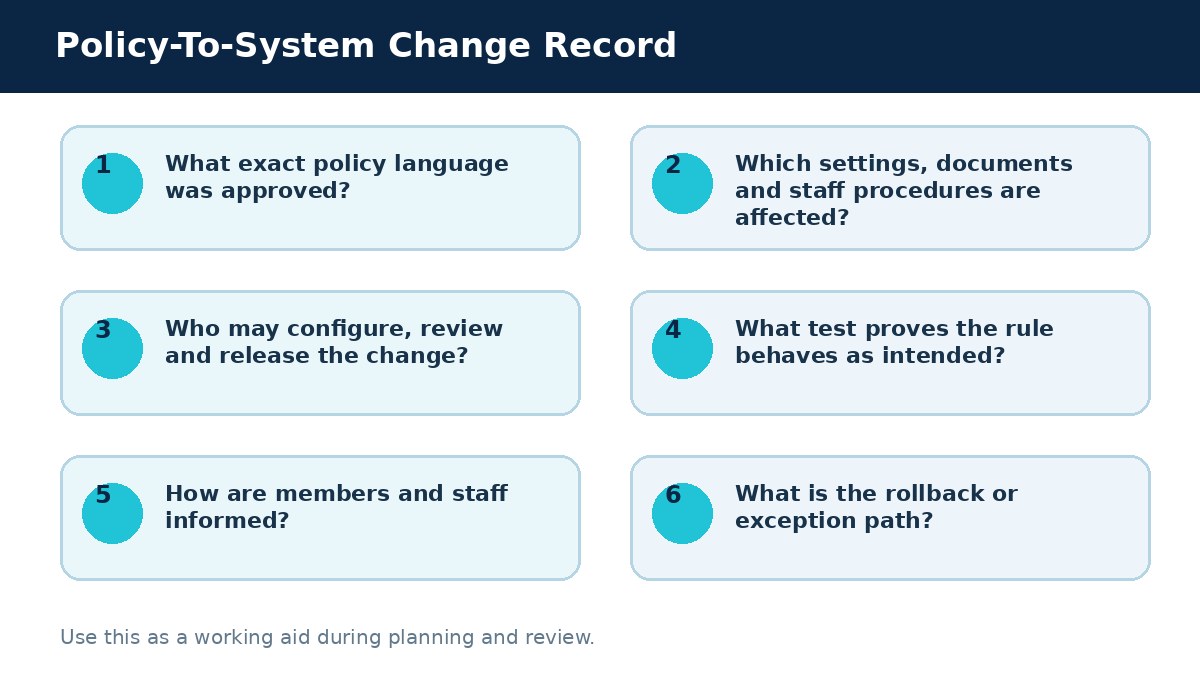
Answer these six control questions first
- What exact policy language was approved? Keep the final wording and approval reference together. Identify the officer or committee authorized to clarify it. A discussion in the minutes may explain the decision, but an abandoned proposal should never become the configuration brief.
- Which settings, documents and staff procedures are affected? Trace the change from the member’s first action through the saved record and eventual report. Include paper forms, email templates and desk instructions. A correct fee setting does little good if staff still quote the previous price.
- Who may configure, review and release the change? Name the requester, implementer, reviewer and release authority. Some roles may overlap in a small club, but someone other than the implementer should compare the result with the approved policy before members encounter it.
- What test proves the rule behaves as intended? Write expected results before testing. Cover a normal transaction, the precise limit or effective-time boundary, and a legitimate exception. “The setting saved” does not establish that reservations, charges and reports now agree.
- How are members and staff informed? Set the audience, message, delivery date and contact for questions. Give staff the explanation before members receive it, including what happens to existing bookings and what the desk may resolve without further approval.
- What is the rollback or exception path? Decide who can pause the affected workflow, restore a setting or approve an individual adjustment. State what cannot be undone automatically, especially issued invoices, processed payments, delivered messages and access already granted.
If one answer is missing, record the open question and its owner. That is much safer than allowing the person with administrator access to fill the gap during setup.
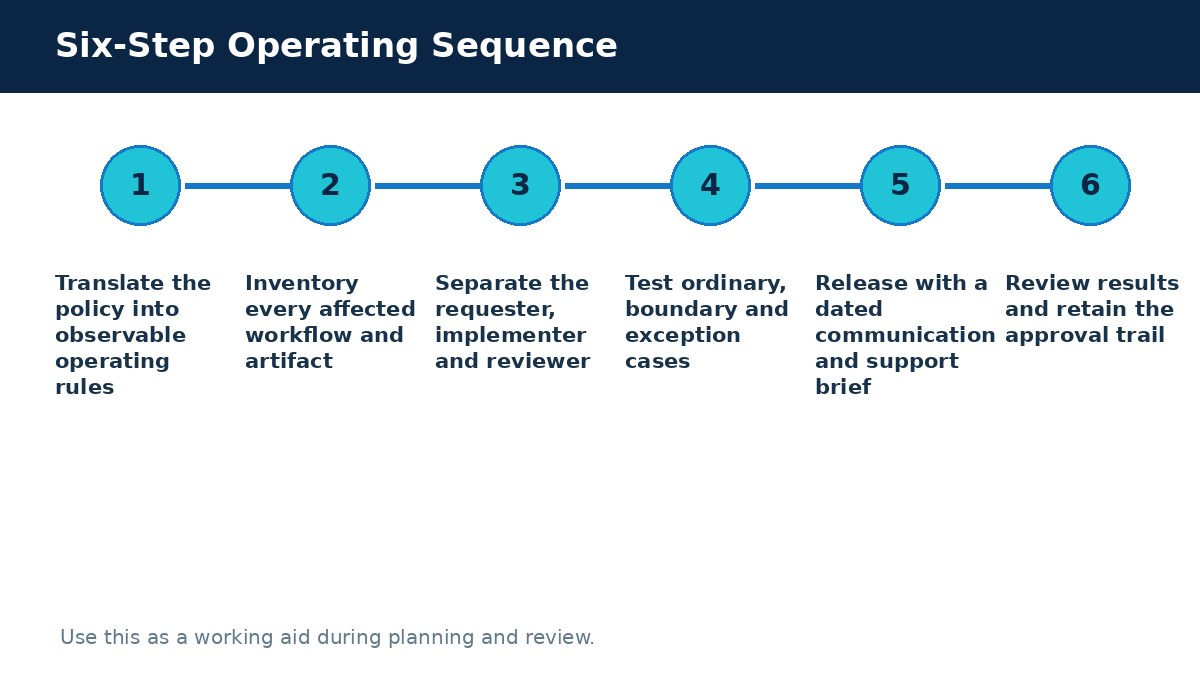
Build the plan in six deliberate steps
1. Translate the policy into observable operating rules
Start with the approved sentence, then describe what the member and staff should actually experience. “Increase guest fees for next season” leaves too much open. A usable rule names the fee, eligible reservation types, charging unit and trigger: for example, a charge per guest on a newly created reservation. It also says whether tax, discounts or complimentary categories are involved, where applicable.
Write the effective point as a date, time and named time zone. “May 1, 2027, at 12:00 a.m., America/New_York” is clearer than “effective May 1.” Specify whether the rule follows creation time, visit date, invoice date or another event. Check which timestamp the relevant system actually uses.
Then address existing records. Does the change affect future visits already booked, unpaid charges already posted or only new transactions? What happens when someone edits, cancels or recreates a booking? These are policy questions when they change a member’s entitlement or financial obligation. Return unclear points to the authorized decision-maker.
Never let a software limitation quietly make policy. If the available configuration cannot distinguish existing reservations from new ones, the manager needs an approved implementation approach, a controlled manual process or a delayed release. Choosing the nearest available setting can produce an outcome the board never approved.
2. Inventory every affected workflow and artifact
Follow one member through the entire process. For a guest-policy change, the inventory should cover at least these areas:
- Reservations: booking limits, eligible time slots, availability descriptions, modification rules, confirmations and existing future reservations.
- Billing: fee schedules, charge descriptions, invoice templates, discounts, adjustment procedures and the account used to classify revenue.
- Member access: eligibility checks, guest lists, check-in instructions and any passes used at the gate. Confirm that a booking change does not unintentionally suspend an otherwise eligible household.
- Reporting: guest counts, fee totals, outstanding balances and comparison reports that may mix old and new rates.
- Communication: website copy, member notices, confirmation emails, printed forms, staff scripts and the escalation contact.
For each item, name its owner and whether it needs a change or only verification. “No change required” is useful when someone has checked it. Record dependencies too: a new confirmation template should not be released while the booking form still accepts the old guest limit.
Keep the list proportionate. A small fee adjustment may need only a handful of checks; a membership-category change can touch much more. The PoolPulse features overview can help frame a product conversation. Verify the particular settings and handoffs your club needs rather than assuming a feature description proves the whole workflow.
3. Separate the requester, implementer and reviewer
The requester provides the approved policy and the intended outcome. The implementer changes the authorized settings and records exactly what changed. The reviewer checks the finished behavior against the policy and test cases. The release authority decides whether the evidence is sufficient to go live.
At a small club, the manager may request and implement the change while the treasurer reviews the charges and a board officer approves release. That is workable if the review is independent and meaningful. Ask the reviewer to walk through a sample and inspect the result, rather than reply “looks good” to a screenshot of a setting.
Use individual accounts where available, and keep access appropriate to the work. A seasonal supervisor may need to explain the rule and escalate exceptions without having permission to alter prices. Never solve an approval bottleneck by sharing an administrator login.
Open the change log before configuration starts. Record the policy reference, affected area, previous value, proposed value, implementer, reviewer and planned release time. Add actual timestamps, test evidence and approval when they exist. Retain the previous configuration securely, without copying unnecessary member information into the log.
4. Test ordinary, boundary and exception cases
Use a safe test environment when one is available. If the club must test in its live system, agree on a controlled method that avoids unintended charges, messages or access changes. Use the minimum data needed, identify test records clearly and document how they will be cleared or reconciled.
Build a short test list with an expected result beside each case:
- Normal: an eligible household creates a reservation below the guest limit. The saved booking, confirmation, charge and staff view show the same quantity and rate.
- Limit: a booking at the maximum succeeds; one above it is handled as the approved rule requires. Check zero guests and an empty guest-count field as relevant.
- Time boundary: compare records created just before, at and after the effective timestamp, using the actual system time zone.
- Existing record: open a future reservation made under the old rule, then test an allowed edit. Confirm that protected terms do not change unexpectedly.
- Exception: run an authorized fee waiver or club-caused cancellation through the process. Check who can approve it, the recorded reason and the resulting report.
Also try the route a busy employee will use, including a staff-entered reservation. A rule that works only in member self-service leaves a gap at the office. Save expected and actual outcomes, the tester’s name and the relevant record references. A failed case stays open until it is corrected and retested, or the proper authority explicitly accepts a bounded workaround.
5. Release with a dated communication and support brief
Choose a release window when someone can verify the result and answer questions. Before switching anything live, confirm approval, completed tests, the prior settings, unresolved issues and the person authorized to stop the rollout. Record the actual release time, including the time zone, rather than treating the planned time as proof.
Give staff a one-page brief: the new rule, start time, treatment of existing reservations, a sample calculation and the exception contact. Include a simple response for a disputed charge: acknowledge the concern, capture the reservation reference and route it for review. Staff should not need to improvise a credit or explain private board deliberations at the gate.
The member notice should describe the practical change and any action required. If existing bookings are protected, say so plainly. Align the notice with what the system will actually do, and confirm any required notice period before choosing the release date.
Define rollback carefully. Restoring a fee setting may stop new mistakes, but it will not reverse an invoice or undo a payment. Have a separate plan for affected records, authorized credits and corrected communication. If safe reversal is unavailable, pausing the affected booking route and escalating may be the better temporary measure.
6. Review results and retain the approval trail
Check a few live records immediately after release, then reconcile the first complete operating or billing cycle. Compare eligible transactions with the charges actually produced. Review grandfathered bookings separately, and account for authorized waivers, cancellations and manual adjustments rather than treating every difference as an error.
Look beyond the total. Ten undercharges and ten overcharges can hide inside a correct-looking revenue figure. Compare quantities, rates, individual outcomes and the report’s inclusion dates. Ask the front desk what members found confusing and whether staff encountered a route the tests missed.
Keep charge reconciliation separate from cash receipts. A valid $10 fee can remain unpaid, and a payment received this week may settle an older charge. Use transaction references to connect them without treating different reporting dates as evidence of an error.
Record corrections as new dated entries. Keep the original approval, configuration history, test evidence, release decision and reconciliation together. Close the change only when discrepancies have been resolved or assigned to an accountable owner with a clear next step. A future manager should be able to follow the decision without reconstructing it from old inboxes.
A worked club scenario
Consider a hypothetical 420-household club. Its board approves a guest-policy change for reservations created from May 1, 2027, at 12:00 a.m., America/New_York: a maximum of six guests per reservation and a $10 charge per guest. The previous terms were eight guests and $8 each. Existing reservations retain their original guest allowance and rate. A canceled reservation that is replaced counts as a new reservation.
Before setup, the manager asks what happens if a member adds guests to an existing booking. The authorized policy owner confirms that these bookings retain the old allowance and rate when edited. That clarification is recorded with the approval. The manager can now write an unambiguous implementation brief without making the decision at the keyboard.
The inventory identifies 84 existing future reservations, two booking entry routes, a fee schedule, a confirmation template, the guest list used at check-in and the monthly guest-revenue report. Those 84 records become the comparison set for verifying that the change leaves existing terms intact. The count is checked again at release because members may book or cancel during preparation.
The manager implements the approved approach, subject to the capabilities actually available. The treasurer independently checks the money and a board officer authorizes release. Tests include a new six-guest booking totaling $60, a seven-guest request handled under the new limit, and an existing eight-guest reservation retaining its $64 charge. A cancellation followed by a new booking must use the new terms. The tests also verify that guest-policy changes leave ordinary household access unchanged.
Staff receive the brief before the member notice. It includes both the $60 new-booking example and the $64 existing-booking example, since the different totals are intentional. The manager records the release time and checks the first live reservation made through each entry route.
At the first-cycle review, suppose new reservations account for 92 chargeable guests: $920 before adjustments. Documented club-caused cancellations remove charges for five guests, leaving $870. The treasurer matches that calculation to individual records and the report, then checks old-rate reservations separately. Any mismatch gets a record reference and an owner. This is how the club establishes that the approved change worked in practice.
Keep exceptions from becoming a second policy
A member may ask for special treatment because a booking took longer than expected or a staff member quoted the old rate. Capture the facts and use the authorized exception path. An individual adjustment should identify who approved it, why it was allowed and which record changed. It should not silently alter the default for every household.
Repeated exceptions deserve a management review. They may reveal unclear wording, inadequate notice or a configuration that cannot carry the policy reliably. If the remedy changes eligibility, prices or rights, take it back to the policy owner. Staff can improve the process within their authority; broader decisions need the appropriate approval.
Make the next change easier
Once the cycle is reconciled, keep the useful pieces: the change record, representative tests and staff brief. Update the names and dates for the next change rather than carrying forward old assumptions. The board, manager and front desk should each be able to see where their responsibility starts and ends.
For a discussion of your own workflow, See PoolPulse role-based access and audit-log workflows . Bring an approved policy, an existing reservation and one troublesome exception. Ask how the proposed setup handles each, what evidence can be retained and where a manual control would still be needed.

Beyond the Tech: How Modern Startups Are Revolutionizing Club Operations Safely
Modern club startups are reshaping operations with safer workflows, clearer access controls, stronger payment visibility, audit trails and security-forward design.

Your Seasonal Staff Onboarding Is Not Finished Until the Live Shift Test
Turn onboarding from a document checklist into a role-based rehearsal that proves staff can handle normal and exception cases.

Build Next Season’s Staff Schedule Around Coverage, Not Names
A list of returning employees is not a staffing plan. Define the coverage the operation needs before assigning names to shifts.
Want to see if PoolPulse is a good fit for your club?
Book a walkthrough and we'll show you exactly how PoolPulse can help based on your club's needs, goals, and current processes.