

What Good Free Migration Actually Costs Your Swim Club
Free migration sounds perfect until you count the hidden hours. Here's what swim clubs actually face when switching software in 2026.


You're six weeks from opening day, and your current swim club software just raised prices again. The new platform promises free migration, which sounds perfect until your assistant manager asks the obvious question: "Who's actually going to fix all the duplicate member records?" That's when you realize free migration might cost more than you thought.
The Real Price Tag Nobody Mentions
Free migration sounds like a gift. Most swim club software companies advertise it right on their homepage, and honestly, they should. Making you pay extra just to move your own member data would feel pretty unfair. But here's what I've learned after watching dozens of clubs switch systems: the migration itself might be free, but the work around it definitely isn't.
Your staff time is the hidden cost everyone forgets to count. When someone says they'll migrate your data for free, they usually mean they'll dump everything into the new system. They won't fix the member who's listed three times with different email addresses. They won't merge the family records where Dad signed up separately from Mom. And they definitely won't clean up the billing codes you created five years ago and never use anymore.
What Actually Gets Migrated
Let's talk about what you're really moving. Most clubs think migration means flipping a switch, but it's more like packing up an entire office.
Core member data usually transfers pretty smoothly:
- Names, addresses, and contact information
- Membership types and categories
- Basic family groupings
- Active/inactive status
The complicated stuff takes real work:
- Payment history with all the custom notes
- Partially completed waivers from last season
- Guest passes with expiration dates
- Equipment rentals or locker assignments
- Board member permissions and access levels
I watched one club discover they had 47 different membership categories in their old system. Seventeen of them had exactly one member. That's the kind of mess you need to clean up before migration, not after, and following data migration best practices can save you from these headaches.

The Three Questions That Determine Your Real Cost
Before you get excited about any free migration offer, you need honest answers to these questions. I've seen clubs skip this step and regret it three months later when they're still fixing problems.
Question One: Who Owns the Cleanup?
Some companies will migrate whatever data you give them. Others will actually help you prepare it first. This matters more than you think.
Here's a typical scenario. Your current system has 450 member families. But when you export the data, you find 520 records because people created duplicate accounts when they forgot their passwords. Someone needs to identify and merge those duplicates. That someone is either you or the migration team.
What to ask your new provider:
- Do you clean duplicate records before importing?
- Will you merge family accounts that got separated?
- Can you flag problematic data for us to review?
- What happens to incomplete or invalid records?
The swim club software migration checklist walks through exactly what data preparation looks like. Most clubs need 10-20 hours of staff time just for the cleanup phase.
Question Two: What Happens to Your History?
You probably care about different historical data depending on your club type. Swim teams need meet results. HOA pools need violation records. Tennis clubs want court reservation patterns.
Not all free migration includes everything. Some providers will move your current member roster but leave behind three years of billing history. Others will import members but not their login credentials, forcing everyone to reset passwords.
| Data Type | Usually Included | Sometimes Included | Rarely Included |
|---|---|---|---|
| Active members | ✓ | ||
| Inactive/past members | ✓ | ||
| Current season billing | ✓ | ||
| Multi-year payment history | ✓ | ||
| Saved payment methods | ✓ | ||
| Document uploads | ✓ | ||
| Email communication history | ✓ | ||
| Check-in timestamps | ✓ |
One club lost two years of guest usage data because they didn't ask specifically about it. They wanted to analyze which members brought the most guests, but that historical pattern was gone. Ask exactly what historical data you're getting.
Question Three: How Long Until You're Actually Running?
Free migration might take three days or three months. The timeline affects everything from when you can sign your contract to whether you need to pay for two systems simultaneously.
The realistic timeline usually looks like this:
- Data export from old system (1-2 weeks): You request exports, wait for files, discover formatting issues, request again
- Data cleanup (2-4 weeks): Your team reviews records, merges duplicates, updates outdated information
- Migration execution (3-5 days): The new provider imports everything
- Verification and testing (1-2 weeks): You spot-check records, test billing, verify family groupings
- Staff training (1-2 weeks): Your team learns the new system while still running the club
- Member transition (ongoing): Families reset passwords, update payment info, learn new processes
You're looking at 6-10 weeks minimum for a smooth transition. Clubs that try to rush it end up running both systems for a month, which costs way more than any migration fee would have.
What Makes Migration Actually Free vs. Technically Free
There's a difference between a truly helpful free migration and one that's free in name only. After talking with probably 50 club managers who've switched systems in the past two years, here's what separates the good experiences from the nightmares.
The Good Free Migration
The providers who do this right assign you a real person who knows swim clubs. Not a general customer success rep who also handles yoga studios and coworking spaces. Someone who understands that your June 1st opening day is non-negotiable and that your membership categories aren't random; they reflect decades of club history.
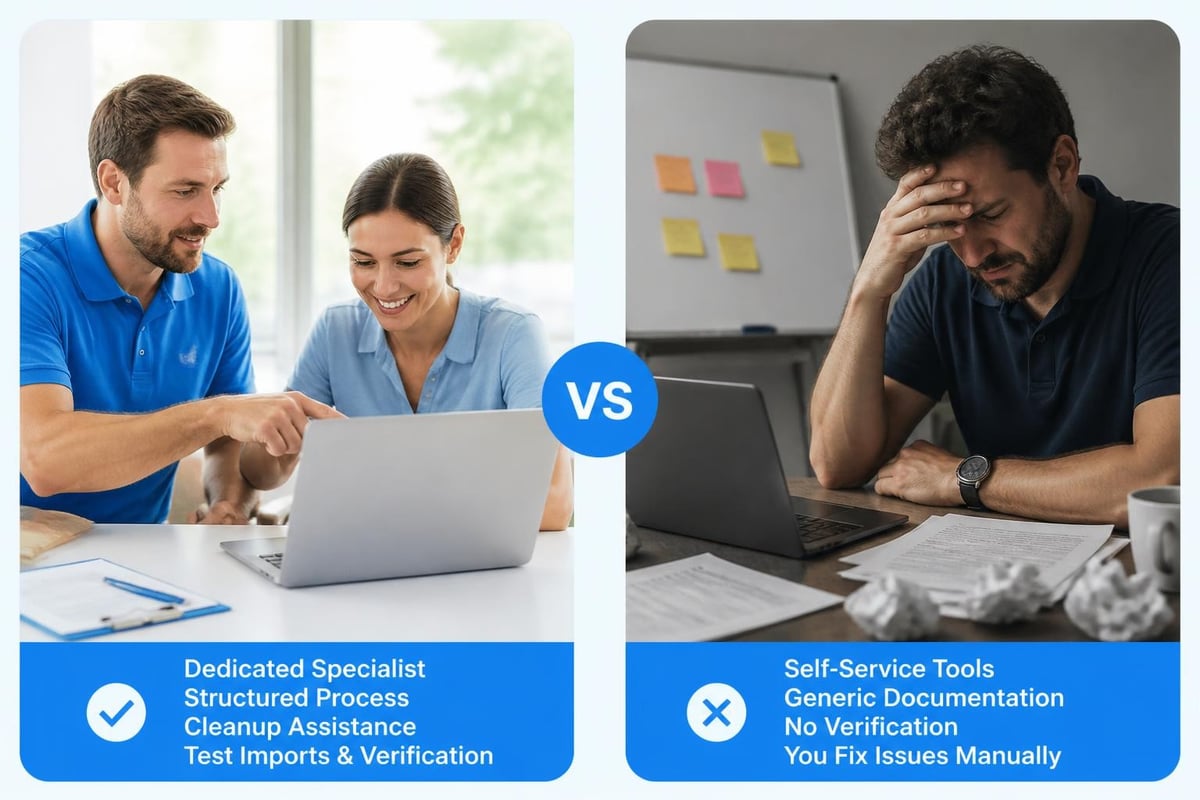
They'll have a structured process. You get a checklist. They tell you exactly what data to export and in what format. They review it before importing and flag obvious problems. They do a test import first, let you verify everything, then do the final migration.
Signs you're getting a genuinely helpful free migration:
- Dedicated migration specialist assigned to your account
- Detailed timeline with specific dates and responsibilities
- Test migration before the final import
- Data cleanup assistance included
- Training scheduled before go-live
- Support coverage extended during your transition period
The best providers also time the migration around your slow season. Nobody wants to switch systems the week before spring registration opens. Having flexible implementation through something like the PoolPulse onboarding process means you control when the migration actually happens.
The Technically Free Migration
This is where things get frustrating. The migration itself costs nothing, but you're basically on your own. You get a data import template, maybe a knowledge base article, and a "good luck" email.
You'll spend hours formatting your data correctly. When you upload it, you'll discover that family groupings didn't import properly. You'll need to manually reassign 40 families to the right primary account holder. Then you'll notice that member since dates are all wrong, which matters because you give tenure discounts.
You'll email support. They'll respond in 24-48 hours with instructions to try the import again. You will. It still won't work right. Eventually, you'll fix it yourself by manually editing records, which defeats the entire purpose of automated migration.
Red flags that free migration means extra work for you:
- No dedicated support contact
- Self-service import tools only
- Generic documentation not specific to swim clubs
- No verification step before final import
- Training starts after migration is complete
- "Best effort" language in the migration terms
One HOA pool manager told me her "free migration" took 60 hours of staff time because they had to manually verify every family grouping. The software company did import the data, technically fulfilling their promise. But the result was unusable without massive cleanup work.
The Data You Didn't Know You Were Losing
Here's something that catches almost every club by surprise. Your current system probably tracks things you don't even realize until they're gone. These aren't critical for running the club, but they're valuable for understanding your operation and making better decisions.
The Invisible Data Trail
Your current software has been quietly collecting patterns. Which families always renew early versus waiting until the last minute. Which membership types have the highest cancellation rates. When your peak check-in times happen each week. What percentage of new members came from member referrals versus your website.
Most free migration moves your member list but not this behavioral data. You'll start fresh in your new system, which means losing years of insights.
I know a swim club that analyzed their check-in data and discovered their Wednesday evening hours were basically empty. They shifted a lifeguard to Saturday mornings instead and saved $3,000 per season. But they only knew to make that change because they had three years of check-in history to review. If they'd migrated to a new system and lost that history, they'd still be overstaffing Wednesdays.
Custom Fields and Special Tracking
Every club adapts their software over time. You add a custom field for which school district families live in because you offer different rates. You create a note system for tracking which members volunteer for work parties. You flag families who need guest passes held at the front desk instead of sent electronically.
Ask about these customizations before migrating:
- Custom member fields and what they contain
- Note histories and who can see them
- Special flags or tags you've created
- Saved email templates
- Report configurations
- Integration connections to other tools
Your new system might not support the same customizations. Maybe you'll need to rethink how you track that information. That's fine, but you want to know before migration day, not after.
When Free Migration Actually Saves Money
Despite everything I've said, free migration can absolutely save you money and hassle. It's just not automatic. You need the right circumstances and the right partner.
The Perfect Free Migration Scenario
The clubs that get the most value from free migration usually share a few characteristics. Their data is reasonably clean to start with. They're migrating during their slow season. They have realistic expectations about timeline and effort. And most importantly, they're working with a provider who treats migration as a partnership, not a checkbox.
If you're comparing providers and one charges for migration while another offers it free, don't automatically pick the free option. Look at what's actually included. A $500 migration fee that includes 10 hours of dedicated specialist time, test imports, and cleanup assistance is probably cheaper than a free migration that leaves you doing 30 hours of manual work.
When evaluating options, check whether providers like PoolPulse offer both free migration support and structured onboarding that ensures you're actually set up for success rather than just handed an imported database.
Migration as a Fresh Start
Here's the counterintuitive benefit I've seen work really well. Some clubs use migration as an opportunity to clean house completely. Instead of migrating everything, they migrate only active members and current season data. Everything else gets archived in the old system, which they keep read-only access to for a year.
This approach means more work during migration, but you start the new system with pristine data. No duplicate records. No outdated membership categories. No billing codes you created in 2019 and forgot about. Just clean, current information.
When to consider a selective migration:
- Your old system has significant data quality issues
- You're restructuring membership categories
- You're changing how you handle family accounts
- You want to simplify your billing structure
- You're combining data from multiple sources
One tennis and swim club did this when switching systems in 2024. They migrated only their 200 active member families, not the 450 total families in their database. It meant some manual verification work, but they started fresh and their new system stayed clean. They still have access to the old system for historical questions, but day-to-day operations run on clean data only.
The Questions to Ask Before You Commit
Whether you're considering a switch or just exploring options, these are the specific questions that reveal what free migration really means. Don't accept vague answers. You need details.
About the Process
"Walk me through exactly what happens during migration" should get you a step-by-step timeline. Who does what. When it happens. What you need to prepare. How long each phase takes. If they can't give you specifics, they probably don't have a structured process.
"What data format do you need?" tells you how much work you're doing upfront. Some providers accept exports from common platforms directly. Others need specific CSV formats. If they need proprietary formats that your current system doesn't export, you're looking at manual work.
"How do you handle family groupings and relationships?" is critical for any membership-based organization. Families are the core unit at most clubs, and getting those relationships wrong causes endless problems. You want to know exactly how primary account holders, dependents, and authorized pickups transfer over.
About Data Quality
"What happens if you find problems during import?" should have a clear answer. Do they stop and notify you? Import everything anyway and let you fix it later? Automatically clean what they can and flag the rest? Understanding their approach helps you plan your own preparation work.
"Can we do a test migration first?" is non-negotiable in my book. You should never do a live, one-shot migration without seeing the results first. Test imports let you spot problems when there's still time to fix them. Tools like EaseUS Todo PCTrans Free work well for PC transfers, and the same principle applies to club data.
About Support
"Who do I contact when something goes wrong?" needs to be a name, not a department. Generic "contact support" answers mean you're on your own. You want a specific migration specialist who knows your account and can troubleshoot quickly.
"What support is included during the first month?" reveals whether they're committed to your success or just checking a migration box. The first 30 days after go-live are when you discover all the edge cases. Unlimited support during that window is worth a lot.

What Better Migration Looks Like in 2026
The swim club software industry has actually gotten better at migration over the past few years. More providers understand that their long-term success depends on happy migrations, not just signed contracts. But you still need to separate the companies who've genuinely improved their process from those who just updated their marketing language.
Modern Migration Standards
In 2026, you should expect certain things as baseline, not premium features. Real-time chat support during migration. Screen sharing for troubleshooting. Video training before go-live. A dedicated Slack channel or similar for quick questions. Migration scheduling that works around your calendar, not theirs.
The best providers also offer what I call "parallel running periods." You use both systems simultaneously for 2-4 weeks, entering new data in both places, verifying that everything syncs correctly. It's extra work in the short term, but it prevents the nightmare of discovering problems after you've already shut down your old system.
Current best practices include:
- AI-assisted data cleaning to flag duplicates and errors
- Automated family relationship mapping
- Payment method migration with PCI-compliant handling
- Historical data archiving with searchable access
- Mobile app migration for member-facing features
- Integration transfers for connected services
Some platforms now use AI to identify data quality issues before migration even starts. They'll scan your export files and flag things like members without email addresses, families with mismatched addresses, or membership types that don't align with standard categories. This kind of proactive cleanup, similar to what ProfWiz offers for Windows profiles , saves enormous time downstream.
The Role of Configuration vs. Customization
Here's something that affects migration more than people realize. The difference between configuring software and customizing it determines how smoothly your data transfers.
Configuration means choosing options within the system. You select which membership categories to offer, what your billing cycles are, whether you require waivers for minors. That's all standard functionality you're just adjusting to fit your club. This stuff migrates easily.
Customization means actually changing how the software works. Custom code for your specific situation. Third-party integrations unique to your setup. Special workflows that aren't built into the standard product. This stuff is hard to migrate and often needs to be rebuilt.
Modern platforms like PoolPulse are highly configurable, which means you can adapt them to your needs through settings rather than custom code. That makes future migrations easier because you're not locked into proprietary customizations that don't transfer.
The Hidden Timeline: What Really Happens Month by Month
Let me walk you through what a realistic migration timeline looks like, based on patterns I've seen across dozens of successful switches. This assumes you're starting in a slow period, not trying to migrate during your busy season.
Month One: Research and Decision
You're evaluating platforms, scheduling demos, comparing pricing. Most clubs talk to 3-5 providers before deciding. You're asking the questions I outlined earlier and getting serious about what you actually need versus what sounds cool in demos.
By the end of this month, you've chosen your new platform. You've read the contract carefully, especially the sections about data migration, training, and support. You understand what's included in "free migration" and what isn't.
Month Two: Preparation
This is data cleanup time. You're exporting data from your current system to see what you actually have. You're merging duplicate member records. You're archiving or deleting outdated information. You're documenting your current membership categories, billing structures, and any custom workflows.
Your migration specialist from the new platform should be actively involved now. They're reviewing your data exports, identifying potential problems, and helping you structure everything for a smooth import. You're also starting to configure your new system: setting up membership types, pricing, locations, and other foundational elements.
Month Three: Testing and Training
Your first test migration happens. You import a subset of data and thoroughly verify the results. Are family groupings correct? Did payment history transfer? Do member portals work? This is when you find and fix problems.
Your staff starts training on the new system. Not just watching videos, but actually using test accounts to process registrations, record payments, and run reports. They need hands-on experience before go-live.
Month Four: Go-Live and Support
You do the final migration during your slowest week. Both systems run in parallel for 1-2 weeks while you verify everything. Members start logging into the new system. Your staff handles real transactions. You're checking daily that everything processes correctly.
The new provider should have heightened support during this period. Quick response times. Screen sharing available. Someone who answers the phone when you call. This is when you earn back the cost of any migration fees or justify the value of truly free migration.
Making the Math Work in Your Favor
Let's talk actual numbers. What does free migration cost in staff time, and when does it make financial sense?
The Staff Time Calculation
Most swim clubs migrating from one modern platform to another spend somewhere between 20-40 hours of staff time on migration-related work. That includes data cleanup, testing, training, and the transition period. At $25/hour for administrative staff, that's $500-$1,000 in labor costs.
If your provider charges a $500 migration fee but does most of that work for you, cutting your time to 10 hours, the paid migration actually costs less. You're paying $500 but saving $750 in staff time, for a net savings of $250.
Conversely, if free migration comes with comprehensive support that reduces your time to 15 hours, it's genuinely saving you money. You're only spending $375 in staff time and paying nothing for the migration itself.
Break-even analysis for a typical 300-family club:
| Scenario | Migration Fee | Staff Hours | Staff Cost | Total Cost |
|---|---|---|---|---|
| DIY free migration | $0 | 40 | $1,000 | $1,000 |
| Paid full-service | $500 | 10 | $250 | $750 |
| Supported free migration | $0 | 15 | $375 | $375 |
| Budget free migration | $0 | 60 | $1,500 | $1,500 |
The best-case scenario is comprehensive free migration with dedicated support. The worst case is "free" migration that leaves you figuring everything out yourself. Understanding which type you're actually getting is the key to evaluating any offer.
Long-Term Cost Considerations
Migration is a one-time event, but your software choice is a multi-year commitment. Sometimes it makes sense to pay more upfront for better migration if it means better software and support for the next 5-10 years. Other times, free migration is the smart choice because the ongoing platform is also superior.
Look at total cost of ownership over three years. Include monthly fees, per-member charges, transaction costs, and required add-ons. If Platform A charges $500 for migration but costs $200/month while Platform B offers free migration but costs $350/month, Platform A is $5,200 cheaper over three years despite the migration fee.
You can compare specific platform costs and features using resources like the PoolPulse comparison pages to understand real pricing differences beyond migration costs.
Real Questions from Real Club Managers
These are the follow-up questions I hear most often when clubs start seriously evaluating a switch. The answers matter more than you might think.
"Can we migrate in phases instead of all at once?"
Sometimes yes, often no. If you have multiple locations or distinct programs (like competitive swim team versus recreational members), some platforms let you migrate one group first, verify everything works, then bring over the rest. But partial migration creates complexity because you're managing members in two systems simultaneously.
"What if we want to switch again in a few years?"
This is why export capabilities matter as much as import. Make sure your new platform lets you export all your data in standard formats anytime you want. Avoid platforms that lock your data in proprietary formats or charge fees to export. You should always maintain ownership and access to your information.
"Do members need to do anything during migration?"
Usually they'll need to reset passwords and verify their information. Some platforms can migrate login credentials, others can't for security reasons. Set expectations early that members will receive a "welcome to the new system" email with login instructions. Having clear member communication templates ready helps this go smoothly.
"What happens to our payment processing?"
This gets complicated because payment processors (Stripe, Square, etc.) are separate from your management software. Your new platform might use a different processor, which means members need to re-enter payment information. Alternatively, if both platforms use the same processor, payment methods might transfer, but don't assume this without confirming.
"Can we keep the old system accessible for a while?"
Most vendors let you maintain read-only access to your old system for some period after migrating, often 30-90 days. Some charge a reduced rate for extended access. This is valuable for answering historical questions ("When did this family join?" or "What did we charge for junior memberships in 2024?"). Budget for at least 60 days of overlap if possible.
When to Walk Away from Free Migration
Sometimes the smartest decision is turning down a free migration offer. I'm serious. There are situations where free migration indicates deeper problems with a provider or platform.
Warning Signs to Watch For
If the provider can't explain their migration process clearly and specifically, that's a red flag. Vague promises about "handling everything" without details suggest they haven't actually done this many times. You want confident, specific answers backed by experience with clubs similar to yours.
If they resist doing a test migration, walk away. There's no legitimate reason to refuse testing except hoping you won't notice problems until it's too late to back out. Any reputable provider should want you to verify the results before committing fully.
If their free migration excludes critical data you need, the offer isn't really helpful. Free migration of active members only might sound reasonable, but if you need billing history, waiver signatures, or incident reports for insurance purposes, incomplete migration creates legal and operational risks. Better migration options, whether free or paid, are explored in guides like TechRadar's data migration tools review .
The Better Alternative
Sometimes paying for expert migration is the right choice. If you're moving from a truly ancient system with messy data, or if you're combining multiple data sources, or if you have complex requirements around family relationships and billing arrangements, professional migration services might cost $1,000-2,500 but save you weeks of headaches.
The calculation is simple: if DIY migration will take 80 hours of staff time ($2,000 in labor), paying $1,500 for professional services that cut it to 20 hours ($500 in labor) saves you money even though you paid for migration. Plus you get a better result.
Free migration makes sense when it comes with real support, structured processes, and commitment to your success. The key is understanding what you're actually getting and counting the total cost including your staff time. Most clubs spend 20-40 hours on migration work regardless of whether the migration itself is free, and that time is worth real money. Choose based on total cost and long-term fit, not just whether migration carries an explicit fee. PoolPulse offers comprehensive migration support designed specifically for swim clubs, HOAs, and tennis facilities, with dedicated specialists who understand your data, your season, and your constraints. Our configurable platform and AI-powered tools help ensure your migration sets you up for better operations, not just a database transfer.

The Swim Club Software Test Every Board Should Run
Run this simple test to see if your swim club software actually saves time or creates more work. Real scenarios, honest questions, better tools.

The Seven Signs You've Outgrown Your Club Operations
Your swim club is growing, but your tools aren't keeping up. These seven warning signs reveal when manual processes cost more than solutions.

How to Answer Every Board Question in Under Two Minutes
Your swim club board asks tough questions. Learn how management reporting software helps you pull accurate answers in seconds, not hours.
Want to see if PoolPulse is a good fit for your club?
Book a walkthrough and we'll show you exactly how PoolPulse can help based on your club's needs, goals, and current processes.