

The "Where Is That Button?" Test for Club Software
Your club software should work the way your staff thinks. Here's how to tell if features actually save time or just add complexity.


You've got a new front desk volunteer starting this Saturday. It's the first busy weekend of summer season. She needs to check in families, process guest fees, and handle a few membership renewals. You have exactly ten minutes to show her the system before you leave for a tournament. Can she actually find what she needs, or will your phone ring five times before lunch?
That's the real test of software features. Not how many boxes your vendor can check on a comparison chart. Not whether the system technically can do something buried four menus deep. The question is whether the people running your club every day can actually use those features when it matters.
When More Features Make Everything Harder
Here's what happens at most clubs when they buy new software. The sales demo looks amazing. The vendor shows you automated billing, online registration, waitlist management, guest tracking, facility reservations, and a dozen other capabilities. You sign the contract feeling great about all those features.
Then your staff tries to use it.
The membership renewal button is in a different section than the member profile. Guest check-in requires three screens and two dropdown menus. The waitlist lives somewhere completely separate from registration. Nobody can remember where anything is, so they keep notes on sticky pads or just call you constantly.
You didn't buy bad software. You bought software where the features weren't designed for the people doing the actual work.
The False Promise of Feature Lists
Most swim club management platforms advertise features the same way. They list everything the system can technically accomplish. But there's a massive difference between "the software has this capability somewhere" and "your Saturday morning desk volunteers can find it in thirty seconds."
Think about your current system for a minute. How many features exist that nobody uses? How many require you personally to handle them because they're too confusing for staff? How many times have you thought "there must be an easier way to do this" while clicking through five screens?
That's the gap between having features and having useful software features.
What Actually Makes Features Work for Your Staff
Let's talk about what separates software that helps your club from software that just creates more work. It comes down to a few key principles that most vendors completely ignore.
Features Should Live Where People Expect Them
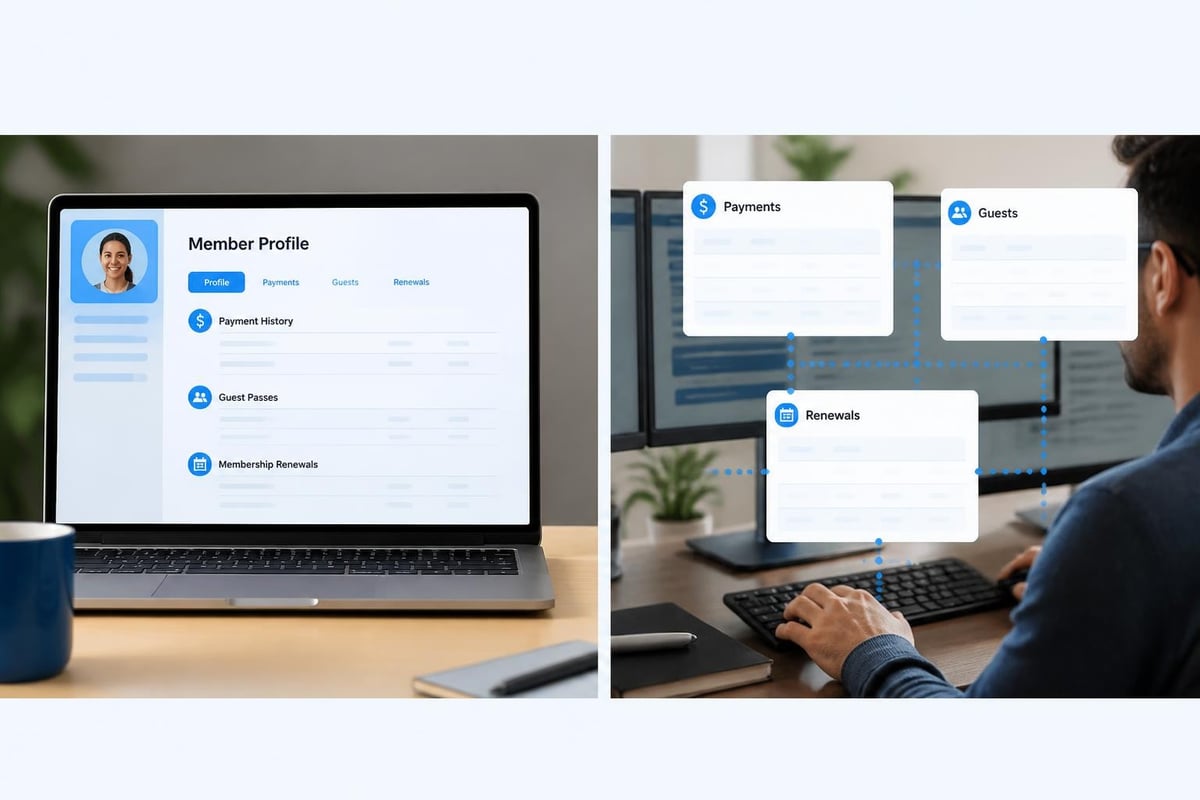
When someone opens a member's profile, what do they need to do next? Usually it's one of these things: process a payment, check their balance, update contact info, add a guest, or renew their membership.
Good software puts all of those options right there in the member screen. You don't navigate somewhere else to process a payment. You don't open a completely different module to add a guest. Everything related to that member sits in one logical place.
Bad software treats each feature as its own isolated thing. Payments live in the billing module. Guests require the guest management screen. Renewals happen in yet another section. Your staff spends half their time just navigating between screens trying to remember where things are.
The Saturday Morning Stress Test
Here's how to evaluate whether your software features actually work for real club operations. Pick your busiest arrival time (usually Saturday or Sunday morning). Watch what happens at the front desk for thirty minutes.
Count these things:
- How many times does someone ask where to find something?
- How many clicks does a simple task require?
- How many times does someone need to open multiple screens simultaneously?
- How many tasks require switching between different modules or sections?
- How many times does someone say "I'll just do it the old way"?
If any of those numbers are high, your features aren't organized around actual workflows. They're organized around how the developers built the system, not how your club operates.
Features That Adapt vs Features That Force Adaptation
Every club runs a little differently. Some charge different rates for different membership levels. Some have complex guest policies. Some handle tennis reservations alongside pool access. Some need custom fields for waivers or medical information.
This is where software features either become incredibly helpful or incredibly frustrating.
The Configuration Question
Rigid software forces your club to adapt to its features. It has one way to handle memberships, one billing structure, one check-in process. If your club does things differently, too bad. You either change your operations to match the software or you work around it with spreadsheets and manual processes.
When evaluating swim club management platforms, look at the comprehensive feature set and ask: can these features bend to fit how we actually work?
Flexible software adapts its features to your club. Want to charge different guest fees on weekends? Set it up that way. Need to track specific information during registration? Add those fields. Run things differently than the club down the street? Configure it to match your operations.
| Rigid Features | Flexible Features |
|---|---|
| One billing cycle for everyone | Configure billing by membership type |
| Standard check-in only | Custom check-in fields and workflows |
| Fixed guest policies | Rules that match your actual policies |
| Generic member categories | Categories and fields you define |
| Take it or leave it | Adapts to how you work |
The difference shows up every single day. Rigid features mean constant workarounds. Flexible features mean the software handles exceptions and special cases without you inventing manual processes.
Real Example: Guest Management
Let's say your club allows members to bring guests, but the rules are specific. Members get two free guest passes per month during peak season, unlimited during off-peak. Kids under five don't count. Guests pay different rates on weekends versus weekdays. Members who exceeded their passes can purchase additional ones.
Rigid software can't handle that. You'll end up tracking some of it manually, making judgment calls at the desk, and hoping for the best.
Good software lets you configure those exact rules. When someone checks in a guest, the system already knows the member's pass balance, the current rate, and whether to charge. Your front desk volunteer doesn't need to remember complex policies or do math. The feature handles it because it's built to match real club operations, not generic assumptions.
The Hidden Cost of Complicated Features
You know what's expensive? Training new staff. Answering the same questions over and over. Fixing mistakes that happen because features are confusing. Time spent clicking through menus instead of actually helping members.
Most clubs calculate software costs by looking at the monthly subscription price. They forget to count all the hidden hours that complicated software features consume.
The Real Training Investment
Simple, well-organized features mean someone can learn your system in an afternoon. They might not know every advanced option, but they can handle check-ins, process payments, and look up member information without bothering you.
Complicated features mean training takes days or weeks. Even then, people only remember the basics. Anything outside normal routine requires calling for help or avoiding the feature entirely.
Think about measuring feature adoption in your own club. How many capabilities does your current software have that nobody actually uses because they're too hard to learn?
The Question Marathon
Count how many times per week someone asks you "how do I..." questions about your software. If it's more than a couple, your features aren't intuitive enough.
Good software answers most questions before people need to ask them. Labels make sense. Options appear where people expect them. Common tasks take obvious paths.
Bad software requires constant explanation. People can't find things. Labels use technical jargon. Simple tasks require memorizing specific steps.
Features Built for Humans, Not Developers
Software developers think differently than swim club operators. They organize things in technical categories that make sense to them. They use terminology from their world, not yours.
The result? Software features that technically work perfectly but confuse everyone who isn't a programmer.
Plain Language Matters
Your registration feature shouldn't be labeled "member onboarding workflow." It's registration. Your billing shouldn't be "recurring revenue management." It's billing or payments.
Every button, every menu, every feature name should use words that club administrators and front desk staff instantly recognize. No translation required.
Progressive Disclosure Keeps Things Clean
Here's a smart principle from user experience design: progressive disclosure means showing people what they need right now and tucking advanced options out of the way until needed.
For example, when processing a membership renewal, the main screen should show the essential information: member name, membership type, cost, payment method. That's what 90% of renewals need.
Advanced options (prorating, custom start dates, special discounts, notes) should be available but not cluttering the main screen. Click "more options" if you need them. Otherwise, they stay hidden and the interface remains simple.
Bad software dumps everything on every screen. Fifty fields and checkboxes even though most renewals only use five. Your staff gets overwhelmed and makes mistakes because they can't tell what matters and what doesn't.
The AI Difference in Modern Features
You've probably noticed AI showing up everywhere in software lately. Most of it feels gimmicky. But there are a few places where AI actually makes software features dramatically more useful for club operations.
Intelligent Insights vs Data Dumps
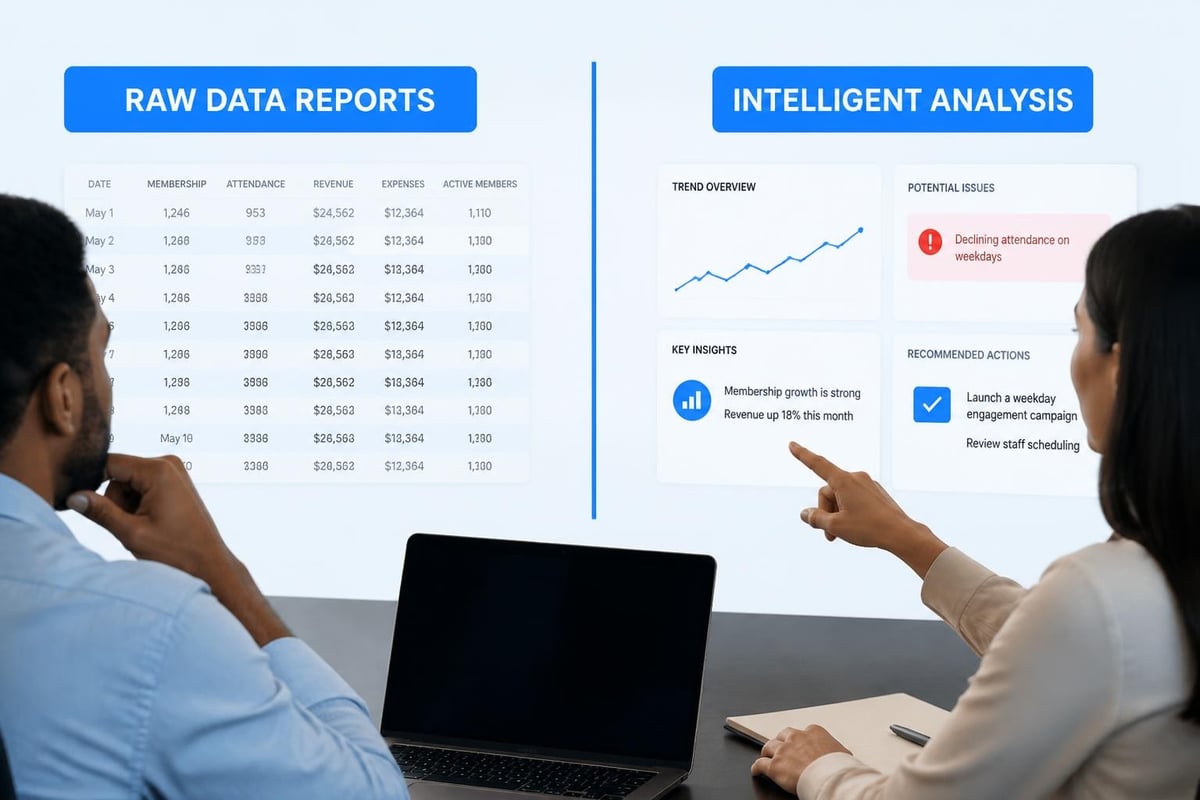
Traditional reporting features give you charts and numbers. You export a spreadsheet, stare at it, and try to figure out what it means. Is renewal revenue tracking on pace? Which membership types are growing or shrinking? Who hasn't shown up in a while?
AI-powered features actually interpret the data and tell you what matters. Instead of "here's 50 rows of renewal data," you get "renewal revenue is down 8% from this time last year, primarily in family memberships, and here are the ten members most likely to cancel based on usage patterns."
That's the difference between having data and having actionable information. When exploring AI-powered insights , look for features that answer questions, not just display numbers.
Reducing Repetitive Decisions
Good AI features handle routine pattern recognition so you can focus on actual decision-making. Things like flagging unusual account activity, predicting which members might not renew, identifying scheduling conflicts, or suggesting optimal pricing based on demand patterns.
Your time is valuable. Features that automate the tedious analytical work mean more time for member service and club improvements.
Security Features You Can't Skip
Here's something most clubs don't think about until there's a problem: security. Your software holds member data, payment information, contact details, and sometimes even medical or liability information.
The OWASP secure design guidelines outline critical security features that modern software should include from the ground up, not bolted on later.
What Security Features Look Like in Practice
You shouldn't need to be a security expert to run a club safely. Good software builds security features into normal operations:
- Automatic session timeouts so someone walking away from the desk doesn't leave member data exposed
- Role-based permissions that let front desk volunteers check people in without accessing financial records
- Audit trails showing who changed what and when
- Encrypted data storage and transmission protecting member information
- Two-factor authentication for staff accounts accessing sensitive features
These aren't optional extras. They're essential features for any system handling member data in 2026. When reviewing your security measures , make sure these capabilities exist and actually work without requiring manual effort.
Accessibility Features Benefit Everyone
Making software features accessible isn't just about compliance or checking boxes. Accessible design makes software easier for everyone to use.
Universal Design Principles
Following web accessibility guidelines creates features that work better in all situations:
- Clear labels and logical organization help everyone find things faster
- Keyboard shortcuts speed up repetitive tasks for power users
- High contrast and readable fonts reduce eye strain during long shifts
- Simple language and clear error messages prevent confusion
- Consistent layouts mean less time relearning screens
Think about your front desk on a bright summer morning with sun glare on the screen. Or an older board member reviewing reports. Or a staff member trying to check someone in quickly while juggling a phone call.
Accessible features handle all those scenarios better. It's not a special accommodation; it's good design that helps everyone.
Integration Features That Actually Connect Things
Your club probably uses multiple systems. Accounting software, email, maybe a website, possibly specialized tools for specific needs. Software features that integrate properly mean information flows between systems without manual data entry.
The Double-Entry Trap
Bad integration means entering the same information multiple times. Someone registers online, and you manually enter them into your management system. A payment gets processed, and you manually record it in your accounting software. A member updates their email, and you update it in three different places.
That's not just tedious. It creates mistakes. Information gets out of sync. You're never quite sure which system has the current data.
Good integration features connect systems automatically. When reviewing API design best practices , modern platforms should expose secure, well-documented interfaces that let data flow between applications without manual intervention.
Practical Integration Examples
Here's what useful integration features look like for clubs:
- Member registration automatically creates accounting entries
- Payment processing updates balances in real time across all screens
- Check-in data feeds attendance tracking without manual exports
- Member updates sync to email marketing tools instantly
- Website membership forms populate directly into your management system
Each integration eliminates manual work and potential errors. The features work together instead of requiring you to connect them manually.
The Mobile Question
Let's be honest about mobile features. Most clubs need mobile access for specific situations, not everything. Your board president checking membership numbers from their phone. A staff member looking up a member at the gate. Processing a quick renewal while walking around during an event.
Mobile Features vs Mobile-First Design
There's a difference between "features that work on mobile" and "everything crammed onto a tiny screen."
Good mobile features focus on the tasks people actually need to do away from a desk:
- Quick member lookup and status checks
- Simple check-in and guest processing
- Payment collection on the spot
- Viewing reports and dashboards
- Approving requests or reviewing alerts
Complex tasks like configuring billing rules or running detailed reports? Those work better on a full screen. Trying to make every feature equally usable on mobile usually means making everything mediocre everywhere.
Feature Deployment Without Disruption
Here's a scenario you want to avoid: Your software updates overnight. You arrive Saturday morning to discover the interface changed, buttons moved, and features work differently. Your staff is confused, members are waiting, and nobody knows where anything is.
Modern development practices like feature toggles and controlled rollouts let software companies deploy new features gradually without disrupting operations.
What Good Feature Releases Look Like
When evaluating software vendors, ask about their release process:
- Do features launch with advance notice and optional training?
- Can you test new features before they go live for members?
- Are changes documented clearly in plain language?
- Do major interface changes happen gradually with opt-in periods?
- Is there a rollback plan if something breaks?
The latest release practices at forward-thinking platforms include preview periods, documentation, and support during transitions. Features improve your operations instead of creating chaos.
Measuring Whether Features Actually Help
You've implemented new software with great features. How do you know if they're actually making your club operations better?
Simple Metrics That Matter
Forget complicated analytics. Track a few practical measurements:
Time savings: How long does check-in take now versus before? How quickly can you process renewals? How much time do you spend answering the same questions?
Error reduction: How often do you find billing mistakes? How many members contact you about incorrect balances or missing payments?
Staff confidence: Can new volunteers handle the basics without constant supervision? Do people use features independently or always ask for help?
Member satisfaction: Are members complaining less about processes? Are they successfully using self-service features?
These simple indicators tell you whether software features deliver actual value or just add complexity. The concept of measuring product experience applies perfectly to club software; focus on outcomes, not just usage statistics.

Features That Grow With Your Club
Your club changes. Membership grows or contracts. You add amenities. Policies evolve. Technology improves. Software features need to accommodate that evolution without requiring a complete system replacement.
Scalability Beyond Member Count
When people talk about software scaling, they usually mean handling more members. That matters, but it's not the only consideration. Features should also scale in sophistication:
- Start with basic check-in, add guest management later
- Begin with simple billing, expand to complex rate structures as needed
- Launch with essential reports, add advanced analytics when you're ready
- Implement core features first, activate specialized capabilities over time
The platform should support both a 200-member neighborhood pool and a 2,000-member multi-sport facility. Same core software, different feature configurations.
The Migration Path Question
Eventually, you'll outgrow any system or need to switch for other reasons. How easily can you extract your data and move it elsewhere?
Good software features export cleanly. Member records, payment history, attendance data, documents-everything should be accessible in standard formats. You own your data. The software should never hold it hostage.
When planning any platform transition, reviewing a detailed migration checklist helps ensure features and data transfer completely without disruption to operations.
The Configurability Advantage
Here's where most swim club software fails clubs. The features work one specific way. If your club operates differently, you're stuck. You either change how you run things or work around the software's limitations.
Building Features Your Way
Modern platforms separate what features do from how they appear and function. Want your check-in screen to collect specific information? Configure it. Need billing cycles that match your exact schedule? Set them up. Have membership categories unique to your facility? Define them.
This isn't about having infinite options. It's about core features that bend to match your operations instead of forcing you to match theirs. When exploring a fully configurable platform , look for systems that let you adjust workflows, fields, rules, and automation without requiring custom programming.
| Traditional Fixed Features | Configurable Features |
|---|---|
| Developer decides workflow | You design the workflow |
| Standard fields only | Add fields you need |
| Generic rules | Rules matching your policies |
| Change requires vendor | Change requires configuration |
| Same for every club | Unique to your operations |
The Self-Service Configuration Test
Ask potential vendors: "Can I configure basic features myself, or do I need to contact support?" If every adjustment requires a support ticket, you don't have configurable features. You have customization that depends on someone else's schedule.
True configurability means club administrators adjust features through clear, safe settings. No programming required. No waiting for vendor assistance. Your club, your rules, your setup.
When Features Should Stay Simple
Not everything needs to be sophisticated. Some features should do exactly one thing, simply and reliably.
The Simplicity Sweet Spot
Member check-in doesn't need artificial intelligence. It needs to be fast and foolproof. Scan a card or type a name, confirm they're current, done. That feature should work the same way every single time without thought.
Payment processing should collect the amount, process the transaction, update the balance. Nothing fancy required.
Guest registration should record who brought whom and handle any fees. Straightforward is perfect.
The sophisticated features-analytics, predictions, automated communications, complex workflows-should support the simple features, not complicate them. Your basic operations should remain utterly simple while advanced capabilities handle the complex work behind the scenes.
Features vs Support: The Balance
Even the best features occasionally confuse someone or create questions. When that happens, how easily can your staff get help?
Self-Service vs Calling for Help
Look for software with features that include built-in help:
- Tooltips explaining what options do
- Help links right where you need them
- Clear error messages that tell you what went wrong and how to fix it
- Video guides for complex processes
- Searchable documentation in plain language
When those aren't enough, responsive support services should answer questions quickly. But the goal is features clear enough that you rarely need to ask.
The Total Cost of Features
Software pricing often looks deceptive. One platform charges $200/month and lists fifty features. Another charges $400/month with fewer features listed. Which is the better value?
You can't answer that question by counting features or comparing prices. You have to calculate the real cost including:
- Time spent training staff on complicated features
- Hours lost navigating confusing interfaces
- Mistakes created by unclear processes
- Manual work because features don't integrate properly
- Support costs for questions and troubleshooting
- Lost revenue from billing errors or missed renewals
Cheap software with terrible features costs far more than premium software with features that actually work. When comparing pricing and value , factor in operational efficiency, not just subscription costs.
The Switching Cost Reality
Staying with bad software has a cost too. Every day you use features that waste time or create mistakes, you're paying for that software with your operations, your staff's sanity, and possibly your members' experience.
Sometimes the best financial decision is switching to better features even when your current contract isn't up. Calculate what those hidden costs actually total. The answer usually surprises people.
The Feature Roadmap Conversation
Software evolves. New capabilities get added. Existing features improve. How does the vendor decide what to build next?
Who Drives Feature Development
Good vendors build features based on actual customer needs. They talk to clubs, understand pain points, and prioritize improvements that help real operations.
Bad vendors build features based on sales pitches or technical preferences. They add flashy capabilities that look good in demos but don't solve actual problems.
Ask potential vendors: "How do you decide what features to build? Can customers request and vote on improvements?" The answer tells you whether future features will actually benefit your club or just pad marketing materials.
The right software features save time, reduce errors, and make your club run smoothly. The wrong ones create frustration and waste everyone's day. Focus on whether your staff can actually find and use features when it matters, not just whether capabilities exist somewhere in the system. If you're ready to experience swim club management software built around how clubs actually work, with configurable features and AI-powered insights that adapt to your operations, PoolPulse delivers the modern platform your club deserves.

The Swim Club Software Test Every Board Should Run
Run this simple test to see if your swim club software actually saves time or creates more work. Real scenarios, honest questions, better tools.

The Seven Signs You've Outgrown Your Club Operations
Your swim club is growing, but your tools aren't keeping up. These seven warning signs reveal when manual processes cost more than solutions.

How to Answer Every Board Question in Under Two Minutes
Your swim club board asks tough questions. Learn how management reporting software helps you pull accurate answers in seconds, not hours.
Want to see if PoolPulse is a good fit for your club?
Book a walkthrough and we'll show you exactly how PoolPulse can help based on your club's needs, goals, and current processes.