

What Club Software Actually Manages (And What It Misses)
Your club software handles renewals and check-ins. But what about the chaos between those moments? Here's what systems management really means.


You're sitting at the front desk on a Saturday morning in June, and three things happen at once. A parent asks why their May payment didn't go through. The pool manager needs yesterday's attendance numbers for a board meeting. And your seasonal staffer just texted asking how to override a guest limit for a birthday party. Each question touches a different part of your club, but they all need answers from the same place: your software. This is where systems management software becomes more than just a tech term. It's the difference between scrambling through spreadsheets and having answers in seconds.
The Gap Between What Software Does and What You Need
Most club administrators think about software in terms of features. Member database? Check. Payment processing? Check. But here's what happens in real life: those features work great on their own, yet your daily work still feels scattered.
Systems management software addresses the connections between all those pieces. It's not just about storing member information or processing a credit card. It's about how that payment connects to their membership status, which affects their check-in privileges, which determines what your staff sees at the gate.
Why Club Operators Miss This Distinction
When you're evaluating new software, the demo usually shows you perfect scenarios. Watch how easy it is to add a member! See how fast renewals process! But nobody shows you what happens when that member has a suspended account, a pending waiver, and a guest reservation all at the same time.
That's the systems management layer. According to comprehensive definitions of systems management , it encompasses the administration of interconnected systems and the processes that keep them working together. For swim clubs, this means:
- How member data flows between registration, billing, and access control
- When staff permissions change based on seasonal hiring
- Where guest policies override standard check-in rules
- Why some renewals trigger immediately while others queue for approval

The Five Places Your Systems Should Talk (But Probably Don't)
Let's walk through a typical member journey and spot where systems break down. Sarah joins your swim club in March. Simple enough, right? Watch what actually needs to happen.
1. Registration to Billing
Sarah fills out the registration form online. In a well-managed system, that information automatically creates her billing profile with the correct membership tier, payment schedule, and due dates. In a poorly connected system, someone manually enters her credit card info into a separate billing platform.
The breakdown: When billing lives in a different system than membership, you get duplicate entries, missed payments, and members who swear they already paid (and sometimes they're right, but it's attached to the wrong account).
What good systems management looks like:
- Registration data populates billing automatically
- Membership changes update payment amounts instantly
- Failed payments trigger membership status updates
- Renewal notices pull current contact information
2. Billing to Access Control
Sarah's first payment processes successfully. Now she should be able to check in at the pool. But if your billing system doesn't communicate with your access system, she's standing at the gate while staff "look into it."
This is where selecting the right system management tools becomes critical. Integration capabilities matter more than individual features. When evaluating swim club management software , ask specifically how billing status affects real-time access permissions.
| System Connection | What Should Happen | What Often Happens |
|---|---|---|
| Payment clears | Member gets instant access | Staff manually updates access list |
| Payment fails | Access revokes automatically | Member checks in until someone notices |
| Membership upgrades | New privileges apply immediately | Requires manual permission change |
| Account suspends | All family members lose access | Primary member blocked, kids still check in |
3. Membership to Family Management
Sarah adds her two kids to the account in April. Good systems management software understands family structures. It knows that her payment covers all three members, that the kids have different waiver requirements, and that guest privileges might apply differently.
Here's where things get messy: if your system treats each family member as a separate account, you'll have payment confusion, duplicate waivers, and frustrated parents who can't figure out why each kid needs a different login.
4. Seasonal Staff to Permissions
You hire college students for summer coverage. They need to process check-ins and handle guest registrations, but they shouldn't access financial data or modify membership terms. Three months later, they head back to school.
What systems management handles:
- Role-based access that changes with employment status
- Temporary permissions with automatic expiration
- Activity logs showing who modified what
- Bulk permission changes for seasonal transitions
Without proper systems management, you're manually adjusting permissions for each staffer, hoping you remembered to revoke access when someone left, and crossing your fingers that nobody accidentally deleted something important.
5. Guest Policies to Exception Handling
Sarah wants to bring six guests for her daughter's birthday. Your standard policy allows three. In a well-managed system, your staff can approve the exception, note the reason, track it for future reference, and ensure it doesn't automatically become Sarah's new permanent limit.
Poor systems management means either rigid rules with no flexibility or complete chaos where exceptions become the norm because nobody's tracking them.

What "Management" Really Means in Your Daily Work
The word "management" in systems management software sounds corporate and abstract. But think about what you actually manage every day: questions, changes, exceptions, and transitions.
Questions: The Real System Test
How fast can you answer these?
- Did the Johnsons pay for June?
- Who checked in last Saturday between 2 and 4 PM?
- Which memberships expire this month?
- How many guest passes has each member used?
If you're checking multiple places to answer each question, your systems aren't managed. They're just stored. Good systems management means having a single, reliable source for operational data.
Understanding the importance of establishing a source of truth applies perfectly to club operations. When member data, billing records, and access logs all point to the same authoritative information, you spend less time hunting and more time helping.
Changes: The Integration Test
What happens when you update a member's email address? In managed systems, that change flows everywhere: billing notifications, renewal reminders, access confirmations, and staff notes all use the new address automatically.
In unmanaged systems, you update the email in the member database, but billing still sends invoices to the old address because it's pulling from a different field. You've changed the information without managing the system.
Exceptions: The Flexibility Test
Every club has unique situations. A founding member who pays annually but wants monthly invoices. A family that shares one membership across divorced parents with different addresses. A corporate membership that covers employees but limits guests differently.
Systems management software should handle exceptions without breaking rules. That means:
- Creating special cases that don't become permanent defaults
- Documenting why exceptions exist
- Alerting staff when unusual situations occur
- Reverting to standard policies when exceptions end
Transitions: The Continuity Test
Seasonal openings and closings. Staff turnover. Membership tier changes. Board transitions. Every club cycles through these shifts, and good systems management preserves continuity.
When your summer manager starts in May, they shouldn't need three weeks of training to understand what happened during the off-season. When members upgrade from basic to premium, they shouldn't experience billing hiccups or access delays. The system manages these transitions so you don't have to manage them manually.
The Hidden Work That Systems Management Eliminates
You know that administrative burden you can't quite name? The feeling that you're always playing catch-up even when nothing's technically broken? That's what happens when systems exist without management.
Let me show you what I mean. Count how many times you do these tasks in a week:
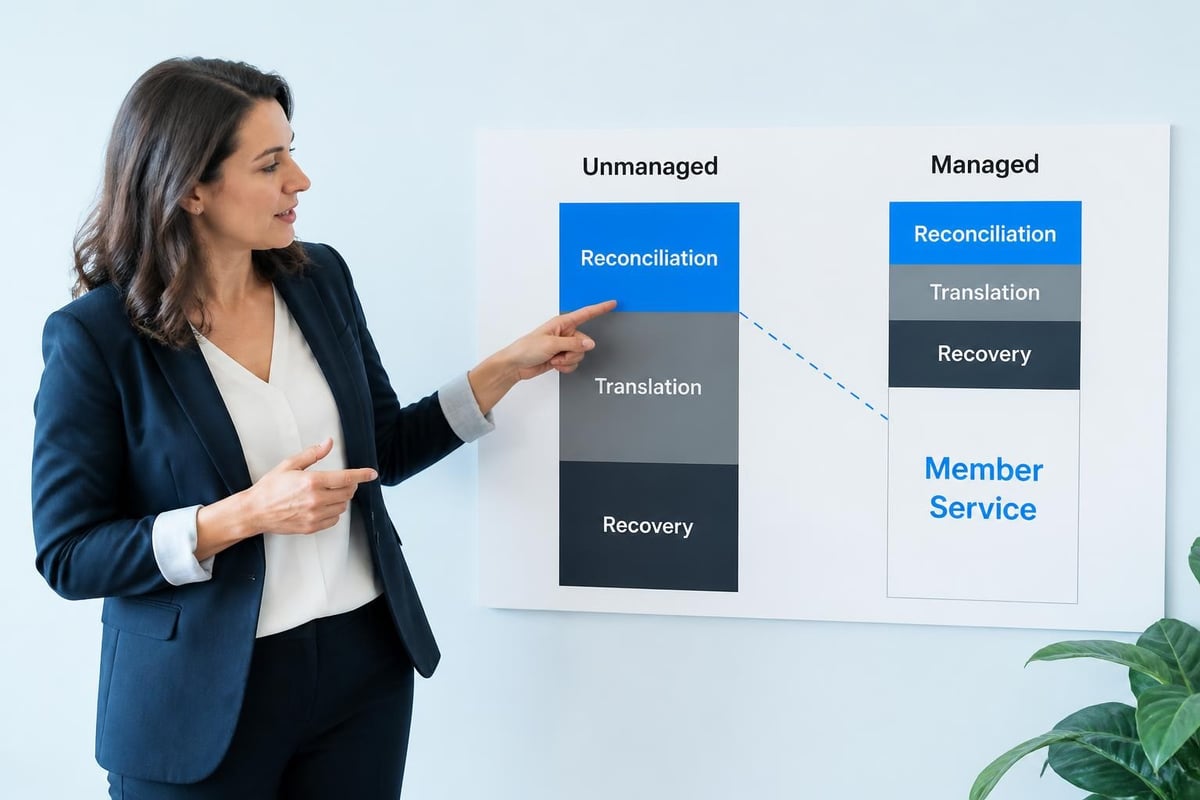
Reconciliation Work
- Checking if the member list matches the billing list
- Verifying that paid members have active access
- Confirming guest counts against what members are charged
- Cross-referencing attendance with capacity limits
In properly managed systems, these checks happen automatically. The software reconciles data continuously, flags discrepancies, and alerts you only when human judgment is needed.
Translation Work
- Converting membership types to billing codes
- Matching family members to primary accounts
- Linking guest passes to usage policies
- Connecting access levels to membership tiers
This translation shouldn't require human intervention. Systems management software maintains these relationships so information flows correctly without interpretation.
Recovery Work
- Finding out why a member can't check in
- Tracking down missing payments
- Explaining billing discrepancies
- Fixing access permissions that mysteriously changed
When systems aren't properly managed, you spend enormous time investigating problems that shouldn't exist. The member's payment processed fine, but three disconnected systems don't agree on their status.
How AI Changes Systems Management for Clubs
Modern systems management software increasingly incorporates AI, but not in the way tech companies advertise it. Forget chatbots and flashy predictions. Practical AI in club management focuses on pattern recognition and anomaly detection.
What AI Actually Does for Club Operations
Detects unusual patterns: When a member who typically checks in twice weekly hasn't visited in three weeks, AI can flag it. When guest usage suddenly spikes, AI notices. When billing failures cluster around specific membership tiers, AI highlights the pattern.
Automates routine decisions: Should this late payment trigger suspension or just a reminder? Is this guest count request unusual for this member? Does this access attempt look legitimate? AI handles standard cases so staff addresses only genuine exceptions.
Maintains data quality: AI catches duplicate entries, inconsistent formatting, and incomplete records. It suggests corrections based on historical patterns and flags data that doesn't match typical structures.
The AI-powered insights in modern club management focus on operational efficiency rather than futuristic automation. They help you spot problems before they become complaints and identify opportunities you'd otherwise miss.
The AI Features That Actually Save Time
Not all AI capabilities matter equally for swim clubs. Focus on these practical applications:
| AI Feature | What It Does | Time Saved |
|---|---|---|
| Payment prediction | Flags likely failures before they occur | Reduces billing follow-up |
| Capacity forecasting | Predicts busy periods based on history | Improves staffing decisions |
| Member risk scoring | Identifies accounts likely to cancel | Enables proactive retention |
| Data cleanup | Finds and fixes inconsistent information | Eliminates manual database maintenance |
Choosing Systems Management Software for Your Club
When you're evaluating software, most demos focus on the exciting stuff: sleek interfaces, mobile apps, fancy dashboards. But systems management happens behind the scenes, and you need to dig deeper to assess it.
Questions That Reveal True Systems Management
Ask about data flow: "When I update a member's phone number, where else does that change automatically?" Good software should update everywhere. Poor software requires multiple entries.
Ask about conflicts: "What happens when a member has a failed payment but already checked in that day?" Well-managed systems have clear conflict resolution rules.
Ask about history: "Can I see when and why this member's access was suspended six months ago?" Systems management includes audit trails and documentation.
Ask about recovery: "If I accidentally delete a member, what's the recovery process?" Managed systems protect against mistakes with backups and restore capabilities.
The Configuration vs. Customization Trap
Many systems claim to be "highly configurable," but configuration means different things. True systems management lets you adjust rules, policies, and workflows without breaking integrations.
Good configuration examples:
- Changing guest limits per membership tier
- Adjusting when renewal notices send
- Modifying what triggers access suspension
- Setting different permissions for staff roles
Bad customization that breaks systems:
- Modifying database structures
- Creating fields that don't integrate
- Building workarounds instead of workflows
- Storing critical data in custom notes
When exploring club management software features , prioritize integration over customization. You want software that adapts to your policies while maintaining system integrity.
The Migration Reality Check
Switching systems management software means moving your data, yes, but more importantly, it means transferring your operational logic. How do your current membership tiers map to new ones? What happens to members mid-billing cycle? How do historical guest counts convert?
A proper swim club software migration checklist addresses systems management, not just data transfer. You're moving relationships, rules, and workflows, not just names and numbers.
What Good Systems Management Feels Like
Here's how you know your systems are truly managed: Saturday morning chaos doesn't spiral. You answer questions quickly because information is where you expect it. Staff onboarding takes hours instead of weeks. Board members get accurate reports without you scrambling.
The Staff Experience
Your seasonal workers should feel confident, not confused. When they log in, they see exactly what they need for their role. Check-in screens show relevant member status automatically. Guest registration prompts them for required information based on policies. Exceptions flag for approval rather than blocking operations.
The Member Experience
Members shouldn't know your systems exist. They register once, payment processes automatically, check-in works consistently, and status changes (upgrades, additional family members, guest requests) happen smoothly. Behind the scenes, managed systems coordinate everything.
The Administrator Experience
You spend time on strategy instead of scrambling. Monthly close takes minutes because systems reconcile continuously. Board questions get answered with accurate reports pulled instantly. Planning for next season uses real operational data, not guesswork.
Common Systems Management Mistakes
Even good software becomes ineffective when used poorly. Watch for these patterns that undermine systems management:
Creating workarounds instead of fixing root causes: When your billing system doesn't talk to access control, the temptation is to maintain a separate spreadsheet. Don't. That workaround becomes a permanent (and fragile) part of your operations.
Storing critical data in unstructured formats: Custom notes fields seem convenient for special situations, but they defeat systems management. If it matters operationally, it should live in structured, searchable, reportable fields.
Granting excessive permissions to avoid permission issues: When staff can't perform needed tasks, the wrong solution is making everyone an admin. Proper systems management means configuring roles correctly, not bypassing security.
Postponing data cleanup: "We'll fix duplicate records later" never happens. Poor data quality cascades through managed systems, creating confusion and eroding trust in reports.
The Real Cost of Poor Systems Management
Think about how much administrative time your club spends on tasks that shouldn't require human intervention. Reconciling lists. Investigating discrepancies. Manually updating related records. Following up on issues that should've been caught automatically.
According to systems management research and insights , organizations typically waste 20-30% of administrative capacity on work that properly managed systems handle automatically. For a swim club with limited staff, that's the difference between barely keeping up and actually improving operations.
The Opportunity Cost
Every hour spent managing disconnected systems is an hour not spent on member experience, facility improvements, program development, or strategic planning. Poor systems management doesn't just waste time, it limits what your club can become.
The Member Impact
Members notice when systems don't work smoothly. They might not know it's a "systems management" issue, but they feel it when:
- Their payment processed but they can't check in
- Guest privileges vary inconsistently
- Staff give different answers to the same question
- Renewals get lost or delayed
- Billing doesn't match what they agreed to
Poor systems management erodes member confidence. Good systems management creates seamless experiences that members barely notice (which is exactly the point).
Moving Toward Better Systems Management
You don't need to replace everything overnight. Systems management improves incrementally when you focus on integration over features.
Start by mapping current disconnects: Where do you manually bridge information gaps? Those are your high-priority integration opportunities.
Document exception handling: How do you currently manage special cases? Good systems management codifies these processes instead of leaving them to institutional knowledge.
Clean your data aggressively: Systems management works only when data quality is high. Deduplicate records, standardize formats, and validate critical information.
Train for system thinking: Help staff understand how actions in one area affect others. When they update member information, what else changes? This awareness prevents problems.
Systems management software isn't about technology for technology's sake. It's about connecting the pieces of your operation so information flows correctly, staff work efficiently, and members experience consistency. When your systems are truly managed, you spend less time hunting for answers and more time running a great club. PoolPulse offers swim club management software specifically designed with integrated systems management, helping clubs streamline member management, billing, renewals, and check-ins through a unified, AI-powered platform. If you're ready to move beyond disconnected tools and toward genuinely managed systems, explore how modern club software can transform your daily operations.

The Swim Club Software Test Every Board Should Run
Run this simple test to see if your swim club software actually saves time or creates more work. Real scenarios, honest questions, better tools.

The Seven Signs You've Outgrown Your Club Operations
Your swim club is growing, but your tools aren't keeping up. These seven warning signs reveal when manual processes cost more than solutions.

How to Answer Every Board Question in Under Two Minutes
Your swim club board asks tough questions. Learn how management reporting software helps you pull accurate answers in seconds, not hours.
Want to see if PoolPulse is a good fit for your club?
Book a walkthrough and we'll show you exactly how PoolPulse can help based on your club's needs, goals, and current processes.