

The Daily Headache Test: Can You Manage Members in Under 5 Minutes?
Every swim club admin faces the same questions at check-in. Here's how to manage member updates, payments, and access without the chaos.


You're at the front desk on a Saturday morning. Three families are waiting to check in. The first member forgot their card. The second needs to add a guest but isn't sure if their membership allows it. The third swears they paid last month, but your system shows a balance. Meanwhile, your phone is ringing, and a board member just walked in with "a quick question" about membership reports. Sound familiar?
This is the daily reality of trying to manage member information when your systems aren't talking to each other. You're juggling spreadsheets, payment records, access logs, and membership tiers while people are waiting. The question isn't whether you can handle it (you always do), but whether there's a better way to manage member data that doesn't leave you scrambling every weekend.
What It Actually Means to Manage Member Information
When someone says "manage member," they usually mean three things happening at once. You're tracking who belongs to your club, what they're allowed to do, and whether they've paid for that privilege. But in practice, it's way more complicated than that.
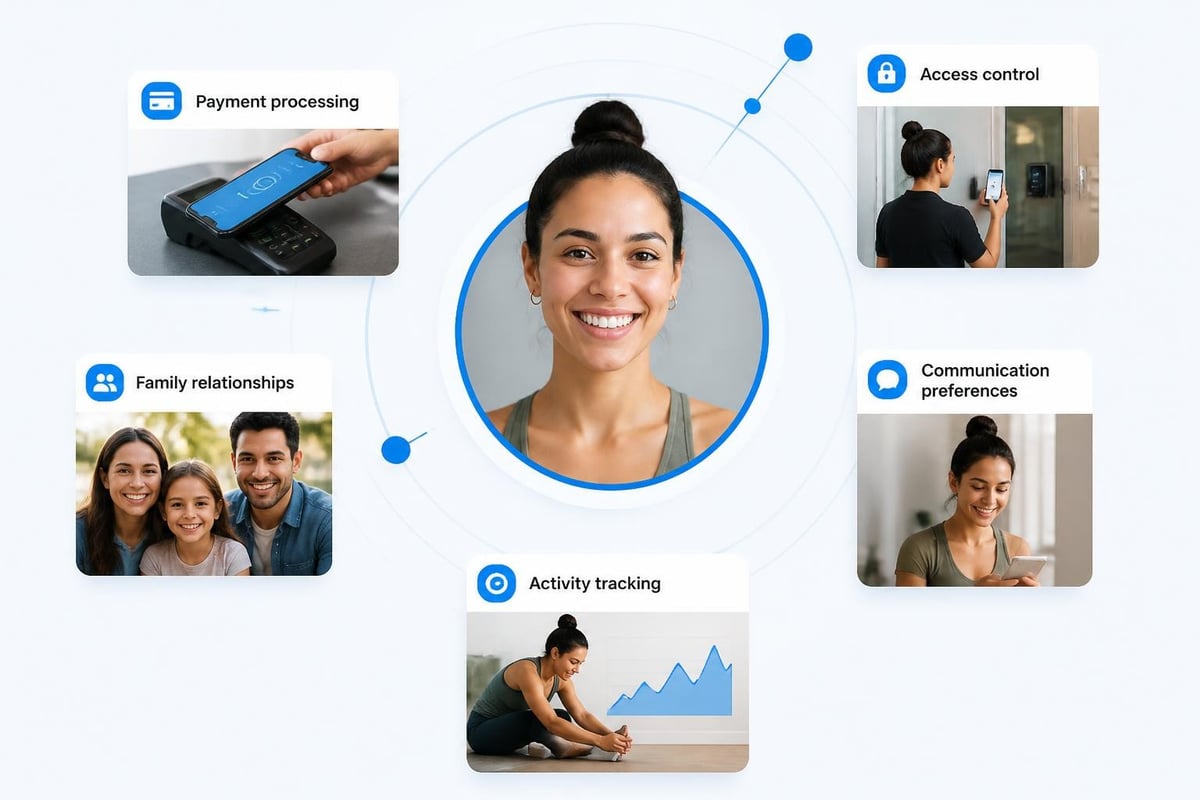
You're really managing relationships. Every member profile connects to family relationships, membership tiers, payment history, check-in records, guest privileges, waiver status, and communication preferences. Change one thing, and it ripples through everything else.
The Five Core Tasks You Handle Every Day
Managing members isn't a single job. It's at least five different jobs that happen simultaneously:
- Verification – confirming someone is actually a member in good standing
- Updates – changing addresses, phone numbers, emergency contacts, or family composition
- Access control – deciding who gets in and what amenities they can use
- Payment tracking – knowing who's paid, who's overdue, and who needs a reminder
- Communication – sending renewal notices, event announcements, or policy updates
Each task touches different parts of your operation. When you manage member check-ins at the gate, you're verifying access. When you process a billing update, you're tracking payments. When a family adds a teenager to their account, you're updating relationships and potentially changing tier pricing.
The problem most swim clubs face isn't doing these tasks. It's doing them quickly enough that members don't wait, accurately enough that you don't create billing disputes, and consistently enough that every staff member handles situations the same way.

The Three Systems You're Actually Juggling
Walk into most swim club offices, and you'll find the same setup. There's the membership database (maybe a spreadsheet, maybe old software from 2015). There's the billing system (possibly your bank's portal or a separate payment processor). And there's the check-in method (key cards, a sign-in sheet, or someone's really good memory).
These systems don't talk to each other. When someone pays their dues, you update the billing system. Then you have to remember to update the membership database. Then you need to make sure the access system knows they're current. Miss one step, and you get the Saturday morning scenario where someone insists they paid but the gate won't let them in.
Why Fragmented Systems Create Daily Problems
Here's what happens in a typical week with disconnected systems:
- Monday: You process renewal payments and update billing records
- Tuesday: You remember to update membership status in your database
- Wednesday: A member complains the gate won't scan their card
- Thursday: You realize access permissions weren't updated when billing changed
- Friday: You spend two hours reconciling everything before the weekend rush
- Saturday: Someone's kid can't check in because their parent's profile shows "inactive"
You're not managing members at that point. You're managing the gaps between systems. According to Higher Logic's 2024 Association Member Experience Report , administrative friction is a top reason members report dissatisfaction with their organizations.
| System Type | What It Tracks | What It Misses | Update Frequency |
|---|---|---|---|
| Membership Database | Names, addresses, tier levels | Payment status, check-in history | When someone remembers |
| Billing System | Charges, payments, balances | Family relationships, access rights | After each transaction |
| Access Control | Who checked in, when | Why they have access, payment status | Real-time, but isolated |
The table shows the core problem. Each system knows part of the story, but none of them know enough to make smart decisions. When you manage member access, you need all three pieces of information instantly.
The Real Cost of Manual Member Management
Let's add up what those disconnected systems actually cost you. Not in software fees, but in time and mistakes.
You spend roughly 15 minutes per week per active member on administrative tasks. For a 300-member swim club, that's 75 hours weekly. Even if you spread that across multiple staff and volunteers, you're looking at two full-time positions just keeping records straight.
Where Your Time Actually Goes
Break down those 15 minutes, and here's what you're really doing:
- 4 minutes updating contact information across multiple systems
- 3 minutes reconciling payment status with membership access
- 2 minutes answering "did I pay?" questions because records don't match
- 3 minutes fixing access issues caused by database sync problems
- 2 minutes generating reports by manually combining data from different sources
- 1 minute documenting what you changed and why
Multiply that by every membership update, payment, or question, and you see why club administrators spend more time on systems than on members. The practical guidance from ICO on data protection reminds us that managing member data isn't just about efficiency; you're also responsible for keeping personal information accurate, secure, and properly maintained.
Then there are the invisible costs. The family that didn't renew because your reminder email went to their old address (which they updated in person, but nobody changed it in the email system). The negative Google review from someone who was embarrassed when the gate rejected their card even though they'd paid. The board member who questions your financial reports because the numbers don't match between systems.
How Modern Systems Actually Manage Member Data
The difference between legacy approaches and current best practices comes down to one concept: a single source of truth. Instead of maintaining the same information in three places, everything lives in one system that handles verification, billing, and access simultaneously.
When someone updates their phone number, it updates everywhere instantly. When they pay their dues, their access permissions change automatically. When you run a report, you're looking at live data that's already reconciled.
What "Unified" Really Means in Practice
A unified platform to manage member information means:
One profile, many uses – Each member exists once in the system, and every feature references that single record. Change the email address, and renewal reminders, event invitations, and account notifications all use the new contact information immediately.
Automated workflows – When a payment processes, the system automatically updates membership status, adjusts access permissions, and triggers any relevant communications. You don't manually move information between systems because there's only one system.
Real-time synchronization – The front desk sees the same information as the billing department and the gate scanner. There's no delay, no batch updates overnight, and no "let me check the other system" conversations.
Modern swim club management software handles these workflows automatically. You focus on members; the system handles the administrative choreography.
The Security Layer Nobody Talks About
Here's something most swim clubs don't think about until there's a problem: you're storing sensitive personal information. Names, addresses, phone numbers, email addresses, payment methods, and family relationships for hundreds of people. That data needs protection.
The NIST guidance on digital identity outlines how to properly verify and authenticate members when they create accounts or access their information online. If you're letting members log in to update their own profiles or register for events, you need proper identity proofing and authentication workflows.
Payment Data Requires Special Handling
If you're storing payment information to manage member billing for renewals, you're subject to payment card industry (PCI) standards. The PCI Security Standards Council FAQ makes it clear: you cannot store card verification codes (CVV), and you must protect cardholder data with encryption and tokenization.
Most swim clubs solve this by never storing actual card numbers. Instead, they use payment processors that handle the sensitive data and return a token (a safe reference ID). Your system stores the token, and when it's time to charge the renewal, the processor handles the actual card transaction. You manage member billing without ever touching the card data yourself.
This is why choosing the right platform matters. When you review pool management company software , ask specifically about payment data handling. If they're storing raw card numbers in their database, walk away.
The Member Experience Side of Management
All this talk about systems and security might make it sound like managing members is a back-office technical challenge. But the real test is what members experience when they interact with your club.
Think about the last time you checked in at a hotel or airline. They know who you are immediately. They see your preferences, your status, your past visits. The interaction is fast and personalized because all your information is right there. That's the experience your members expect, even at a community swim club.
What Good Member Management Feels Like
When you properly manage member interactions, here's what happens:
At check-in: Staff scan a card or look up a name. The system instantly shows membership status, family members authorized to check in, any unpaid balances, and guest allowances. The whole verification takes 10 seconds, and members feel recognized rather than interrogated.
During updates: A member calls to add their college student home for summer. You pull up the family account, see their tier allows dependent additions, add the student, and generate a new access card. The entire process takes two minutes, and the student can check in that afternoon.
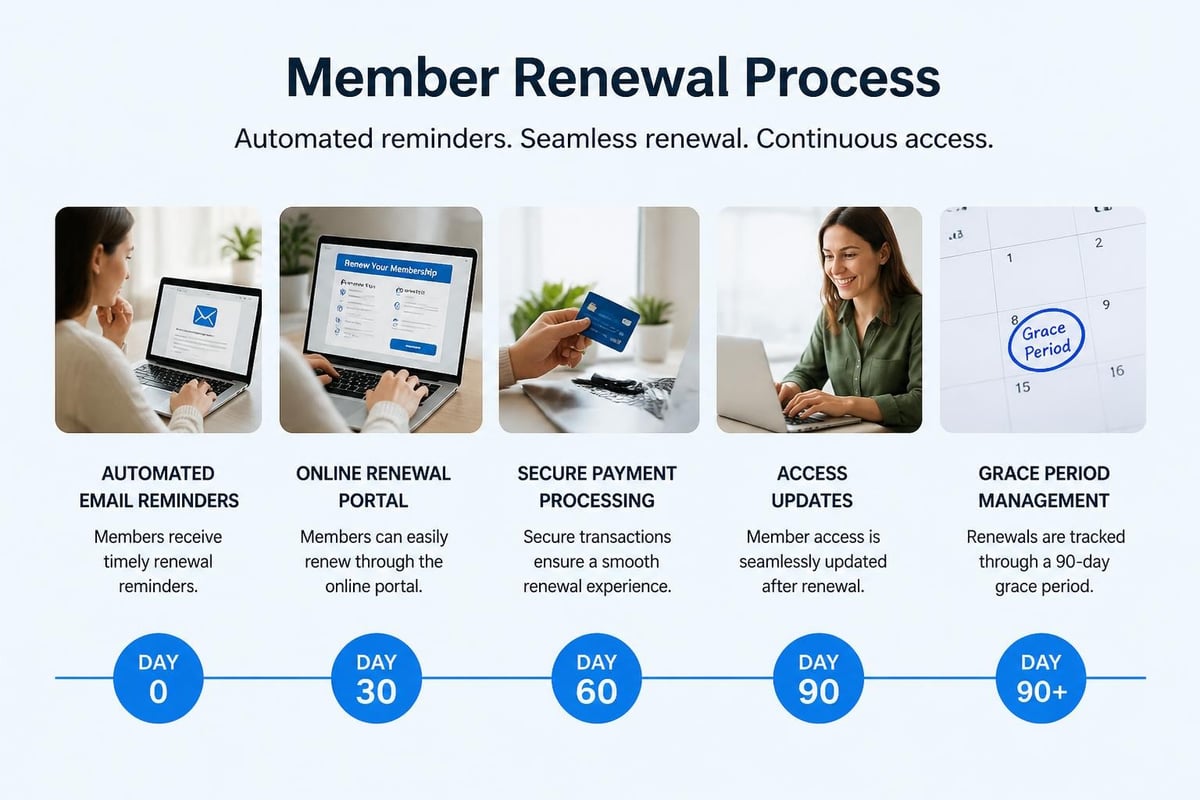
At renewal time: The system automatically sends personalized renewal notices 60 days before expiration, again at 30 days, and a final reminder at 14 days. Members can renew online in under a minute. Those who don't renew automatically lose access on their expiration date, no manual intervention required. FeverBee's community management guides emphasize that great member experiences come from reducing friction and making engagement effortless.
When problems arise: Someone disputes a charge. You pull up their complete history: when they joined, what they paid, when they checked in, what communications they received. You can see exactly what happened and resolve the issue with facts, not memory.
This level of service isn't about expensive technology. It's about having information organized so you can manage member needs quickly and accurately.
Building Workflows That Actually Work
Theory is great, but you need practical steps to manage member operations every day. Here's how to structure the most common workflows so they're fast, consistent, and reliable.
New Member Onboarding
The goal: get someone from "interested" to "actively using the club" in the shortest time possible with the least friction. Every extra step or delay is a chance for them to change their mind.
- Initial contact – Capture basic information (name, email, phone) and membership interest through your website or in person
- Tier selection – Present available membership levels with clear benefits and pricing
- Application completion – Collect required details: family members, emergency contacts, any club-specific requirements
- Payment setup – Process initial payment and set up recurring billing if applicable
- Access provisioning – Create accounts, issue access cards or credentials, set permissions
- Welcome sequence – Send confirmation, facility rules, member portal login, and first-visit guide
Every step should trigger the next automatically. When payment processes, access permissions should update immediately. The new member shouldn't wait three days for manual approval. They've already paid; they should be able to check in right away.
The comprehensive member lifecycle guide from Glue Up provides detailed frameworks for onboarding, engagement, and retention that apply directly to swim clubs and similar member facilities.
Renewal Management
Renewals are your largest recurring administrative task. Automate them properly, and you free up hours every month while improving renewal rates.
90 days before expiration: System flags upcoming renewals and begins tracking campaign 60 days out: First renewal invitation sent via email with online renewal link 45 days out: Second reminder sent (email plus postal mail for members without email) 30 days out: Third reminder emphasizing deadline 14 days out: Final notice with clear "renew by this date to maintain access" Expiration date: Access automatically disabled for non-renewed members 7 days after expiration: Grace period ends, membership officially lapses
Your role in this workflow should be: review the auto-generated renewal list, approve any special cases (longtime members who need payment plans, hardship considerations), and let the system handle the rest. You manage member relationships and exceptions; the platform manages the process.
Handling the Difficult Scenarios
Every swim club faces situations that don't fit the standard workflow. Here's how to manage member edge cases without creating chaos.
Non-Payment and Collections
Someone stops paying. Maybe they forgot, maybe they're having financial trouble, maybe they moved and forgot to cancel. How you handle it matters for both operations and relationships.
| Days Past Due | Action | System Response | Your Response |
|---|---|---|---|
| 1-7 | Friendly reminder | Auto-email: "Payment didn't process" | Nothing, unless member contacts you |
| 8-14 | Second notice | Auto-email + SMS: "Please update payment" | Nothing, system handles it |
| 15-30 | Suspension warning | Auto-email: "Access will be suspended on [date]" | Review account for patterns/issues |
| 31+ | Access suspended | Gate access disabled | Personal outreach to resolve or cancel |
| 60+ | Account termination | Member status changed to inactive | Final notice, collections if applicable |
The key is consistency. Every member gets the same timeline and the same notices. You don't manually decide who gets cut off and who gets grace periods based on who you saw at the grocery store. The system enforces policy; you handle exceptions when there's a legitimate reason.
Family Account Changes
Families grow, shrink, split, and merge. Kids age out or age in. Parents separate. College students come and go. You need to manage member family structures without creating billing nightmares.
Adding dependents: Verify they meet dependent age/relationship criteria, update tier pricing if needed, issue new credentials, effective immediately.
Removing dependents: Deactivate their access, adjust pricing on next billing cycle, maintain their history in the account notes for future reference.
Custody arrangements: Create separate accounts if needed, split access times or allow both parents equivalent access, document arrangement in member notes, update automatically rather than requiring monthly coordination.
Aging out: Automatically transition dependents who reach age limits (usually 18 or 21) to either individual memberships or removal, with notification to account holder 60 days before transition.
The Community Roundtable's research on community management emphasizes that handling life transitions gracefully is critical for long-term member satisfaction and retention.
Reports and Data You Actually Need
Most swim club software can generate 47 different reports. You'll use maybe six of them regularly. Focus on reports that help you make decisions or answer board questions quickly.
Daily Operations Reports
Current member count by tier – Know exactly how many memberships you have active right now, broken down by type. Updates in real-time as people join, renew, or lapse.
Check-in activity – Who's using the facility, when, and how often. Helps with staffing decisions and capacity planning.
Payment exceptions – Failed payments, accounts past due, and upcoming payment issues. Your daily to-do list for billing follow-up.
Financial Reports for the Board
Revenue by membership tier – Shows which membership types generate the most income. Essential for pricing decisions.
Retention rates – What percentage of members renew versus letting memberships lapse. Track trends month-over-month and year-over-year.
Growth trends – New memberships versus cancellations, with net change. Shows whether you're growing, stable, or shrinking.
The best systems let you schedule these reports to run automatically. Every Monday morning, you get last week's check-in activity in your inbox. Every month, the treasurer gets updated financials. You're not spending time generating reports; you're spending time acting on them.
Moving from Chaos to Control
If you're currently managing members across spreadsheets, email, and memory, the transition to a proper system feels overwhelming. You're busy keeping the club running; when do you have time to migrate hundreds of member records?
The answer is you don't do it all at once. You manage member migration in stages while continuing normal operations.
The Practical Migration Path
Phase 1 (Week 1): Set up the new system structure – membership tiers, pricing, access rules, payment processing. Import basic member data (names, emails, membership types). You're not switching yet, just building the foundation.
Phase 2 (Week 2-3): Run both systems in parallel. New members go into the new system only. Renewals move people from old to new. Check-in uses the old system, but you're updating records in both. This phase is painful but short.
Phase 3 (Week 4): Switch check-in and billing to the new system. Keep the old system as read-only reference for history and edge cases. Answer member questions using the new system, but verify against old data when something seems wrong.
Phase 4 (Week 5+): Fully operational on new system. Old system becomes pure archive. Gradually clean up member data quality, merge duplicates, update outdated information as you encounter issues.
The swim club software migration checklist walks through this process with specific action items and timeline recommendations. Most clubs complete the transition in 4-6 weeks without disrupting member access or billing.
The Questions You Should Ask Before Choosing a System
Not all swim club management platforms handle member data the same way. Some are glorified spreadsheets with a login page. Others are genuine operational platforms. Here's what to ask:
Can members update their own information? If the answer is no, you'll be manually entering every address change, phone update, and email correction. Self-service member portals save you hours every week.
How are family relationships handled? Some systems treat each person as a separate member. Others understand family accounts with primary account holders and dependents. You need the latter for accurate billing and access management.
What happens when payment fails? Automatic retry? Notifications? Grace periods? Access suspension? The system should handle the entire workflow, not just record that payment failed.
Can I customize membership tiers and pricing? Every club has unique membership structures. You need flexibility to create the tiers that make sense for your facility without forcing members into categories that don't fit.
Is payment processing integrated or separate? If billing happens in a different system, you're back to manual reconciliation. Look for platforms where payment processing and member management share the same database.
How does access control work? Physical key cards, mobile apps, QR codes, or manual check-in? Make sure the access method integrates with membership status in real-time. When someone's membership expires, their access should stop automatically.
Many clubs find success with platforms designed specifically for their needs. Features built for swim club management tend to handle these scenarios better than generic membership software adapted for pools.
Privacy Rights and Member Data Requests
Here's a scenario you'll eventually face: a member emails asking for "all the data you have about me" or requesting that you delete their information. Under privacy regulations like GDPR (even in the US, similar state laws are emerging), members have rights to access and control their personal data.
Your system needs to make this easy. You should be able to:
- Generate a complete export of everything you store about a specific member
- Delete or anonymize a member's data when they request it (while preserving necessary financial records for legal requirements)
- Track what data you collect, why you collect it, and how long you keep it
- Document consent for communications and data processing
The research on machine-interpretable GDPR rights explores advanced approaches to automating member data rights requests, showing how systems can be built to handle these obligations efficiently rather than manually compiling data from multiple sources.
Most swim clubs aren't subject to full GDPR requirements unless they have European members, but the principles are good practice regardless. Treat member data respectfully, keep only what you need, secure it properly, and make it easy for members to see and control their information. Strong data privacy practices build trust and reduce liability.
Making It All Work on Busy Saturdays
Return to that Saturday morning scenario. Three families waiting, phone ringing, board member approaching. How does proper member management change this picture?
Family one (forgot their card): Staff types the last name or phone number. Member profile appears instantly with photo, membership status, and check-in authorization. "No problem, Mr. Johnson, I can check you in manually. You're all set."
Family two (wants to add a guest): Profile shows they're on a tier that allows two guests per visit, they've used none this month. "Yes, absolutely. What's your guest's name?" Staff adds the guest, system tracks it against monthly allowance, everyone checks in.
Family three (payment dispute): Profile shows last payment was March 15, next payment due April 15, account is current. "You're actually all paid up through May 15. That payment you made last month covered April through mid-May. You're good to go." Crisis averted with facts, not arguments.
Phone call: Another member calling about their bill. While talking, staff pulls up complete payment history, can see exactly what was charged and when. Answers question in under a minute.
Board member: "How many families renewed early this year versus last year?" Staff pulls up year-over-year renewal report in 15 seconds, shows the comparison on screen.
Total time for all five interactions: under eight minutes. Members feel taken care of, not processed. Staff feels competent, not flustered. That's what it means to properly manage member information.
When you can answer member questions in seconds instead of minutes, when billing happens automatically instead of manually, and when everyone on your team sees the same accurate information instantly, you've moved from managing chaos to managing a club. The goal isn't perfect software; it's giving yourself time to focus on members instead of spreadsheets. PoolPulse brings all your member data, billing, access control, and reporting into one platform built specifically for swim clubs, so you can spend less time hunting through systems and more time running a great facility.

Five Front-Desk Tasks Your Swim POS Should Handle
Your front desk shouldn't need three systems to check in a swimmer. Here's how modern swim POS systems save time and reduce errors.

When Your Check-In Line Proves Software Is Too Slow
Discover how software timing affects your swim club's daily operations, from check-ins to billing, and why faster response times mean happier members.

The Swim Club Software Test Every Board Should Run
Run this simple test to see if your swim club software actually saves time or creates more work. Real scenarios, honest questions, better tools.
Want to see if PoolPulse is a good fit for your club?
Book a walkthrough and we'll show you exactly how PoolPulse can help based on your club's needs, goals, and current processes.